
See All Updates
New Features Index of Releases - history of our recent updates
🌤️ Minor Release
Release is: May 28, 2026
That means we focused on a few fixes and enhancements.
If you're unsure how to read the notes or how to make the most of YouLi, you can schedule a 1:1 Consulting session with one of our experts, and we will walk you through the features and best practices.
Focus Features in this Update:
✨✨ Enhanced Itinerary Items:
Grow customers are already taking advantage of the Enhanced features for Accommodation and Transfer Windows. Now they are even more powerful with per unit pricing in addition to the per person pricing.
🛏️ Per Room Add-Ons and 🚗 Per Transfer Add-Ons
Works with Reservations!
For early adopters, it will now be possible to price PER ROOM! or PER TRANSFER!
So no matter how many people are in the Invitation Group, they only pay for the extra cost of the Room or Transfer.
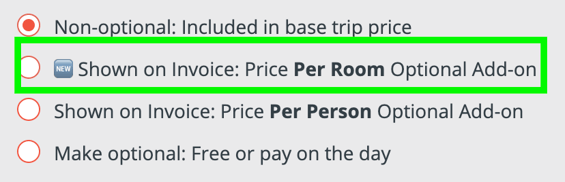
Use this for optional Pre and Post night extras to drive up revenue on your Trips.
Request access if you are on GROW
Or you can wait for the next update and it will be automatically enabled for:
-
Enhanced Itinerary Items: Accommodation
-
Enhanced Itinerary Items: Transfer Windows
Don't already have access to Enhanced Itinerary Items? Contact Sales to learn more
COMING SOON; Per room per night. For now, Add-ons are just per Room, so create them as seperate items of 1 or 2 nights if you need to offer more than one extra night as an option.
# 11107, 11155
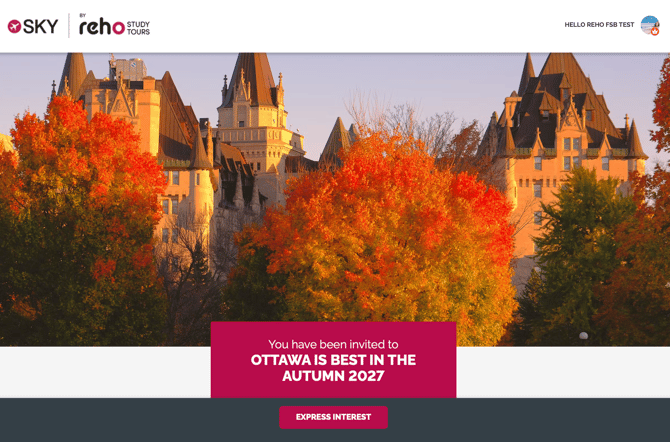
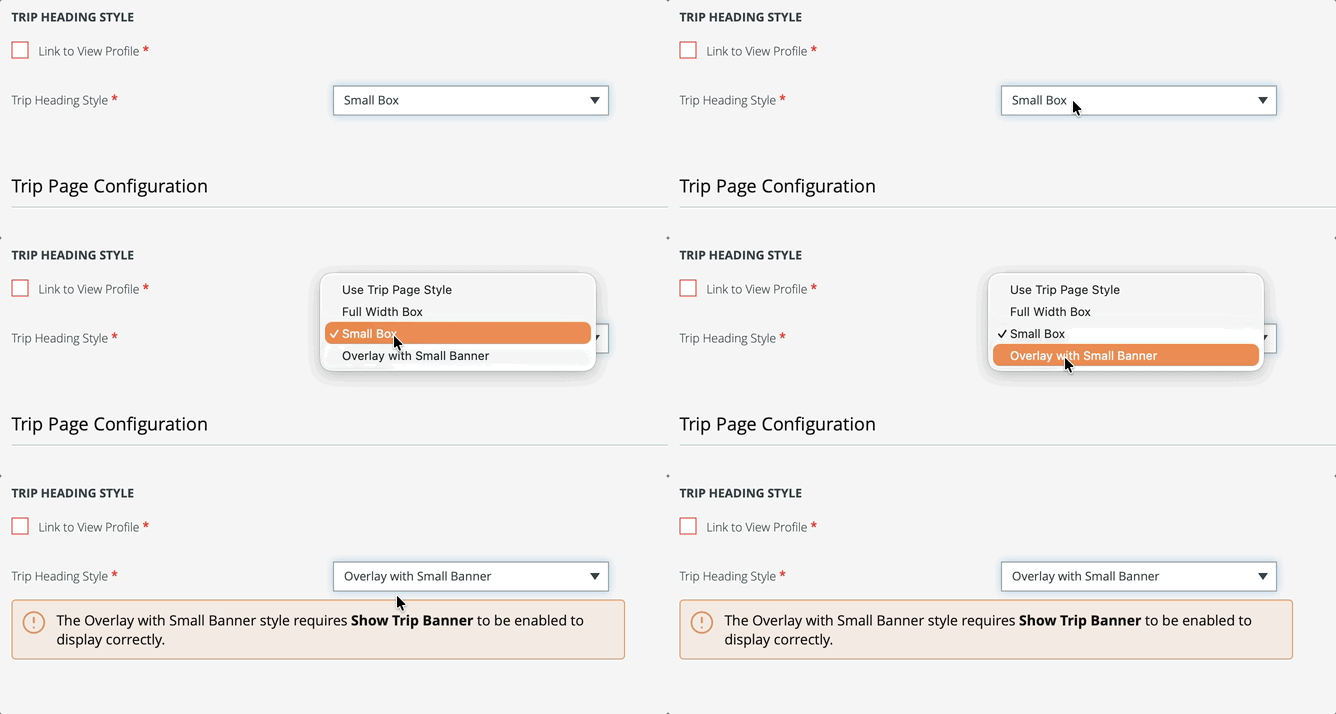
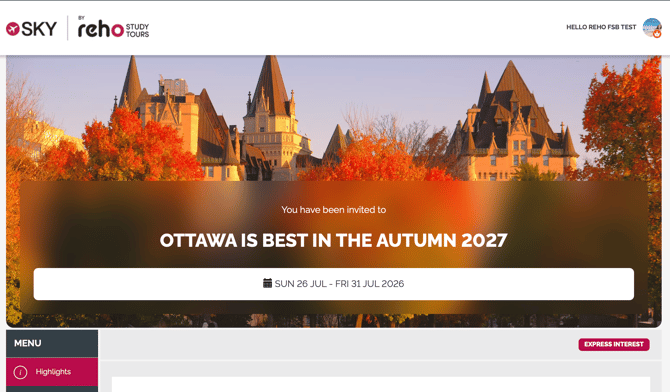
💫 New Trip Heading Style - when the banner is NOT the Hero
Tired of the classic look? Try a new style for your heading when the banner is not the hero.
BEFORE:
Change to "Overlay with small banner":
AFTER:
TIP: If your banner IS the hero, check out our YouTube showing how to make it pop:
# 11086, 11159 - Thanks to Reho for sponsoring
🐞 Brochure Mode Registrations no longer default to Packages
If you have created a Trip in Bookings Mode, then switched back to Brochure mode and you have packages with minimum numbers, you might have seen people end up with duplicate registrations.
Now when you switch back to Brochure Mode, any Packages will be ignored, so people can register as individuals and only end up with more people when the Trip is switched back to Bookings Mode and they pick a package with a Minimum Occupancy.
# 10925
⚡ Trigger Webhook (and Zapier) for Waitlist Registration
Now if you are using the NewRegistration Zapier Trigger or the equivalent webhook, your Zap will be triggered when someone joins the waitlist.
- Learn more about Waitlist
- Learn more about NewRegistration Trigger
CAUTION: People may start as 'Registered' and then change to be 'Waitlisted,' so be sure your automations account for potential changes of status.
And of course they can go from 'Waitlisted' to 'Registered' when you have a spot become available.
👫 "Also Respond For" - Back with Smarter Options
ALL PLANS
You will love the "group within groups" feature we call Invitation Groups, and now it just got better!
You as a Planner will have the ability to set your Task to enable this option.
If enabled:
-
Your Travelers will see the option to:
-
Respond with exact same information for: [companion name]
-
- The data is copied for each person in the group, but document attachments are NOT duplicated.
If disabled:
-
Profile & Registration forms or Passport forms do not allow this option
- Otherwise, the Traveler will see a friendly message to guide them on how to complete the form for others in the group: [Companion name] need to complete their form - go to [PeopleTabLabel] to respond for them.
- Example: Jonathan Worther needs to complete their form - go to Adventurers to respond for them.
Learn more about enabling this feature per Task
TIP: Encourage your Travelers to use this for their Flight Details task when everyone in the booking is on the same flight. You can update your Task instructions to mention it.
# 11049 - Thanks to Orbridge for Sponsoring
SPONSORED FEATURES
🔢 Easier to add a Pre/Post Tour Booking from TripBoard
Learn more about Pre/Post Tours
# 11089
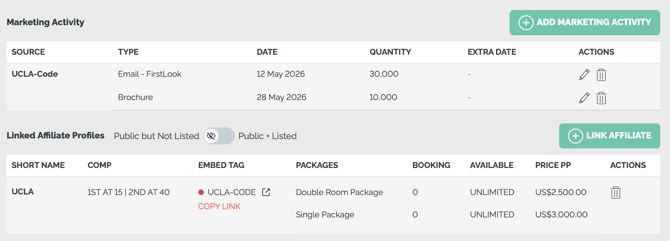
🔢 Track Marketing Activity per Trip and per Affiliate
Access via Trip Summary
If you do Marketing Campaigns with your Affiliates and you are using the Affiliate Profile feature, then you'll now be able to View and Manage Marketing Activity per Trip.
- Keep track of physical mail drops
- Log Email Campaigns
- Note important dates
- Link each Campaign to the right Affiliate
- These can be future or past dated to help you keep track of what Marketing Activities have been done or will be done
Team Members/Admins have these new Role Based Access Controls.
ViewMarketingActivityEditMarketingActivity
Need to track marketing Activity? Contact Sales to learn more
# 11048 - Thanks to Orbridge for Sponsoring
🔢 Flight Bookings Upgraded
When your Sabre is integrated, we now pull even more information onto the Planner side.
-
Now your Agents can update the Markup and Agent Fees per ticket.
-
See the price that will be displayed to Travelers next to the Fixed Add-on.
-
Removed the Historical Ticket concept
-
Added the new Western Sydney International airport code (WSI)
COMING SOON: Displaying the full cost of the ticket on the Traveler Invoice
# 10824, 11168, 10778, 11153- Thanks to Reho for sponsoring
💪🐞 Bugs & Enhancements
Thanks to everyone who submitted issues, we love making things work!
- 💪 11104 - Added a View Line Items permission to extend the Role Based Access Control in case you don't want your entire team (or external users to see Line Items on the TripBoard)
ViewInviteesInvoiceLineItems
- 💪 10641 - Added Traveler status and Pricing Explanation (terms and conditions) into the PDF Confirmation
- 💪 10634 - Add Reservation Number to PDF Confirmation
- 💪 10989 - Sort 'Waitlisted' people above 'Declined/Canceled' people - thanks to Select for suggesting
- 💪 11009 - Added Learn More Link for Traveler Contact Email <--- amazing feature if you have a team of agents and one shared mailbox.
- 💪 11117 - Enhanced Itinerary Accommodation no longer requires Checkin/out time.
- 💪 11132 - Amended option to be clear it does not work with Sales Page style: Show Cost (Does not show on Sales Page Style)
- 🐞 11121 - Traveler selecting an Optional item in a group saw an incorrect message about the Invoice - FIXED!
- 🐞 11114 - Planner saw an error when changing the status to 'Waitlisted' for a sold out package via TripCRM - FIXED!
- 🐞 11129 - Glitch when changing the Trip Banner and then changing the Trip Name immediately after caused the Trip Banner to disappear - FIXED!
🔜 COMING SOON
Not scheduled for this release, but we are working on more things coming soon.
💬 TELL US WHAT YOU THINK
Click YES below to tell us if you like these changes
or contact support to share your feedback in detail.