
Early adopters: Feb 2025 - on request only
General Availability: Sep 2026
This feature requires
Definitions
- Templates are an optional way to ensure consistency across all your Trips that are using the same Itinerary. You don't have to use them to use Pre and Post Tours, but if you are doing a lot of departure dates, we recommend building out your Templates.
- If you choose to use Templates with Pre/Post then your Templates will be labeled as:
- Main Template
- Pre-Template
- Post-Template
- If you choose to use Templates with Pre/Post then your Templates will be labeled as:
- Trips are created one by one or based on Templates if you use that structure. If you use Templates, when you create a Main Tour from a Main Template, the Pre and Post Tours will be created automatically for you.
- Main Tour
- Pre Tour
- Post Tour
How-to link Pre and Post Tours
If your team has the feature enabled:
- Click to "Update Trip"
- Scroll down and select the right Tour Series
- Once Tour Series is selected, any non-linked tours will be shown to link as either Pre or Post
TIP: You don't have to have a Pre and a Post, you can have one or the other or both.
What Trips are available to link as Pre Tours
- Must be in the same Tour Series
- Must have a Start Date before the Start Date of the Main tour (change coming soon)
- Must not be linked to another Main tour
What Trips are available to link as Post Tours
- Must be in the same Tour Series
- Must have a End Date after the End Date of the Main tour (change coming soon)
- Must not be linked to another Main tour
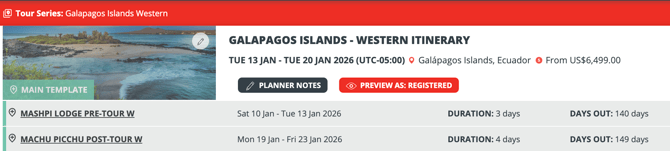
An example of a Template with a Pre and Post tour linked
Once linked, they will show in the header, with links to view the linked Pre/Post Tours and a link back to the Tour Series.
Reservations across Pre/Post Tours and Packages
Want to allow people to book more than one package in the same group? You need reservations!
Here's an example of a basic reservation example where a couple has booked the Main Tour (Southwest) and the Pre Tour (Denver to Moab).
Note the ability to add another person to the room or add another person in another room on the same reservation.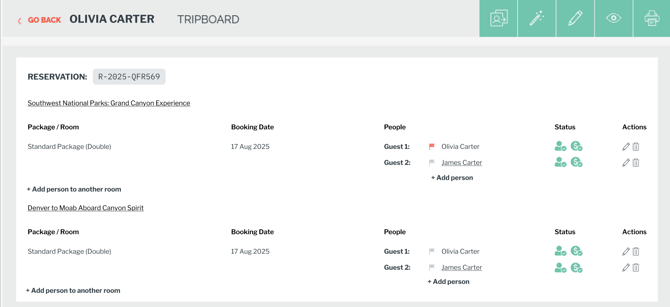
Reservations combine bookings across Main, Pre and Post Tours and within a Trip across packages/rooms types. The invoice is still consolidated and even the Tasks are merged.
Create Main, Pre and Post Tours in one Action
-
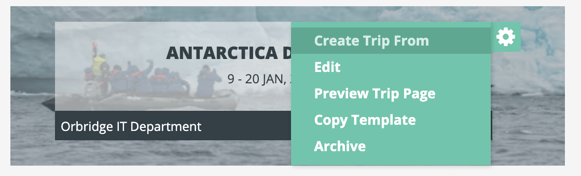
From Templates, hover over the cog and click "Create Trip From"
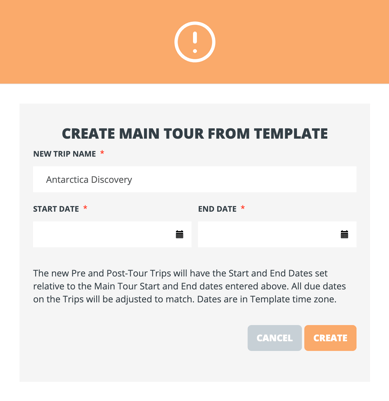
- Then complete the form to name your new Main Tour and set the Start/End Date
- The Pre and Post Tours will be created automatically with dates relative to the Main Tour Start/End
Pre and Post Tour Itineraries now Included in the Main Trip Page and the generated PDF
The Itinerary and Highlights defined for your Pre and Post Tours are automatically integrated and consolidated into two key traveler touchpoints:
- The Main Trip Page – Travelers can view their entire journey seamlessly in one timeline.
- The Generated PDF Confirmation – Your downloadable, print-ready travel documents will now automatically inherit and display the Pre/Post tour itineraries.
Complete payment flow including selection of Main/Pre/Post + add-ons across any number of travelers
Advanced checkout experience that allows travelers to book different room types across connected tours, including different rooms on the main tour, optional room selection on a linked pre-tour, and optional room selection on a linked post-tour.
Example Scenario:
- Mary and Charlie are booking a Luxury Suite on the Main Tour
- at the same time they want to invite their daughter Susan to join in a Single Room on the Main Tour
- Mary and Charlie are adding the Pre-tour
- Susan is skipping the Pre-tour but staying on for the Post-tour
If you have this type of scenario, get in touch to learn about when this sponsored feature will be available for your bookings.
Frequently Asked Questions
Q: If I "Create Trip from Template" from a Post Tour Template, will it create the Main Tour as well?
A: No, in that case it will just make a standalone Trip. If you want them to be created linked, use the "Create Trip from Template" option on the Main Tour.