
See All Updates
New Features Index of Releases - history of our recent updates
💬 Make YouLi Yours 🤗
👉👉 Book a demo to see these features in action 👈👈
🌤️ This is a MAJOR Release
Released: July 16, 2026
That means we focused on a few major changes + fixes and enhancements
If you're unsure how to read the notes or how to make the most of YouLi, you can schedule a 1:1 Consulting session with one of our experts, and we will walk you through the features and best practices.
💸 Accept More International Bookings. Zero Cost to You
Watch this video to see the feature in action.
Stripe Adaptive Pricing is enabled by default on all new trips. But you should also consider enabling for all existing trips as well. Learn more about Adaptive Pricing to accept 150+ currencies with no fees
This feature has been in use successfully since February, if you're worried about making the switch, open a ticket with your concerns.
In this update, we have improved the Google/Apple Pay checkout experience when using Adaptive Pricing.
#11298
Video: Four Ways to Sell & Manage Rooms
Are you managing rooms or .... are you SELLING rooms?
Many group travel businesses use accommodation inventory tools the same way they've always done it, but there may be a better way!
In this video, we explore:
✅ Package-level inventory - quick and easy default option
✅ Room-level allocation - more advanced control, but more admin
✅ Interactive deck plans - beautiful way to charge more for different classes of rooms and make your travelers do their own allocation
✅ Group rooming management - great option for student tours when you need to manage roommates that change throughout the trip and invite Group Leaders to assist
If your business sells retreats, cruises, student travel, hosted tours or speciality group experiences, this video may change how you think about accommodation strategy.
Prefer to read rather than watch? Learn about the Four Ways to Sell & Manage Rooms
🛏️🚗✈️ Enhanced Itinerary Items
These are powerful ways to manage what matters on your TRIPS.
- Accommodation - learn more
- Per room add-ons
- Transfer Windows - learn more
- Per transfer add-ons
- COMING SOON: Integration with Flight Alerts
-
Flight Bookings (Sabre integration required)
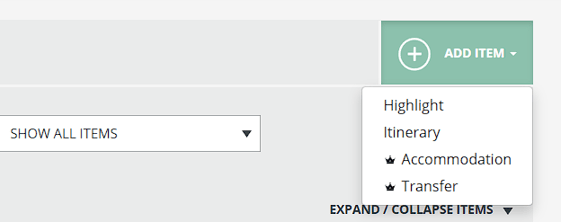
If you see the crown icon, click and upgrade to GROW to activate these features
#10617
🛏️ Room Level Inventory Enhancements
-
Match roommates from different bookings into the same room
Learn more about Managing Inventory at the Room Level
⚡ New Zapier Actions to Automate your Manual Tasks
API for Create/Update Trip (using a Template)
Previously this API was only accessible with development, but now you can use it inside a Zapier workflow.
Learn more about Create/Update Trip API
#11349
addpayment API for Payment made Externally (Manual Payment)
Payments received in other platforms still need to be recorded, you can do this via the UI using Manual Payments, or use this API to do it automatically.
Eliminate the step of manually confirming the payment in two systems, trigger this action when the payment is received on the external system.
Use the new Zapier Action or directly via API
Learn more about how to use this Action
Additional Information in Payment Webhooks and getinvitee
When you've got someone with past due payments, you might want to apply special messaging logic. Using an API integration, you can now access the necessary information.
Here's an example:
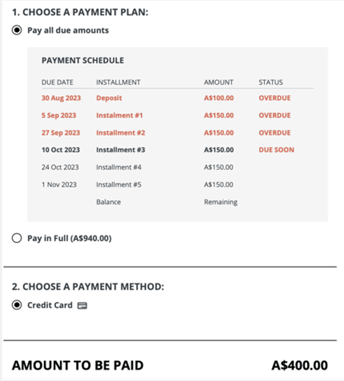
- Past Due Amount -
PastDueAmountThe amount currently overdue for the relevant invoice or invitation group. This will include installments with a due date prior to the date the API call or webhook event is generated based on the Trip Timezone. Installments due on the same day will not be treated as past due. The amounts shown as OVERDUE in the screenshot will be summed to be this total amount. - Next Due Installment Amount -
NextDueInstallmentAmountThe amount of the next scheduled installment that is due today or in the future, excluding any past due amounts. In the screenshot above, the “Installment #3” amount would be provided in this field. - Next Due Installment Date -
NextDueInstallmentDateThe due date of the next scheduled installment that is due today or in the future. In the screenshot above, the date would be 10 Oct 2023
All these actions and triggers are available via Zapier and API for GROW customers and above
#10719, 11290, 10720 - Thanks to Flooglebinder for sponsoring
🔄 Three Ways to Manage B2B Group Travel Invoices
How do you invoice for B2B Group Travel?
-
Bulk Invoice to the School (Third Party) 100% of the tour
- Many Educational tour companies use this option, setting the price for Travelers to $0 and invoicing the School (or other Third Party) for the total cost of the Tour
- It's up to the School to recoup that cost from students or cover it themselves
-
Split the total into Travelers Invoices, ensuring 100% is collected
- This is where YouLi shines, making it easy to collect payment from all the Travelers after the Group Leader has selected your company for the Trip
- The Group Leader can login to help ensure everyone pays
-
🆕 Best of Both: Multiparty Payments allows you to bulk invoice the contibution to the School and then generate split invoice across Travelers to pay their contribution
- This model works especially well when the School is only paying a portion of the total Trip cost.
- Improve margins on your School trips: Just because you invoice the School in bulk, doesn't mean you have to miss out on the upsell opportunity for individual Travelers.
- Example of how to use to increase revenue if you currently only bulk invoice the School:
- Set your base Traveler contribution to be $0 so the School (Third Party) is paying for the total amount (this can be invoiced directly)
- Then add Add-Ons to the Trip so that your Travelers can select and pay for the extras not covered by the School.
- Arrive Early
- Single Supplements
- Extra excursions
Reach out to learn if this feature is right for you
#9222, 11334, 11314, 11317, 11318, 11316 - Thanks to Reho Study Tours for sponsoring
📊 Advanced Reporting released for PRO and PLUS
Previously this required an upgrade to GROW, but now you'll find access unlocked for:
- Booking Report
- Including the ability to see summarized data per Trip
- Now including Booking Add-On amounts in the totals
- People Search
- Like a Mini-CRM: Search by name, email and more
#10710, 10228
Dashboard Improvements
- LIST VIEW: Trips with the same start date will now sort alphabetically in the list
- LIST VIEW: Pre and Post tours will now show indented
#11178, 11296
👩💻 Platform White Label - Login Screen Logo Alignment
When branding really matters for the entire customer journey, Platform White Label is the way to go!
Ever noticed when using the simplified Login page style that the logo was a little to the left?
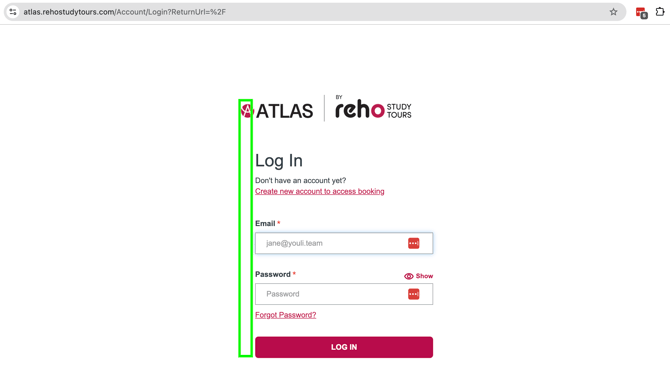
No? Well, now you probably can't un-see it. But thankfully, we've fixed it, so the logo is now aligned with the form.
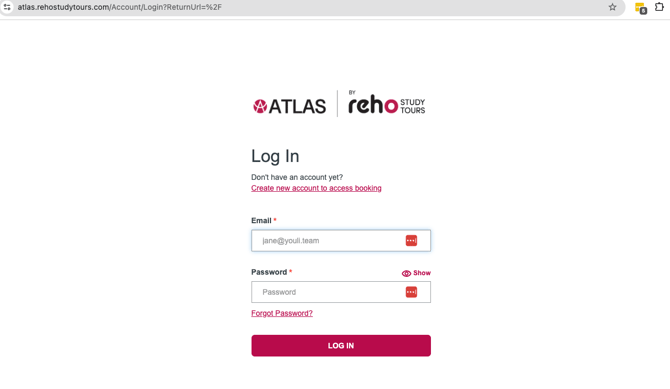
You're welcome!
#11176
🔃 Synced Library
Do you ❤️ the Library, but wish that when you changed an item in your Library it changed in all the TRIPS?
Then you need Synced Library - especially good for Tasks (when you need to make a change to your form in one place instead of 20+).
When using the Synced Library feature, you won't be able to edit items on TRIPS that are SYNCED unless you make them UNIQUE. But if you click to edit them, the options to:
-
Edit the dates on the item in the TRIP
-
Edit the item in the LIBRARY
- Make the item UNIQUE
To make it clearer that those options are available, now the pencil icon will no longer be greyed out.
Reach out to learn if this feature is right for you
#10946
🔢 Sponsored Features:
- Reservations
- 11234 - Links from Pre/Post back to Main Tour sometimes failed to link properly. FIXED
- Learn more about Reservations
- Flight Search & Book
- 11287 - Show the flight number without the airline code on the Trip Page Invoice. This is part of the Fixed Add-on functionality COMING SOON to all Enhanced Itinerary Items.
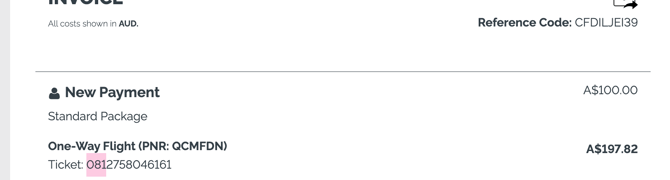
- 11287 - Show the flight number without the airline code on the Trip Page Invoice. This is part of the Fixed Add-on functionality COMING SOON to all Enhanced Itinerary Items.
- Affiliate Profiles
- 11076 - Invite multiple users per Affiliate brand and allow them to see a Dashboard of their linked TRIPS
- 8020 - Allow bulk edit of Affiliate Source from Trip CRM
- Learn more about Affiliate Profiles
💪🐞 Bugs & Enhancements
Thanks to everyone who submitted issues, we love making things work!
🐞💪 HOTFIXES:
- 11311 - Improved security in Task Response notifications
- 11309 - Bug making payments in reservations - FIXED
- 11234 - Link back to Main lost on Pre/Post TripBoards sometimes - FIXED
- 11348 - Automated Reminders were sending duplicate reminders. It was very effective at getting responses, but a bit TOO annoying - FIXED
🐞 FIXES:
- 10581, 10999 - The text editor in forms would not always load properly, requiring a reload of the page. Thanks to Nick for reporting.
- 10820 - Preview as Registered, when selecting a payment method showed an OOPS error. FIXED!
- 10731 - Date of Birth was not always required on Checkout Form due to network issues. It is now required server side to ensure no registrations happen with a missing Date of Birth when it is required - Thanks to Prometour for reporting
- 11281 - When a traveler selected "No" for a Yes/No radio button field in a Profile form during Checkout, the system incorrectly stored the response as "YES". Thanks to Adventurous Women for reporting
- 10820 - Do not show an error in PREVIEW AS REGISTERED when selecting a payment method.
- 11008 - Link to Manage Tour Series from Trips was broken. FIXED!
- 11019 - Chip Away configuration no longer prompts Team Admins to upgrade when the feature is enabled for their Team Owner
- 11135 - Check Trip Owner when adding/removing user from a TRIP to show the correct team member message
- 11250 - Global Payments and Activity Reports respect the Trip Tags or Explicit Trips access restriction
- 11265 - Fix to the new PastDueAmount and NextDueInstallmentAmount in the Payments webhooks and getinvitees data returned via API - Thanks to Flooglebinder for prioritizing
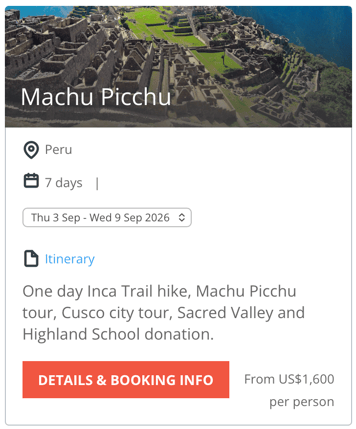
- 10639 - Embedded cards with Tour Series drop downs were too squished, now that dropdown will wrap to the next line
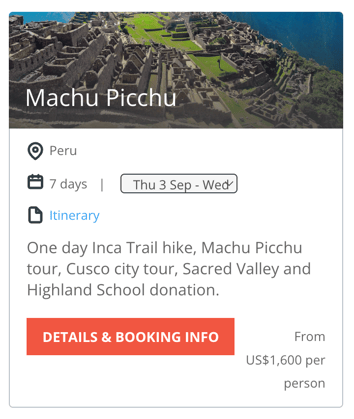
- Tour Series selection drop down now wraps to the next line when squished:
💪 IMPROVEMENTS
-
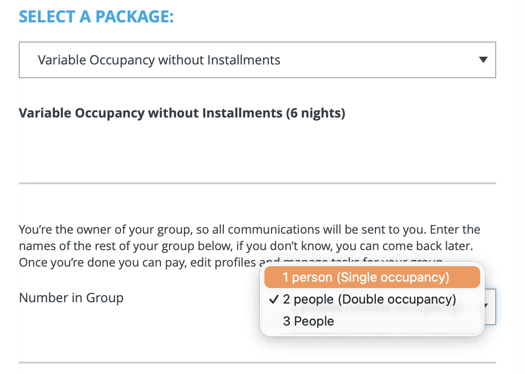
10853 - To make the choice clearer, we have changed the label for Travelers selecting room occupancy on checkout
- "Single Occupancy" => “1 person (single occupancy)”
- "Double Occupancy" => “2 people (double occupancy)”
- 11338 - Max Bookings has been clarified to be
Max Number of Bookings (Room Inventory)
when editing Pricing Packages. Because what you are really setting is the maximum number of rooms when you use Packages to manage Room Inventory.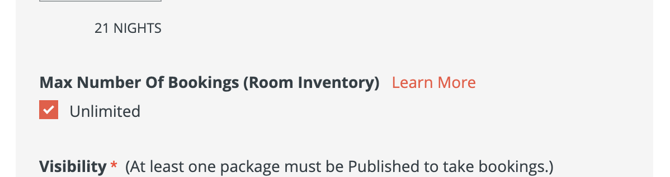
- 11286 - Improved error messaging for API Responses
- 11290 - /addpayment now requires Advanced API Access
- 10697 - Support for personalized arrival and departure date pre-fills when using Prefill API for Checkout Flow
- 9806 - Block indexing of web.youli.io sites (to avoid SEO conflict with client websites)
- 11017 - Show links to paid support and Compare YouLi Plans under HELP to the right users
- 11210 - Removed extra space between "Location" and the colon so it is "Location:" instead of "Location :" - yes, someone cared enough to report it.
- 11248 - Remove the "CHECK IMAGES" button from Trip Page
- 11311 - Remove the Task Response details from the emails sent to notify Planners, now you'll need to login to see the responses - yes, for security reasons
🔜 COMING SOON
Not scheduled for this release, but we are working on more things coming soon.
💬 DO YOU READ THESE NOTES?
If you want us to keep creating these documents to share the changes we make each update:
Click YES below so we keep writing them
or contact support to share your feedback in detail.