
🌤️ This is a Minor Release
Release: Mar 19, 2026
That means we focused on fixes and enhancements.
If you're unsure how to read the notes or how to make the most of YouLi, you can schedule a 1:1 Consulting session with one of our experts, and we will walk you through the features and best practices.
Compliance:
📚 Restrict Access to Edit Library
If you aren't using the Itinerary & Highlights Library or Task Library it is time to get on it!
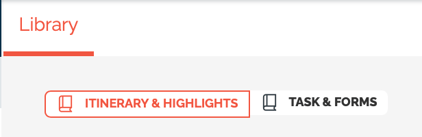
If the reason you were waiting is that you need to restrict so only certain members of your team can edit the library - then wait no more!
By default, Team Admin and Team Members both have access to Edit Itinerary (just like before).
If you already have an existing role, submit a support ticket to request that role be granted or remove the access to Edit Library (applies to both libraries).
If you don't already have a Custom Role, learn more about them and submit a request.
#10787
User Experience Enhancements:
📶 Affiliate Reports are MUCH Faster
We hear you on the need to improve performance and we have been working on tuning up as many places as possible. Last time we made it faster to Add/Edit people in TripCRM, this update we made Affiliate Reports run smoother.
Previously it could take minutes, now it returns in seconds! 👏
#10864
💸 Shortcut to Manage Payments from Dashboard
Need to just get to the point and see how much money has been collected/is due?
- Click on the # Traveler(s) Booked to jump to Manage Payments (green arrow)
- The main card still goes to TripCRM (blue arrow)
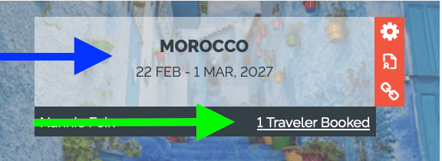
#10929 - Thanks to Flooglebinder for the suggestion
⬆️ TripBoard Payments Table upgraded
If you only book Solo Travelers, you can ignore this update. If you allow people to book together, read on...
Have you ever found the numbers in the Payments section of the TripBoard to be a bit... off?
That's because you're using our "Invitation Group" feature allowing people to pay for each other and the payment gets "Allocated" across people in the Group. But when the Group splits, the payments and the allocations no longer show in the same view, causing the numbers to be a bit ... off.
-
A Payment is the money collected. That's what goes to your bank.
-
An Allocation is how that money is allocated to the people travelling to pay for their booking. This is what allows us to say that a person is "Booked & Fully Paid" or "Booked & Past Due".
Now we've amended the table to pull in payments that might have been hidden before because the person who made them is no longer in the current Group.
We've also changed the totals on top to be more clear about what has been paid.
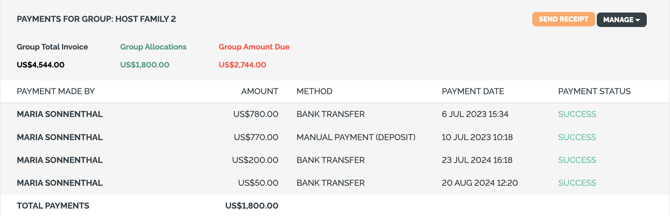
In the above, the Group Allocations and the TOTAL PAYMENTS are the same amount: US$1,800.
But if a member of the group is removed, then those totals will be different, which tells you there's a lingering allocation in another group you need to return (or put the person back in the group).
If you work with unique payment scenarios: Learn more about how payments and allocations work
⚪⚫ Show/Hide Itinerary on Trip Page - Toggle from Manage Itinerary
This has always been an option under Update Trip -> Settings -> Menu
Now it's a quick toggle when your are on Manage Highlights & Itinerary, toggle on when the Itinerary is ready! Toggle off if you need to make changes, to avoid confusion until the final version is ready.

So this is handy to know whether your detailed itinerary is currently visible or not while you are editing and quickly toggle on/off in the same place where you are building it.
NOTE: This only hides the Itinerary menu on the Trip Page, it does NOT hide any Itinerary items that you have ALSO SHOWN ON HIGHLIGHTS.
# 9864 - this has been a long time coming!
💱 Stripe Enhancements
- 💪10843 - For US Accounts: Enable the option to set a different ACH Surcharge
- NOTE: this feature does NOT work with Stripe Adaptive Pricing
- 🐞 10900 - Ever noticed that sometimes customers' names were not added to Stripe - just their email was passed? FIXED!
- 🐞 10911 - HOTFIXED: Reduced the errors from new Stripe webhooks.
- 💪10899, 10912 - When using Stripe Adaptive Pricing with Saved Card - selecting a non card payment method reloads - now there will be a spinner while it loads.
- 💪10898 - Only enable AutoPay when paying in Trip Currency to avoid issues in future charging the wrong currency.
New Features
☑️ Configured Reports - Include & Filter by Category
If you're using the Traveler Category feature to provide different forms/itinerary/pricing to different categories of people, then you'll be keen to create more advanced configured reports.
Open a support request to add to your existing report or contact your Account Manager to get a new report.
#10893 - Thanks to Live N Learn and Reho for Sponsoring
🛌 Max occupancy of 1 - for Single Rooms
Do you need to restrict people to only book one person into a room (no more, no less)?
Then you'll need to use the Variable Occupancy Pricing Mode and then pick 1 in the Max Occupancy dropdown.
You've always been able to select max occupancy higher than 1, so no change there. 😀
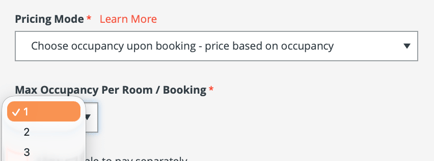
This works especially well with Reservations, available to Early Adopters to allow booking of multiple rooms at the same time.
#10827
💲 Advanced Option: Hide package price on selection
If you prefer to sell packages on their merits and not their price, you'll love this one:
You can hide the price (configured per package) shown in the selection drop down and package description when selected.
#10852 - thanks to our anonymous sponsoring client for prioritising this feature
Sponsored:
✈️ Flight Booking - Enhancements
- 10923 - Support for multiple ticket numbers in the same Flight Booking (PNR)
- 10848 - GetFlightTicket API now makes the Flight Bookings data accessible for automations
🚗 Transfer Allocations - with Color Coded Flight Info
In case you missed it, we've released the ability to allocate people to Transfers (similar to Allocation blocks) and link the Transfer to a the flight data being collected in Tasks & Forms.
Now we are also showing a colored box to help you see who is arriving/departing IN the window or outside of it.
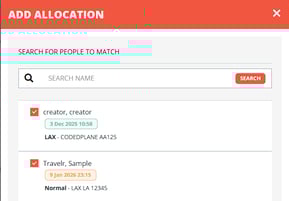
#10788
⬅️▶️➡️ Reservations: Pre/Main/Post Tours - Complete payment flow including selection of Main/Pre/Post + add-ons across any number of travelers
We are excited to be developing advanced checkout experiences that include the ability to book:
- Different rooms on the Main tour
- Optional selection of rooms on a linked Pre-tour
- Optional selection of rooms on a linked Post-tour
Example Scenario:
- Mary and Charlie are booking a Luxury Suite on the Main Tour
- at the same time they want to invite their daughter Susan to join in a Single Room on the Main Tour
- Mary and Charlie are adding the Pre-tour
- Susan is skipping the Pre-tour but staying on for the Post-tour
If you have this type of scenario, get in touch to learn about when this sponsored feature will be available for your bookings.
Enhancements for Early Adopters
-
💪 10894 - Reservation Number is now appearing in all relevant confirmation emails
- 💪 8027 - Reservation Number can now be included in Configured Reports
- 💪10807 - The "ADD ROOM" and "CONTINUE TO PAYMENT" buttons have changed styles to make it more obvious how to click to pay for Reservations using the primary brand color on that button.
- 💪10773 - OVERBOOKING is added to the subject line for any booking that is over the Max on the Trip or the selected Package - sent to Planner only - Traveler will not see this.
- 💪10904 - Allowing Overbooking can be controlled per Main Tour, Pre or Post - so you can set to block at Max capacity or allow Overbooking for each one based on your business rules.
💪🐞 Bugs & Enhancements
- 🐞 10914 - HOTFIXED: Cannot register for more than one person on Register to Pay flow.
- 🐞 10910 - HOTFIXED: When adding a new person to a Trip via TripCRM in Brochure Mode, it was attempting to assign them to a package and failing, causing an Oops error.
- 🐞 10926 - HOTFIXED: Affiliate links blocked bookings
- 🐞 10631 - People Search would fail for 6 or 10 character searches. FIXED.
- 🐞 10940 - Copy Trip fails when Trip Name is between 81 and 100 characters. FIXED.
- 🐞 10920 - Cannot add more than one Itinerary item from the library at once. FIXED.
- 💪 8027 - Trip Short Name (alias) can now be included in Configured Reports
Known Issue - not yet fixed:
- When in Brochure mode with Packages defined, new registrations default to the first package, if those packages had a minimum number of people it would automatically create placeholders for them. Working on a fix to not add people to packages when in Brochure mode.
- Stripe Adaptive Pricing + ApplePay not currently working together
Affiliate Features:
- 🐞 10927 - When an Affiliate is also part of the Trip Owner's team - a duplicate logo would appear. FIXED!
- 🐞 10937 - Trip Summary: COPY LINK on Linked Affiliates now works right after linking an Affiliate.
🔜 COMING SOON
Not scheduled for this release, but we are working on more things coming soon.