
See All Updates
New Features Index of Releases - history of our recent updates
🌤️ We are working on a MAJOR Release
Target release is: June 18, 2026
That means we are focused on a few big features, we also include small improvements and bug fixes that we can.
If you're unsure how to read the notes or how to make the most of YouLi, you can schedule a 1:1 Consulting session with one of our experts, and we will walk you through the features and best practices.
⚠️ Is this a release note?
Not yet! This is advance notification of what is coming
You told us you wanted advance notification of our release notes - we listened 👂
Things will change as we get closer, and when it is released, these will become final release notes with accurate descriptions, screenshots and videos.
Until then this is the best information available about what we are actively working on.
Focus Features in this Update:
General Availability:
🛏️ Per Room Add-Ons and 🚗 Per Transfer Add-Ons
Works with Reservations!
If you have Enhanced Itinerary Items, you can now price PER ROOM! or PER TRANSFER!
Don't already have access to Enhanced Itinerary Items? Contact Sales to learn more
So no matter how many people are in the Invitation Group, they only pay for the extra cost of the Room or Transfer.
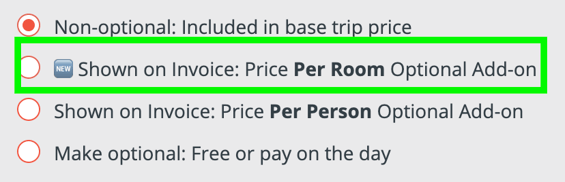
Use this for optional Pre and Post night extras to drive up revenue on your Trips.
COMING IN FUTURE; Per room per night. For now, Add-ons are just per Room, so create them as seperate items of 1 or 2 nights if you need to offer more than one extra night as an option.
🔢 Embedded Images now appear in PDF Confirmation Overview
#11165
🔢 Extra information in Webhooks, API and Zapier
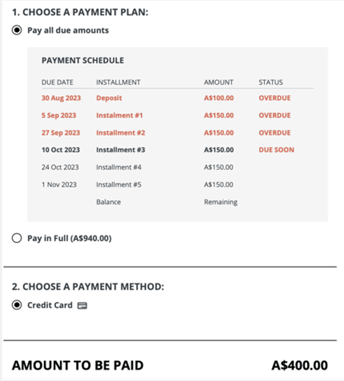
When you've got someone with overdue payments, you might want to apply special logic. Using an API integration, you can now access the necessary information.
Here's an example:
-
Past Due Amount -
PastDueAmountThe amount currently overdue for the relevant invoice or invitation group. This will include installments with a due date prior to the date the API call or webhook event is generated based on the Trip Timezone. Installments due on the same day will not be treated as past due. The amounts shown as OVERDUE in the screenshot will be summed to be this total amount.
-
Next Due Installment Amount -
NextDueInstallmentAmountThe amount of the next scheduled installment that is due today or in the future, excluding any past due amounts. In the screenshot above, the “Installment #3” amount would be provided in this field.
-
Next Due Installment Date -
NextDueInstallmentDateThe due date of the next scheduled installment that is due today or in the future. In the screenshot above, the date would be 10 Oct 2023
#10943
🔢 Ability to Add Users Per Trip (and convert from Trip Coordinator)
Take advantage of the full Role Based Access Control to create custom roles, then decide which TRIPS they can access:
- All Trips
- Trips with specified tags
- Explicit Trips
When adding people as custom roles, you'll be able to convert them from Trip Coordinator or Traveler.
#10351
💲 SPONSORED
- Fixed Add-ons for Flight Bookings
🔜 COMING SOON
Not scheduled for this release, but we are working on more things coming soon.