
See All Updates
New Features Index of Releases - history of our recent updates
💬 Make YouLi Yours 🤗
👉👉 Book a demo to see these features in action 👈👈
🌤️ We are working on a Minor Release
Target release is: Nov 19, 2026
That means we are focused on a few fixes and enhancements, we also include small improvements and bug fixes that we can.
If you're unsure how to read the notes or how to make the most of YouLi, you can schedule a 1:1 Consulting session with one of our experts, and we will walk you through the features and best practices.
Latest Blog:
How LLV Makes Room Selection Part of the Luxury Travel Experience
Latest Taming your Tech Stack Video:
Change can be good, ready for a White Label App to get off Whatsapp for your trip coordination?
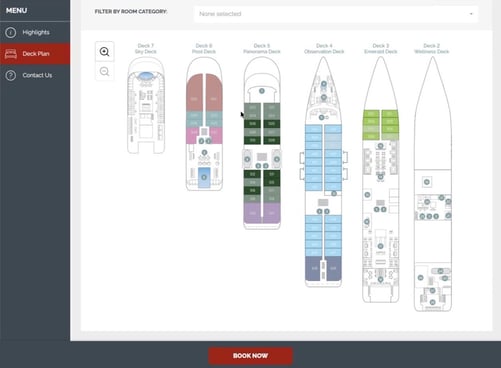
Four Ways to Manage Rooming Lists
Look for the new menu that looks like a bed:
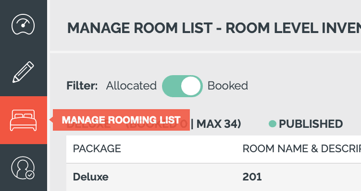
We've been testing with a few clients for a while, and now you can see your 4 options to Manage Rooming Lists under a new menu on your trips (11622)
To control access, there is a new ViewRoomInventory user permission
-
- Trip Leaders cannot access this menu, explore a Custom Role if you need a limited access role like Trip Leader that can view the Rooming Lists.
-
- PRO and above can now play with this new way of managing rooms:
Watch Jen and Nick explore this new method:
🚌 Flights Transfers
- Transfer Window Block Selection in Planner Review
- Added a dropdown to the Planner Review dialog on custom flight tasks, enabling planners to assign travelers directly to an available transfer block within the matched transfer window (11724).
- Enhanced Itinerary Transfer Export
- When exporting your Transfer allocations (which bus/car is picking up each person) you'll now get more information included and totals!
- Reformatted the Itinerary Block CSV export for transfer items to include transfer notes, unique Air Agent fields (
AIR_AGENT), and expanded headers for streamlined operations (11729).
- Western Sydney International Airport (WSI) Added
- Updated the airport locations dictionary to support Western Sydney International Airport (
WSI) when selecting the Transfer Airport (11691).
- Updated the airport locations dictionary to support Western Sydney International Airport (
✈️ Flight Search & Book (FSB)
- Planner Airport Exclusion Configuration
- Allows planners to exclude specific airport codes for origins, destinations, and stopovers under Trip Settings > Flight Search & Book, including a custom hover message explaining the exclusion (11037).
- FSB Search Restrictions Enforcement
- Enforced airport exclusions on the FSB platform by disabling restricted airports in dropdowns and filtering out excluded stopovers/routes from Sabre search results (11735).
📍 Pre & Post Tours and Trip CRM
- Pre / Post Tour Badges in Planner Views
- Added blue "PRE" and "POST" pills beneath traveler names on main tours across Task Item Responses, Trip CRM, and Manage Payments (11726, 11745, 11750).
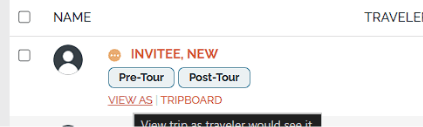
- Added blue "PRE" and "POST" pills beneath traveler names on main tours across Task Item Responses, Trip CRM, and Manage Payments (11726, 11745, 11750).
📚 Booking Add-on
- Booking Add-on Consent Prompt Visibility
- If the Booking Add-on "Consent Prompt" field is left blank, the checkbox is automatically hidden at checkout so travelers are not prompted for unneeded consent (10382).
↩️ APIs, Webhooks & Reports
- Email Domain Validation in Create Trip API
- Added
RegistrationDomainValidationEnabled,DomainValidationWhitelistDomains, andDomainValidationErrorMessageparameters to/api/trip/createtripfor API and Zapier integrations (11707).
- Added
- Validation Length Check on Domain Whitelist
- Enforced maximum character length validation on
DomainValidationWhitelistDomainsin the Create Trip endpoint to properly return 400 Bad Request if length exceeds limits (11738).
- Enforced maximum character length validation on
- API Alert Email Configuration in Site Settings
- Allowed Team Owners and Admins with Advanced API enabled to configure the
APIAlertEmaildirectly within Account > Site Settings under an API Configuration section (11472). - Be sure to configure this if you're actively using the API
- Allowed Team Owners and Admins with Advanced API enabled to configure the
- Configurable Reports: Prettier column headers for custom fields
- Added option to use the API Field Name as the column heading in case of long field name, so that instead of a column header like: "Please explain your preferred wake up time" it can be PREFERRED_WAKE_UP_TIME (10572)
- Added option to use the API Field Name as the column heading in case of long field name, so that instead of a column header like: "Please explain your preferred wake up time" it can be PREFERRED_WAKE_UP_TIME (10572)
🔜 COMING SOON
Not scheduled for this release, but we are working on more things coming soon.
These are items we are actively working on you will see VERY soon:
- COMING SOON: Standardized Flight & Transfer Data Display
- Standardized how traveler flight details, transfer window matching, status pills, and notes appear across planner views including Transfer Blocks and Task Item Responses (11725).
- COMING SOON: Dedicated Transfer Flight Notes Field
- Added a dedicated single-line "Transfer Flight Notes" field to the Planner Review modal for flight tasks, which saves with the task response and carries through to itinerary block exports and views (11741).
- COMING SOON: Transfer Window Lock Status Indicators
- Added LOCKED / UNLOCKED status labels (with padlock indicators) above the Task Item Responses table for all matched arrival/departure transfer windows (11727).
- COMING SOON: Sabre FSB Flight Reports in Trip CRM
- Added two standard Sabre-powered reports for FSB accounts under Trip CRM: a segment-centric "Flight Report" and a traveler-centric "Full Itinerary by PNR" with HTML view and CSV export (11673).
- COMING SOON: Pre / Post Column in Trip CRM CSV Export
- Added a "Pre/Post Tour" column to both per-traveler and per-group CSV exports from Trip CRM on main tours (11731).
💬 TELL US WHAT YOU THINK
Click YES below to tell us if you like these changes
or contact support to share your feedback in detail.