---
title: New Features - Minor Release 2.213 - Sort Packages & Changes to Price per Night
description: You'll love what we've been cooking up with Reservations and Waitlist, but you'll have to wait till the new year for the full experience. For now, enjoy these updates and have a wonderful festive season.
---
[Skip to content](https://support.youli.io/new-features-minor-release-213-dec-2025#main-content)
[Open Ticket](https://support.youli.io/kb-tickets/new?hsLang=en) [Customer portal](https://support.youli.io/feature-request-tickets-view?hsLang=en)
[](https://support.youli.io/?hsLang=en)
- [Pricing](https://go.youli.io/pricing)
- [Book Demo](https://go.youli.io/youli-demo-videos)
- [Blog](https://blog.youli.io/)
Open main navigation
Close main navigation
- [Pricing](https://go.youli.io/pricing)
- [Book Demo](https://go.youli.io/youli-demo-videos)
- [Blog](https://blog.youli.io/)
- [Open Ticket](https://support.youli.io/kb-tickets/new)
- [Customer portal](https://support.youli.io/feature-request-tickets-view)
- [Open Ticket](https://support.youli.io/kb-tickets/new)
[Open Ticket](https://support.youli.io/kb-tickets/new?hsLang=en)
How can we help you?
- There are no suggestions because the search field is empty.
1. [Help Center](https://support.youli.io/?hsLang=en)
2. [New Features](https://support.youli.io/new-features?hsLang=en)
3. [Recent Releases](https://support.youli.io/new-features?hsLang=en#recent-releases)
# New Features - Minor Release 2.213 - Sort Packages & Changes to Price per Night
## You'll love what we've been cooking up with Reservations and Waitlist, but you'll have to wait till the new year for the full experience. For now, enjoy these updates and have a wonderful festive season.
### Our Latest Travel Tech Cafe
If you’ve ever spent hours tweaking your trip/retreat sales page… only to wonder why enquiries (and bookings) still aren’t coming through — this session is for you.
In this Travel Tech Cafe replay, Nick breaks down the final 5 small but crucial elements that often get missed on sales pages — the ones that quietly make people bounce, hesitate, or “come back later” (and never do).
You’ll hear practical examples, real talk, and a live conversation with Andrea (who runs small-group buying trips to Antwerp, Belgium) about what actually builds trust and confidence for travelers — from the first emotional hook to pricing clarity, inclusions, and room details.
You’ll learn about:
- How to open with an “arrival moment” vignette that makes people feel the experience
- Why “what’s included / what’s not included” needs to be crystal clear (and why it matters legally too)
- How a professional, calm back-end experience affects conversion
- How to explain deposits/refunds/cancellations without a scary policy dump
- How to sell the after (return on intention) — not just the itinerary
- Why room descriptions can make or break bookings (and why bunk beds are… a hard no 😅)
### ☀️ This is a Minor Release
Release date: **Dec 18, 2025**
If you're unsure how to read the notes or how to make the most of YouLi, you can schedule a [1:1 Consulting session](https://support.youli.io/4410822548623-how-to-get-help-from-youli-support?hsLang=en#pay) with one of our experts, and we will walk you through the features and best practices
### Focus Features in this Update:
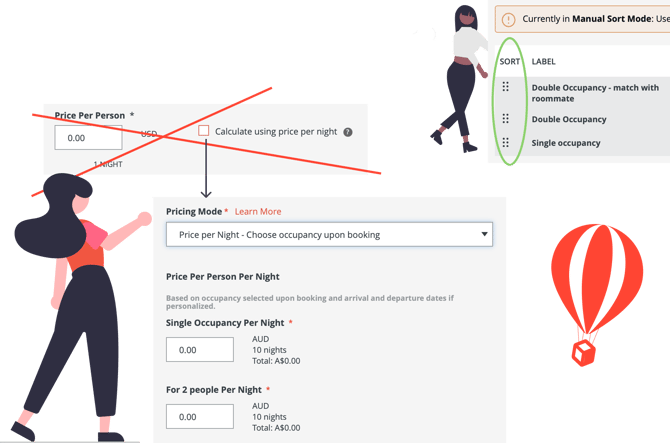
### 📦 "Price per Night" Pricing Mode replaces "price per night" option on packages
**Available Plans:** PRO and above - [Upgrade today to access](https://youli.io/account/billingsetup)
If you aren't already using the new Price per Night package type, now is the time to switch.
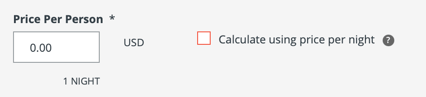
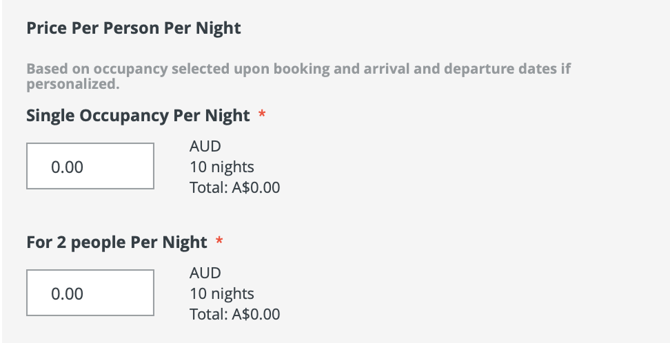
The old way of pricing per night is going away, so you'll need to edit your future trips to use the "Price per Night - Choose occupancy upon booking"

Then set your price per night for each available occupancy. If you want to discourage singles, price it so the total for Single Occupancy is the same for Double Occupancy.
[Learn more about Price per Night packages](https://support.youli.io/price-per-night-pricing-package-personalized-arrival-departure?hsLang=en)
*#10475*
### 💪 Sort Packages manually
**Available Plans:** PLUS and above - [Upgrade today to access](https://youli.io/account/billingsetup)
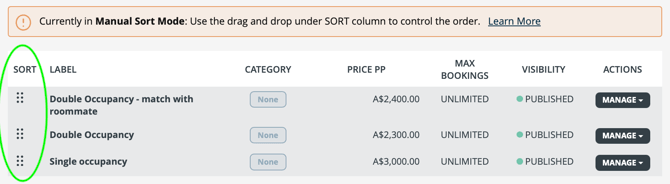
We default to showing packages with the lowest price first - if you are on a PLUS plan or above, you'll be able to sort your packages however you like.And the **first one in your package list** will be set as your default package.
That means, for example: if you have a $0 package, you can change so it's not the default package.
NOTE that this does not change the "FROM $price" since that is always the lowest available price on the trip.
Look for the drag and drop icons on the Package table highlighted in green below:
[Learn more about sorting packages](https://support.youli.io/how-to-change-the-sort-order-of-trip-packages-auto-and-manual-mode?hsLang=en)
### 📊 Payments Report - Refund dates & Export fix
Looking for your refunds at a glance?
Search across your Trips with improved reporting - explore the **Payments Report** to see all the ways you can search for payments.
When refunding via a gateway, the Payments report was not always returning data the way you'd expect.
We've fixed that search - so you can count on your refunds data being accurate.
*#10574 - Thanks to Prometour for reporting*
### ⌛ Waitlist - for early adopters
That's right, we are finally introducing a proper waitlist feature!!
Early adopters will get to try out the new feature, starting with the ability to set the status of people to "Waitlisted".
Waitlisted Travelers won't get reminders or see tasks/payments. AND they won't mess up your Min/Max numbers since they won't count as booked, like they did on $0 packages. AND they won't show in your Manage Payments report.
They will show on your TripCRM as a new status: "Waitlisted"
They will not be able to make a payment until you get a free spot and change them back to "Invited"
Next update you'll be able to allow Travelers to select the option to JOIN WAITLIST - and you'll be able to configure that button and the message that appears with it.
Reply to the release notes email to request access in our next update to the new Waitlist feature and help us test it out!
*#10654, 10345, 10689*
### 🚐 Enhanced Itinerary Item - Transfer Window
**Available Plans:**
- GROW: Enabled - [Upgrade today to access](https://youli.io/account/billingsetup)
- Enterprise: Contact your account manager
You know how you love putting people in Rooms using the Accommodation type?
Now you'll be able to allocate people to Transfers too!
POV: So you’ve been allocating people to rooms and the thought occurs to you - this is very similar to Transfers! 💡
**If you need to pre-allocate people onto various transfers:**
- Shuttles in a transfer window
- Private transfer for special cases
- Many buses for large event
- Etc
**And you want to be sure:**
1. You’ve got everyone on the Trip allocated to a Transfer
2. You don’t have extra transport options that aren’t needed
Then Enhanced Transfer Items are for you.
COMING NEXT: The ability to link the Transfer Itinerary item to a Flight Task so you can see which flights people are coming in on and easily put them on the right Transfer.
### 📲 Experience Improvement on Checkout
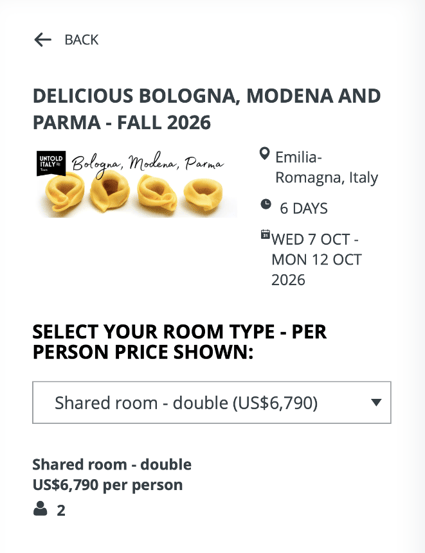
Thanks to some feedback from the expert in Italian tours, we've improve the look of the banner image on Checkout Flow.
BEFORE:
AFTER:
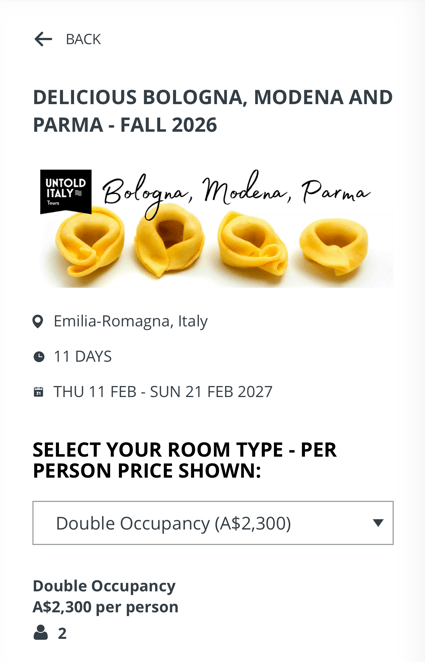
Can you spot the difference? It's subtle, but makes the whole page feel much less "squished".
**HINT:** We've given the banner image more breathing room, so it will now show the location, duration and dates below the image instead of to the right.
This impacts mobile and larger devices (all screen sizes)
*#10622- Thanks to Untold Italy for bringing this to our attention*
### 🔄 Small Language Change - Important Concepts: Please Read the Full Article about Allocating Payments Dynamically
When using the Manual Payment or other Planner payment options for people in Invitation Groups, you'll see an option to:
- **Allocate the payment across the invitation group dynamically**
- This will apply the payment to the next due Installment until it is Paid in Full for each member of the Invitation Group. Depending on what is owed and what is paid, this often does not end up as an even split. [Learn More](https://support.youli.io/understanding-payment-allocations?hsLang=en#partial-payments)
- **Apply only to this person across installments dynamically**
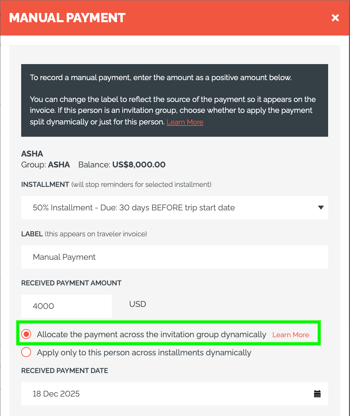
Previously the first option said:
- Split across the invitation group installments dynamically
And this confused users thinking it would "Split evenly" like it used to a long time ago. We found that worked great sometimes, but was awful other times when there were more complicated situations besides two people owing the same amount (which is more common than you think).
If you REALLY need to make them split evenly and the dynamic logic isn't doing what you expect - please use the "Apply only to this person" option and do the split yourself. Keep in mind this might result in an overallocation so be sure to check after using that option.
If you're not sure you understand how we dynamically allocate payments:
[Get to Know how Payment Allocations Work](https://support.youli.io/understanding-payment-allocations?hsLang=en#partial-payments)
*#10611*
### 🏁 SPONSORED: Flight Bookings via Sabre
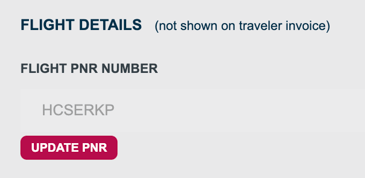
When using the "Update PNR" feature to fetch updated tickets on a Sabre booking, the webhooks to trigger automations will now only fire when the Planner hits PUBLISH on the Flight Booking Item.
Interested in integrating with Sabre to enable flight bookings? [Contact Sales](https://support.youli.io/how-to-request-contact-from-sales-or-account-manager?hsLang=en)
*#10603, 10601*
### 🏁 SPONSORED: Checkout for Reservations
Today your Travelers can book the same room and pay separately, but what if you need to book two different rooms together at the same time?
Introducing Reservations! The way YouLi is enabling multiple rooms to be booked together (and coming soon across pre/post tours)
Via Checkout Flow: Reservations allow your travelers to book more than one room at a time and allocate people to the correct room.
That could be mom and dad in the King Sea View with the 3 kids in a garden view room with 2 beds.
Or maybe Grandma is treating and she gets the single, while her daughters share a room with 2 queens, and their boys share a triple by the pool.
Setup your packages as rooms and let Checkout flow guide them through the process to pick what they need.
Reservations show a simplified header to focus on the details, hiding the Trip banner image and showing a summary of the booked rooms.
Pair this with Named Rooms to see a visual of who is booked into what rooms and generate a rooming list.
Currently in a **sponsored pilot** and limited to Checkout Flow without Booking Add-on.
[Contact Sales](https://share.hsforms.com/18b6DN9nmTVCJpTMdRc-PhA2pfil?__hstc=15466857.37454e9e58251430531d93bfc2fc46fd.1758074679272.1765919225233.1765930467413.122&__hssc=15466857.4.1765930467413&__hsfp=4199956119)or your account manager to learn more.
*#10695, 10678, 10606*
### 💪🐞 Bugs & Enhancements
- 10647 - Mismatched subscription no longer shows error on User Profile
- 10628 - YouLi signup now has a recaptcha to block spam signups. Sorry if you don’t pass the human test!!
- 10656 - Sometimes showing a hidden Highlight item was breaking the drag and drop sort order of existing Highlights. FIXED!
- 10553 - Better tools for Admins to change plans.
- 10632 - Synced tasks now link properly to edit the Task in the Library
- 10636 - The Main Navigation was collapsing when going to the Library. FIXED!
- 10642 - Allow Super Admins to manage Task Library
- 10645 - Show correct error message when missing checkin time on Accommodation of a Synced item when using EDIT DATES
### 🔜 COMING SOON
Not scheduled for this release, but [we are working on more things coming soon.](https://support.youli.io/coming-soon-youli-upcoming-roadmap?hsLang=en)
- [Get Started](https://support.youli.io/get-started?hsLang=en#main-content)
- [Checklists](https://support.youli.io/get-started?hsLang=en#checklists)
- [Setting up your account](https://support.youli.io/get-started?hsLang=en#setting-up-your-account)
- [Setting up your Trip Page](https://support.youli.io/get-started?hsLang=en#setting-up-your-trip-page)
- [Video Tutorials](https://support.youli.io/get-started?hsLang=en#video-tutorials)
- [Trip Registration](https://support.youli.io/get-started?hsLang=en#trip-registration)
- [Emails](https://support.youli.io/get-started?hsLang=en#emails)
- [Packages & Installments](https://support.youli.io/get-started?hsLang=en#packages-installments)
- [Payments](https://support.youli.io/get-started?hsLang=en#payments)
- [Adding & Managing People](https://support.youli.io/get-started?hsLang=en#adding-managing-people)
- [Starter Website](https://support.youli.io/get-started?hsLang=en#starter-website)
- [How-To](https://support.youli.io/how-to?hsLang=en#main-content)
- [Technology Partners](https://support.youli.io/how-to?hsLang=en#technology-partners)
- [API](https://support.youli.io/how-to?hsLang=en#api)
- [Reports](https://support.youli.io/how-to?hsLang=en#reports)
- [YouLi Plan Add-ons](https://support.youli.io/how-to?hsLang=en#youli-plan-add-ons)
- [Affiliates](https://support.youli.io/how-to?hsLang=en#affiliates)
- [Payments](https://support.youli.io/how-to?hsLang=en#payments)
- [Video Tutorials](https://support.youli.io/how-to?hsLang=en#video-tutorials)
- [Website Integration](https://support.youli.io/how-to?hsLang=en#website-integration)
- [Mobile App](https://support.youli.io/how-to?hsLang=en#mobile-app)
- [White Label App](https://support.youli.io/how-to?hsLang=en#white-label-app)
- [Account Roles](https://support.youli.io/how-to?hsLang=en#account-roles)
- [Tasks](https://support.youli.io/how-to?hsLang=en#tasks)
- [Packages](https://support.youli.io/how-to?hsLang=en#packages)
- [Highlights, Itinerary & Optional Add-ons](https://support.youli.io/how-to?hsLang=en#highlights-itinerary-optional-add-ons)
- [Invitation Groups](https://support.youli.io/how-to?hsLang=en#invitation-groups)
- [Coupons](https://support.youli.io/how-to?hsLang=en#coupons)
- [Trip Page Menu](https://support.youli.io/how-to?hsLang=en#trip-page-menu)
- [Integrating Cruise Deck Plans](https://support.youli.io/how-to?hsLang=en#integrating-cruise-deck-plans)
- [Managing Trip Dashboard](https://support.youli.io/how-to?hsLang=en#managing-trip-dashboard)
- [Emails](https://support.youli.io/how-to?hsLang=en#emails)
- [Bookings](https://support.youli.io/how-to?hsLang=en#bookings)
- [Managing People](https://support.youli.io/how-to?hsLang=en#managing-people)
- [Registration](https://support.youli.io/how-to?hsLang=en#registration)
- [PDF Confirmation](https://support.youli.io/how-to?hsLang=en#pdf-confirmation)
- [Documents](https://support.youli.io/how-to?hsLang=en#documents)
- [Billing](https://support.youli.io/how-to?hsLang=en#billing)
- [New Features](https://support.youli.io/new-features?hsLang=en#main-content)
- [Recent Releases](https://support.youli.io/new-features?hsLang=en#recent-releases)
- [Past Releases](https://support.youli.io/new-features?hsLang=en#past-releases)
- [Enterprise Clients](https://support.youli.io/enterprise-clients?hsLang=en#main-content)
- [Enterprise Onboarding](https://support.youli.io/enterprise-clients?hsLang=en#enterprise-onboarding)
- [Enterprise-only Features](https://support.youli.io/enterprise-clients?hsLang=en#enterprise-only-features)
- [FAQ](https://support.youli.io/faq?hsLang=en#main-content)
- [Data Security](https://support.youli.io/faq?hsLang=en#data-security)
- [Payments](https://support.youli.io/faq?hsLang=en#payments)
- [YouLi Account](https://support.youli.io/faq?hsLang=en#youli-account)
- [Emails](https://support.youli.io/faq?hsLang=en#emails)
- [Managing People](https://support.youli.io/faq?hsLang=en#managing-people)
- [Packages](https://support.youli.io/faq?hsLang=en#packages)
- [YouLi Subscription Plans](https://support.youli.io/faq?hsLang=en#youli-subscription-plans)
- [Tasks](https://support.youli.io/faq?hsLang=en#tasks)
- [Reporting](https://support.youli.io/reporting?hsLang=en)
- [YouLi User Roles](https://support.youli.io/youli-user-roles?hsLang=en)
- [For Travelers](https://support.youli.io/for-travelers?hsLang=en)
- [Partners](https://support.youli.io/partners?hsLang=en)
- [Upcoming Features](https://support.youli.io/upcoming-features?hsLang=en)
- [Incidents](https://support.youli.io/incidents?hsLang=en)
- [Contact Us](https://support.youli.io/contact-us?hsLang=en)
[](https://go.youli.io)
### Need more help?
Reach out to the YouLi Support team via the **Chat** icon at the bottom-right corner of your screen:
or [submit a Support Ticket.](https://support.youli.io/kb-tickets/new?hsLang=en)
Copyright © 2025, YouLi Travel Pty. Ltd