NOTE: This article assumes you have setup Packages, learn more about creating Pricing Packages for your Trip.
How Pricing Packages are Sorted
Auto Sort Mode
Packages appear in many lists and dropdowns in YouLi for Planners and Travelers. By default, they are sorted using Auto Sort Mode., which is order by price from lower price to higher price, if the price is the same, the order by the package name.
The first package (the cheapest) will be the default option under the Package field when a planner manually adds new travelers or when a traveler views the checkout page/trip page to register interest.
Manual Sort Mode
Available Plans: PLUS and above - Upgrade today to access
For Planners with access to Manual Sort Mode, they can override the Auto Sort by dragging and dropping the packages in the table under PRICING.
The first order package that the planner manually chooses, as mentioned above, will be set as the default package option when a planner manually adds new travelers or when a traveler views the checkout page/trip page to register interest.
Don't see the Drag and Drop option?
Auto Sort Mode
You will see the following messages if your are still in Auto Sort Mode:
- Feature NOT enabled
-
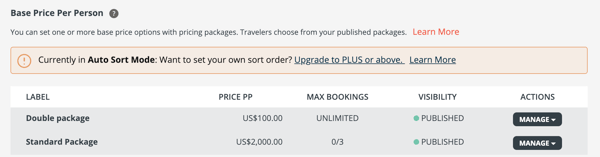
Currently in Auto Sort Mode: Want to set your own sort order? Upgrade to PLUS or above. Learn More
-
-
Feature enabled, but planners are not using it, planners will see the drag and drop option
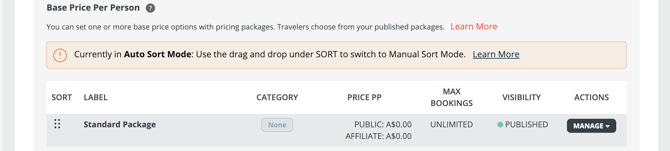
- Currently in Auto Sort Mode: Use the drag and drop under SORT to switch to Manual Sort Mode. Learn More
TIP: Once you start sorting manually - it won't automatically sort by Price, so use your power wisely!
We recommend adding all your packages FIRST, then start re-arranging the exceptions to the price order that you need.
Manual Sort Mode
-
With feature enabled
-
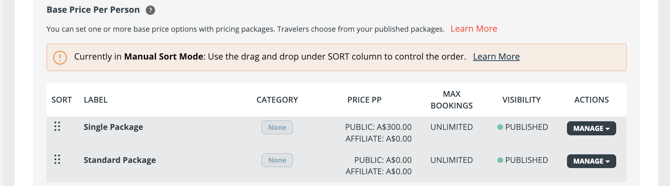
Currently in Manual Sort Mode: Use the drag and drop under SORT column to control the order. Learn More
-
- Feature was enabled, but is now disabled, planners will not see the drag and drop option
-
-
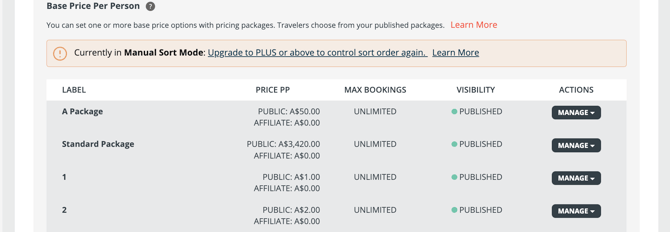
Currently in Manual Sort Mode: Upgrade to PLUS or above to control sort order again. Learn More
-
In this case, you will remain in Manual Sort Mode. Any newly added packages will be placed at the end of the list and will ignore the price order. You cannot change their position by adjusting the price, but you can always manually drag them to reorder.
-