
See All Updates
New Features Index of Releases - history of our recent updates
💬 Make YouLi Yours 🤗
👉👉 Book a demo to see these features in action 👈👈
🌤️ We are working on a Minor Release
Target release is: October 22nd, 2026
That means we are focused on major changes and fixes and enhancements, we also include small improvements and bug fixes that we can.
If you're unsure how to read the notes or how to make the most of YouLi, you can schedule a 1:1 Consulting session with one of our experts, and we will walk you through the features and best practices.
Latest Taming your Tech Stack Video:
The world has the problem this time, so we are talking about it....
AI, is it going to free us, kill us or should we just make a peanut butter sandwich?
Focus Features in this Update:
| Section | Summary |
|---|---|
| 💳 Payments & Invoicing | More reliable checkout after Stripe account changes, saved billing State/Province details, booking dates on invoices and receipts, and corrected credit and refund dialogs. |
| 🧭 Trip Pages & Registration | Cleaner Register to Pay forms, Pre-Tour activities first in the ALL itinerary view, and approved email domain restrictions for registration. |
| 🛏️ Rooming & Task Management | Downloadable rooming lists, clearer room inventory labels, and trip-specific deadlines for tasks synced from the Task Library. |
| 🏷️ White-Label Branding & Customization | Up to four custom footer navigation links for Platform White-Label Domains. |
| ⚙️ Integrations, Performance & Platform Improvements | Time zone and date offset fields in APIs and webhooks, faster traveler selection in visibility settings, and more reliable login redirects when sessions expire. |
Some of you might have received an email about the update to the comment box. Here is some additional information to help explain this change.
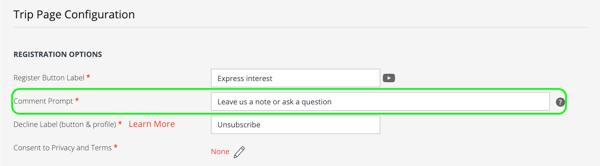
💡 When does the generic comment box no longer appear in the Register to Pay popup?
The generic comment box is hidden only when a trip uses the Register to Pay flow AND has a Profile & Registration Form task.
If you still want to collect comments, you can add your own comment field to the Profile & Registration Form task. All previously collected comments are retained—no existing data is deleted.
For trips using the Checkout flow, or Register to Pay trips without a Profile & Registration Form task, the generic comment box remains available.
📦 Detailed Release Notes
1. 💳 Payments & Invoicing
-
#11659 — Reliable Checkout After Changing Stripe Accounts
-
Summary: If you connect a different Stripe account to a trip, travelers who paid through the previous account can now continue paying without encountering a “No such customer” error.
-
-
#11656 — Billing State/Province Saved for Future Payments
-
Summary: Saved billing State/Province details now stay populated when travelers make subsequent payments through Stripe and Authorize.NET. That means less retyping at checkout.
-
-
#11594 — Booking Dates on Invoices & Receipt Emails
-
Summary: Traveler booking dates now appear on Trip Page invoices and payment receipt emails, giving travelers and planners a clearer payment record.
-
-
#11600 — Correct Credit & Refund Dialogs for “Remove & Redo”
-
Summary: Using “Remove & Redo” on a manual credit or refund in Manage Payments now opens the matching Credit or Refund dialog, with the appropriate instructions.
-
2. 🧭 Trip Pages & Registration
-
#11552 — Cleaner Register Forms
-
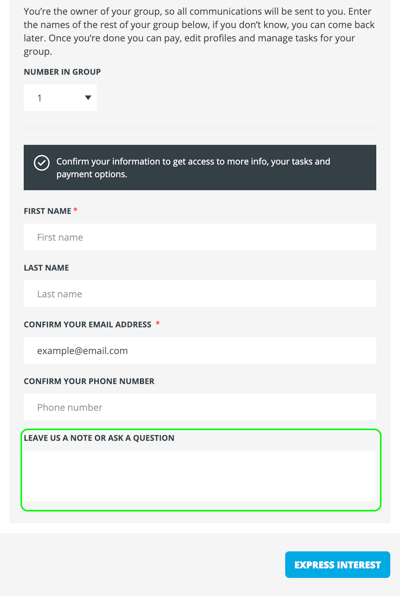
Summary: For trips using Register to Pay with a Profile & Registration Form task, the generic comment box no longer appears in the Register to Pay popup, so travelers aren’t asked the same questions twice.
-
-
#11636 — Pre-Tour Activities First in the ALL Itinerary View
-
Summary: The Trip Page itinerary now displays Pre-Tour activities before Main Tour and Post-Tour items in the ALL view, making the full journey easier to follow.
-
-
#11669 — Approved Email Domains for Register to Pay
-
Summary: Email domain restrictions now apply to Register to Pay registrations. Planning a trip for a company or organization? You can limit registration to approved email domains, with a clear message when an address is not accepted.

-
3. 🛏️ Rooming & Task Management
-
#11623 — Download Your Rooming List
-
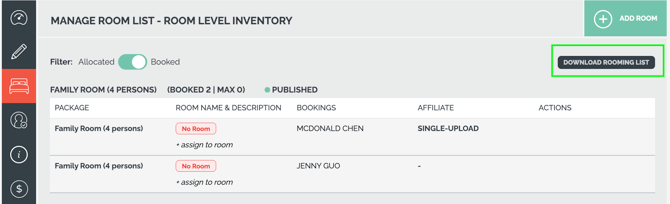
Summary: A new “Download Rooming List” button in Room Level Inventory lets planners with CRM export permissions export a CSV containing traveler names, dates of birth, packages, assigned rooms, and dietary requirements. Handy when preparing rooming details for your accommodation providers.
-
-
#11621 — Clearer Room Inventory Labels
-
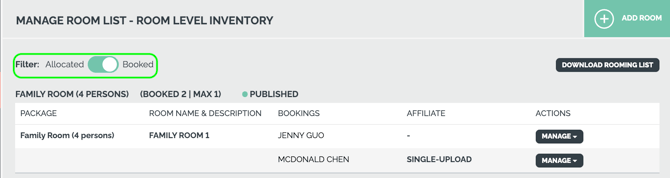
Summary: Room Level Inventory view toggles are now labeled “Allocated” and “Booked,” with helpful tooltips and column headings that match the selected view.
-
-
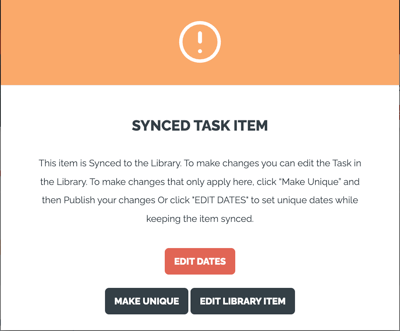
#10691 — Set Trip-Specific Dates on Synced Tasks
-
Summary: You can now use “Edit Dates” to adjust deadlines on trip tasks synced from the Task Library while keeping the library connection. Your trip-specific dates stay in place when library content is updated.
-
4. 🏷️ White-Label Branding & Customization
-
#11380 — Custom Footer Navigation for White-Label Domains
-
Summary: Platform White-Label Domain (PWLD) owners can now configure up to 4 custom footer navigation links on authentication and planner pages. Use them to direct users to your Privacy Policy, Help, Terms & Conditions, or Cancellation Policy.
-

-
-
- If you already have PWLD configured, contact support to update your footer text and add up to 4 custom links. Please include the text and destination URL for each link you’d like to add.
-
Don’t have PWLD yet? [Explore upgrading from White Label Domain (WLD) to Platform White Label (PWL)]
5. ⚙️ Integrations, Performance & Platform Improvements
-
#11670 — Trip-Local Timestamps in APIs & Webhooks
-
Summary: The registration data returned from webhooks and various API endpoints now include additional fields for the Trip Time Zone and relevent dates including offsets (using ISO 8601 format) . This helps connected CRMs and automation tools interpret dates and times correctly.
-
-
#11658 — Faster UI for Visibility Component
- Summary: Improved the speed of the UI for the Visibility component when assigning people to tasks, highlights and itinerary items, helping planners find the right travelers more quickly.
-
#7891, #11625 — Improved Session Expiration Handling
-
Summary: Expired planner sessions now redirect more reliably to login.
-
🔜 COMING SOON
Not scheduled for this release, but we are working on more things coming soon.
💬 TELL US WHAT YOU THINK
Click YES below to tell us if you like these changes
or contact support to share your feedback in detail.