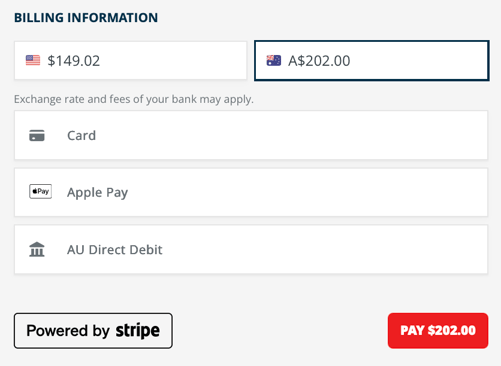
Let Travelers Pay in Their Preferred Currency (150+ Supported)
Stripe Adaptive Pricing lets your Travelers pay in their local currency — while you receive funds in your Stripe account currency. No FX risk. No setup cost. No extra work on your end.
Businesses using Adaptive Pricing see an average 17.8% increase in cross-border purchases. YouLi has enabled this for your platform — giving you a competitive edge in international group travel right now.
Why This Matters for Group Travel
If you sell internationally, many Travelers hesitate when they see pricing in a foreign currency. When using Stripe, you get to price in YOUR currency and then:
-
✅ Travelers see a familiar currency
-
✅ The exact exchange rate is shown before payment
-
✅ There are no hidden surprises
The result? More completed international bookings.
Why You Should Enable It
📈 +17.8% more cross-border bookings, on average
When Travelers see pricing in a foreign currency, many hesitate or abandon checkout entirely. Adaptive Pricing removes that friction automatically — showing each Traveler their local currency at checkout and increasing the likelihood they complete the booking.
💰 Zero cost to you
Adaptive Pricing costs your business nothing. Stripe handles all currency conversion and takes on all FX risk — including on refunds. The 2–4% conversion fee is paid by the Traveler, not you. You receive your full amount in your Stripe account currency, every time.
💳 Fewer declined transactions (~5% improvement)
Cross-border card declines are a silent booking killer. Adaptive Pricing reduces them by up to 5% by eliminating the currency mismatches that cause issuer rejections.
🌍 A competitive edge in international travel
Most international group travel platforms haven't enabled this yet. Offering local currency checkout is a meaningful differentiator when Travelers are comparing their options.
What You Need to Do
- Ensure Stripe is connected to YouLi (see how to connect)
- Go to your Trip → Pricing
- Make sure Adaptive Pricing is enabled
- This will be on by default for Trips made after Feb 2026.
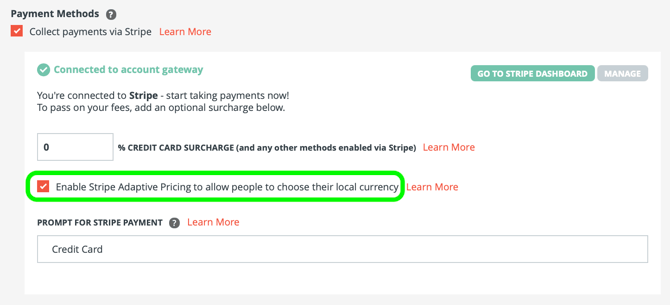
- This will be on by default for Trips made after Feb 2026.
- That's it!
- Just remember that you might not see multiple currency options depending on your location, but not to worry, your international customers will!
Video Explainer
Watch how payments via Stripe Adaptive Pricing solves Nick's international booking problem.
What your Travelers experience
Stripe automatically detects each Traveler's location and presents pricing in their local currency. They can pay in their local currency or your trip currency — either way, you receive your original amount.
Example: Your trip is priced in AUD. A US-based Traveler clicks PAY NOW and sees the USD equivalent with the live exchange rate shown clearly. The 2–4% conversion fee is displayed upfront — transparent, no surprises, similar to a standard foreign transaction fee.
Regardless of which currency your Traveler selects:
-
✅ You receive your original trip currency amount (minus Stripe and YouLi fees)
-
✅ Stripe takes on all FX risk
-
✅ You do not pay conversion fees — the Traveler does
Frequently Asked Questions
Q: Do I need to make any technical changes?
No. Adaptive Pricing works with your existing YouLi setup. No backend updates required.
Q: What currencies are supported?
150+ currencies across 150+ countries.
Q: What does it cost me?
Nothing. The 2–4% conversion fee is paid by the Traveler.
Q: What if a Traveler requests a refund?
Stripe processes the refund in the Traveler's payment currency. You are not exposed to FX risk on refunds.
Q: How do I test it?
The easiest way: create a trip in a different currency than your Stripe account currency and see how your account currency appears as the alternative. You can also use a VPN to simulate a different Traveler location.
Q: I'm using another payment gateway, can I use this feature?
You can switch to Stripe at any time.
Want to test Adaptive Pricing with Stripe on just one trip without disrupting your other trips connected to your current gateway? Contact Sales to discuss enabling Stripe for a limited rollout.
Q: How does the money flow and when are the fees taken?
- Traveler selects their local currency
- Stripe processes payment
- Stripe converts behind the scenes
- You receive payment in your Stripe account currency
- Minus the Stripe merchant fees
- Minus any YouLi Booking Fee (contact Sales to drop this to 0%)
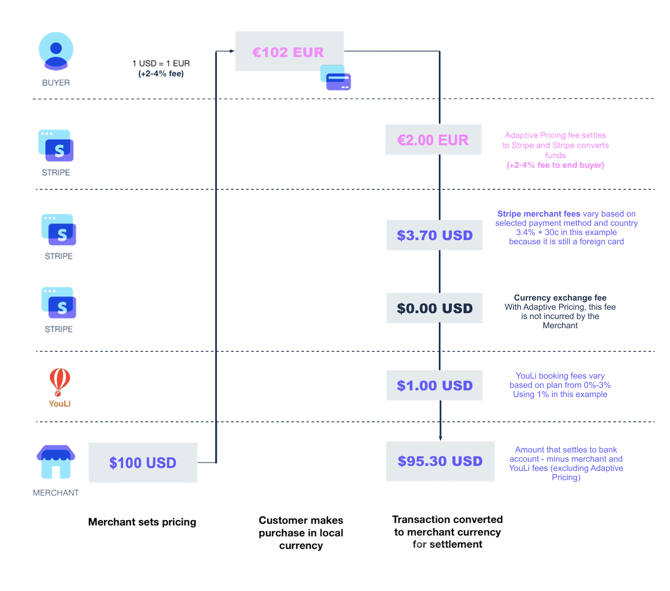
How It Works (AUD + USD Example)
Let’s say:
-
Your trip is priced in AUD
-
A Traveler is located in the United States
-
The deposit is A$200 (+ $2 surcharge)
When they click PAY NOW, they will see:
The USD amount is shown based on the conversion rate offered by Stripe at that time.
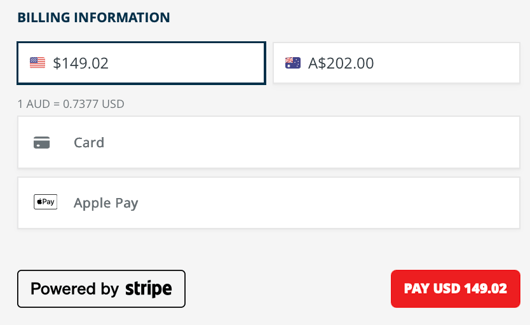
Notice that different payment methods may appear depending on the currency selected:
Option 1: USD (What is recommended to the Traveler)
Stripe automatically detects their location and suggests USD.
-
The live conversion rate is displayed (e.g., 0.73377)
-
The full USD total is shown clearly
-
FX markup is typically 2–4%, similar to or better than most credit card foreign transaction fees
-
No hidden costs
Option 2: AUD (Trip Currency)
They can choose to pay in AUD if they prefer.
Regardless of what they select:
👉 You receive your original AUD amount
- minus Stripe and YouLi fees
👉 Stripe takes on all FX risk.
👉 You do not pay the conversion fees — the Traveler does.
Another Example Scenario (USD-Based Trip)
You’re selling a trip with a US$100 deposit.
You attract:
-
Americans
-
Europeans
-
Australians
Without Adaptive Pricing:
-
European Travelers pay US$100
-
Their credit card adds foreign transaction fees
-
They may see unexpected charges
With Adaptive Pricing:
-
Stripe presents EUR to European buyers
-
They see the exact EUR amount upfront (for example, €2 FX cost)
-
They pay in EUR
-
You still receive US$100 in your Stripe account
Simple. Transparent. Higher conversion.
Technical Notes
- Adaptive Pricing options will only appear if your Trip Currency is the same as your connected Stripe Account Currency.
- So if you're an American company, trips priced in USD will show Adaptive Pricing options, but trips priced in CAD, for example, will NOT show Adaptive Pricing options.
- Adaptive Pricing does not currently work with AutoPay if a Local Currency is selected - since Stripe does not support passing in the selected currency for the later payments.
- Travelers selecting the Trip Currency will be able to use AutoPay without any problem
- If you have AutoPay enabled, and someone selects their local currency they will NOT be allowed to enrol in AutoPay.
- Adaptive Pricing is not supported if you use different surcharges for different payment methods (e.g., ACH).
- YouLi allows you to set a different surcharge for ACH, but if you take advantage of this, Stripe does not support Adaptive pricing with dynamic surcharges.
- Adaptive Pricing will be disabled on Trips where ACH Surcharge is not set to 0.
- If a Traveler has an authenticated Link session
- Since they have gone to the effort to authenticate their Linked card: They must use their authenticated Link session to pay
- OR start a new private/incognito session or close their browser and restart to choose a different payment method.
- It may be difficult to test yourself, since Stripe only shows alternative currencies based on Traveler location signals.
- You can use a VPN as one way to test
- But mostly you'll need to trust in the magic of Stripe to present the right currency options to the right people
-
- Best way to test is to create a trip with a currency other than your own and see how your currency is shown as the alternative.
What has Changed?
Adaptive Pricing was released in 2.217.
To support this feature, YouLi has switched from the previous integration using Stripe Payment Intents to Stripe Checkout, you'll notice a couple of changes (besides Adaptive Pricing):
- 🙌 No more INCOMPLETE payments showing in your Stripe Transactions dashboard
- This was an annoying feature of the previous integration that created incomplete payments for anyone who clicked the PAY NOW button even if they didn't finish checking out. No more!! 👏
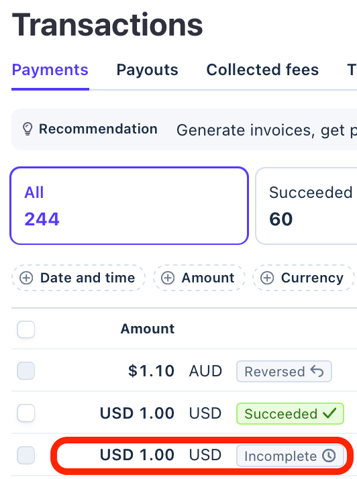
- This was an annoying feature of the previous integration that created incomplete payments for anyone who clicked the PAY NOW button even if they didn't finish checking out. No more!! 👏
- 👀 The payment method options show as a list down rather than across, allowing more options to be displayed. In the example below there are 3 payment methods presented below the choice of currency enabled by Adaptive Pricing