
Don't have 2FA enabled yet? Set it up first
How-to Login
- Login: https://youli.io/Account/Login
- If you have Platform White Label, the URL will be different.
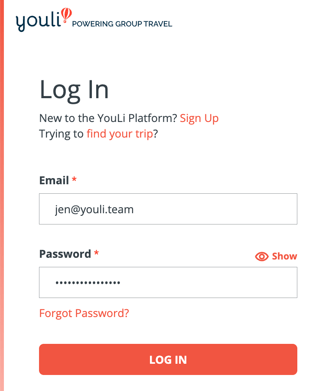
- Enter your email and password
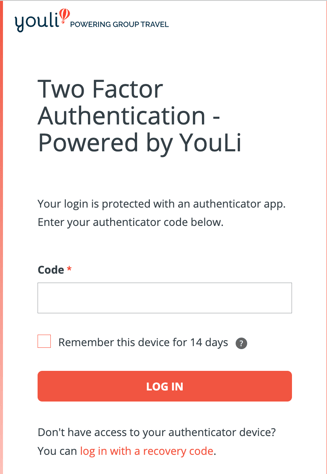
- Then you'll be prompted to enter your authenticator CODE
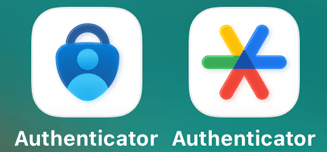
- Which you will get from your Authenticator App on your phone. You have to remember which authenticator app you chose, typically it would be Microsoft or Google and look like one of these icons. They have the same name, but are from different companies. You might have one or both - if you don't remember which one, open each and search for "YouLi"
- If you find a code, that's the one you need to enter in the box on YouLi. In this example the code is
437 242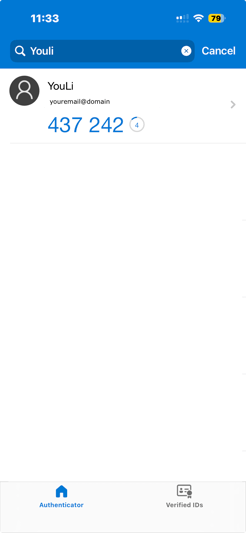
- If you find a code, that's the one you need to enter in the box on YouLi. In this example the code is
- Enter that into the code box. You can also select "Remember this device for 14 days" to avoid having to enter another code for up to 14 days on this device.
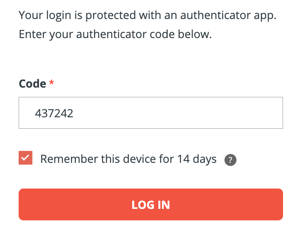
- If you get an error, you might not have entered it fast enough, try getting a new code and enter again. The clock in the authenticator app tells you how much time you have (in the above screenshot it is 4 seconds left)
- Sometimes it's best to wait for the code to reset and then copy the new one if the time remaining is too short
- Once you login, if you checked the box to remember, you will only need your email and password on the same device and browser for the next 14 days.
What if I have lost my authenticator app or can't find it?
You can use your backup codes provided to you during setup.
Simply click the "log in with a recovery code" option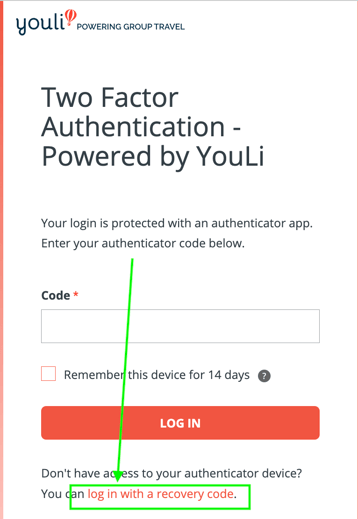
Then enter on of the recovery codes you were given during setup. These should have been saved in a secure location - like a password keeper or printed out and kept near your computer.
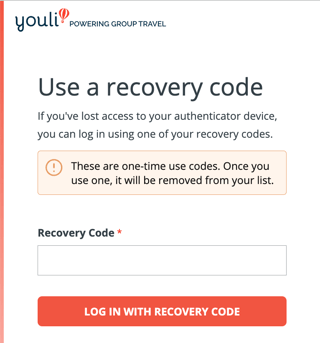
Once you login with the one time recovery code:
- Then you should follow the instructions to disable and re-enable your 2FA so you don't need to use codes each time.
What if I don't have a backup code or my authenticator app?
Contact support for further assistance.
Why am I prompted to enter 2FA even when I've asked it to remember?
There are a few reasons this might be happening:
- You have cleared cookies
- You have logged out explicitly (this clears the remembered devices)
- You are using a different browser (or private mode)
- You are using a different device (phone vs. laptop)