
We've found that sometimes free features get abused, so we've had to restrict access to the Public Trip and SEND MESSAGE features by default for EXPLORER accounts (new accounts).
Before you can use them, we need to know you're a real person, not someone trying to send spam or post scam website links.
❌ Cannot Make your Trips Public
Upgrade from EXPLORER or connect Stripe to be able to make Trips Public
If you can not make your Trips Public, follow the instructions to Upgrade or connect Stripe to be able to make Trips Public.
You'll see this prompt:
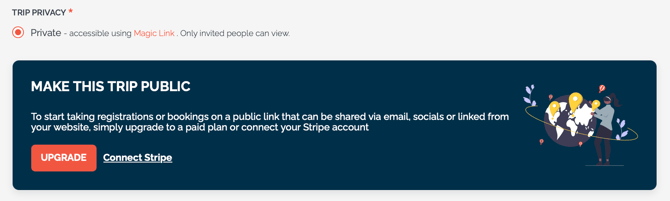
Simply click to:
1. Upgrade to any paid plan
OR
2. Connect to Stripe to identify yourself
OR
3. Book a demo so we can see you on a call and confirm you are a legitimate user so we can unblock this feature.
Once done, you'll see the Public option

If you do NOT see the option after upgrading, open a Support Ticket and we'll get you sorted.
❌ Cannot SEND INVITE or SEND MESSAGE from TripCRM
Upgrade or connect Stripe to be able to SEND INVITE or MESSAGE
On the TripCRM, if you see the SEND INVITE or MESSAGE buttons are disabled and there is a hover message: "Upgrade or book demo to enable"
.png?width=390&height=129&name=image%20(40).png)
Then you'll need to
Simply click to:
1. Upgrade to any paid plan
OR
2. Connect to Stripe to identify yourself
OR
3. Book a demo so we can see you on a call and confirm you are a legitimate user so we can unblock this feature.
If you do NOT see the feature activated after upgrading, open a Support Ticket and we'll get you sorted.