
To ensure flawless rendering across iOS and Android, please deliver all brand assets strictly matching the specifications below.
1. App Icon
-
Size: 1024 x 1024 px
-
Format: PNG
-
Layer Requirement:
- No transparency
- No rounded corners (the app stores will apply rounded corners automatically)
- Keep important design elements away from the edges
- Leave adequate padding around the logo to ensure it displays well across devices
-
Reference Documents:
2. Splash Screen
-
Size: 1080 × 1920 px
-
Format: .jpeg
-
Usage:
-
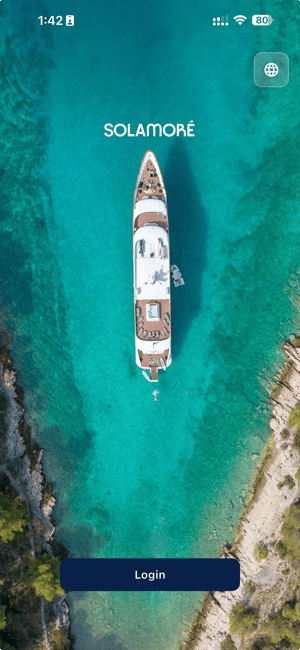
Full-screen background image
-
Displayed on the app splash screen

-
Used as the background image during the loading process
-
-
Design Considerations
-
Important content should be positioned within the central safe area. The Display Logo will be placed in the upper section of the screen, while login buttons and actions will be displayed in the lower section.
-
Avoid placing key visual elements too close to the edges.
-
Wider compositions are preferred over close-up imagery, as the image may be cropped differently across devices and screen sizes.
-
3. Display Logo
-
Size: 600 × 200 px
-
Format: PNG
-
Requirements:
-
Transparent background
-
-
-
Horizontal logo orientation
-
Displayed throughout the app, including login and splash screen experiences
-
Positioned over the splash screen background image

-
3. Delivery Checklist
|
Asset |
Dimensions |
Format |
Key Notes |
|---|---|---|---|
|
App Icon |
1024 × 1024 px |
PNG |
Pure square design. Keep all key elements within an 80% safe zone and leave adequate padding around the edges. No transparency. |
|
Splash Screen (Portrait) |
2048 × 2732 px |
JPEG |
Scenic background image. Important content should remain within the central safe area. The Display Logo will be positioned in the upper section of the screen, with login actions displayed in the lower section. |
|
Display Logo |
600 × 200 px |
PNG (Transparent Background) |
Horizontal logo used throughout the app. The logo will be displayed over the splash screen image and positioned in the upper section of the screen. |