
Available on the following plans:
- Grow - Upgrade today to access
- Enterprise - contact Sales
Why Do I Need a Task Library?
Task Library is an advanced feature for clients who need to maintain consistent Tasks & Forms across Trips when Templates are not sufficient.
Templates are a great option when the Trips have the same set of Tasks each time. But if each Trip requires a unique combination of standard Tasks, it can be much more convenient to save the standard Tasks to the Library and then add them as needed per Trip.
This can be especially important when using the API Fieldname feature - crucial for using Zapier automations based on Task Webhooks or Configured Trip Reports.
Using the Task Library makes it easier to ensure consistent API Fieldnames.
Add TO Library
To save Task & Form Items to your Task Library for future use:
- Click to Manage Tasks & Forms on any TRIP
- Hover over Add To Library icon under the ACTIONS column
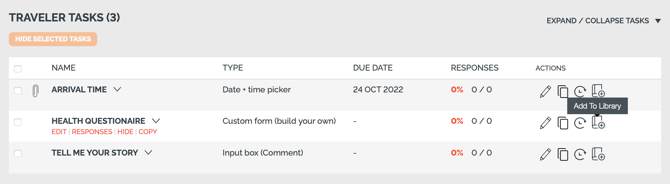
- Click to open the popup
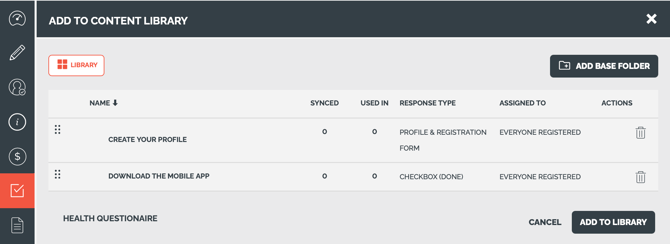
- Optionally "ADD BASE FOLDER"
- Then click ADD TO LIBRARY
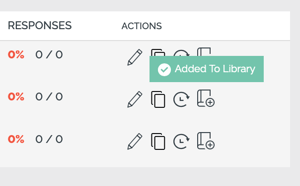
- You'll see the confirmation "Added to Library" back on the Trip Task List.
Add FROM Library
To use a Task & Form Item from your Library
- Click to Manage Tasks & Forms on any TRIP
- Click the ADD FROM LIBRARY button
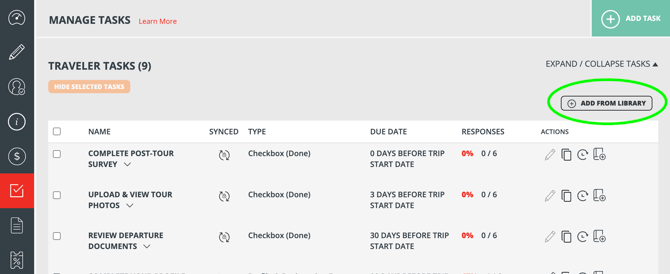
- In the popup, select the Task Form you want to pull into the TRIP
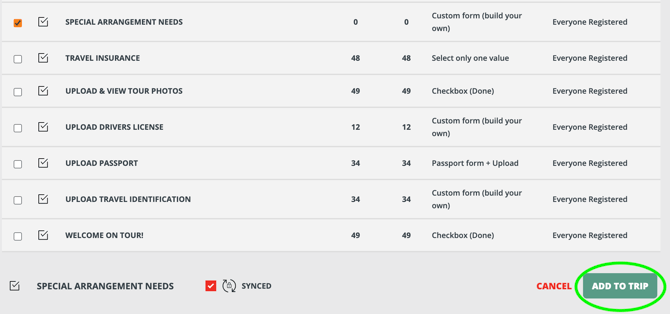
- Once added it will appear on Trip Pages based on the Assigned To setting
User Access
Co-Planners, Affiliates and Trip Coordinators cannot view or edit your Task Library. So you can safely invite them to collaborate with you without fear that they will made changes to your library.
Any team member in the account can access the Task Library only if:
- The User has permission to edit task on individual trips
- By default, Team Members and Team Admins have this permission, if you need Users that do not, you need Custom Roles
AND
- The User has "Grant access to all. trips" checked (they are not restricted to some trip tags)
- This can be changed by editing their user under Team Members and restricting to a set of tags or clicking to "Grant access to all trips"
Synced Task Library
Available plans:
- Enterprise Extra - contact Sales
- Works well with Global Image Library