---
title: "New Features: Minor Release 2.220 - April 2026"
description: Stripe Adaptive Pricing, Accommodations & Transfer Windows, Send to Non-responders, System Optimizations and more
---
[Skip to content](https://support.youli.io/new-features-minor-release-apr-2026#main-content)
[Open Ticket](https://support.youli.io/kb-tickets/new?hsLang=en) [Customer portal](https://support.youli.io/feature-request-tickets-view?hsLang=en)
[](https://support.youli.io/?hsLang=en)
- [Pricing](https://go.youli.io/pricing)
- [Book Demo](https://go.youli.io/youli-demo-videos)
- [Blog](https://blog.youli.io/)
Open main navigation
Close main navigation
- [Pricing](https://go.youli.io/pricing)
- [Book Demo](https://go.youli.io/youli-demo-videos)
- [Blog](https://blog.youli.io/)
- [Open Ticket](https://support.youli.io/kb-tickets/new)
- [Customer portal](https://support.youli.io/feature-request-tickets-view)
- [Open Ticket](https://support.youli.io/kb-tickets/new)
[Open Ticket](https://support.youli.io/kb-tickets/new?hsLang=en)
How can we help you?
- There are no suggestions because the search field is empty.
1. [Help Center](https://support.youli.io/?hsLang=en)
2. [New Features](https://support.youli.io/new-features?hsLang=en)
3. [Recent Releases](https://support.youli.io/new-features?hsLang=en#recent-releases)
# New Features: Minor Release 2.220 - April 2026
## Stripe Adaptive Pricing, Accommodations & Transfer Windows, Send to Non-responders, System Optimizations and more
### See All Updates
[New Features Index of Releases](https://support.youli.io/new-features?hsLang=en) - history of our recent updates
🌤️ Minor Release
Released: **April 23, 2026**
**That means we are focused on a *few fixes and enhancements.***
If you're unsure how to read the notes or how to make the most of YouLi, you can schedule a [1:1 Consulting session](https://support.youli.io/4410822548623-how-to-get-help-from-youli-support?hsLang=en#pay) with one of our experts, and we will walk you through the features and best practices.
### Focus Features in this Update:
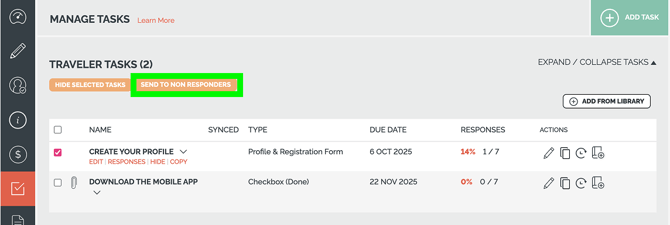
### ✅ ✅ Send Tasks reminders to ALL Non-Responders - Across Tasks
Ready to speed up your followup? Go find your "one click" option under Tasks for any Trip. See the screenshot below with the button highlighted in green.
**Included in all GROW plans**
*[Upgrade to GROW to get access](https://youli.io/account/billingsetup#grow)
Enterprise customers - [contact your account manager.](https://support.youli.io/how-to-request-contact-from-sales-or-account-manager?hsLang=en)*
*#10573, 11056, 11042 - thanks to You Can't Steal My Happy for prioritizing*
### 🛏️ 🚌 General Availability: Accommodation & Transfer Enhanced Itinerary Items
We've been testing our new Enhanced Itinerary Items and now we have released for our GROW plans.
- [Accommodation](https://support.youli.io/manage-room-inventory-for-each-accommodation-with-room-blocks-enhanced-itinerary-items?hsLang=en) - manage room inventory on the backend. Great for room allocation for large groups, especially when managing different room lists for each hotel.
- [Transfer Window](https://support.youli.io/manage-transfer-windows-enhanced-itinerary-items?hsLang=en) - link your Flight Responses to your Transfer Window for extra ease of management. Group people together into the right transfers and identify who needs a special transfer outside the window.
*[Upgrade to GROW to get access](https://youli.io/account/billingsetup#grow)
Enterprise customers - [contact your account manager.](https://support.youli.io/how-to-request-contact-from-sales-or-account-manager?hsLang=en)*
### 🏃🏃 System Optimizations
#### 🗂️ Embed Optimizations - load Trip Cards faster on your website
HOTFIX: Delivered on Apr 14, 2026
If you use our [Trip Card Embeds on your website](https://support.youli.io/360000535336-how-do-i-integrate-with-my-website-?hsLang=en), you'll have noticed the spinner doesn't spin as long as it used to!
In some cases it's 5 to 10x times faster to load!! 😱
Besides speed, why should you be using embeds? Let Jen explain ....
*#11014 - thanks to Adventure Outloud for prioritizing*
#### 📋 Trip Dashboard and TripCRM and more
- The Trip Dashboard is running on a new framework - do you notice the difference?
- We've made changes to how the TripCRM returns the list of people on your Trips
- More performance improvements coming, but we are keen to see if this change already improves your experience
- HOTFIX applied for timeouts on large trips
*#10717, 9346, 8958, 11026, 11077*
#### 💰 PayPal Optimizations - no UI changes
- No visible changes, but we've updated the way we manage PayPal payments
*#9350*
#### 🔀 Rate Limits
We hear you about occasional slowdowns and the source of the problem is often bot traffic. (the dark side of automation)
To address this we are implementing Rate Limits. This will apply to all traffic, including yours, so if you are a very quick clicker, you might see an message to slow down (j/k you can't click that fast)
For normal usage, we do not expect this to impact your experience, except to avoid the worst slowdowns.
For technical users:
- If a request hits a rate limit, you will get a 429 error code instead of a 200 - just try again
- Static assets like JS, images and CSS won't hit the rate limit
*#11006*
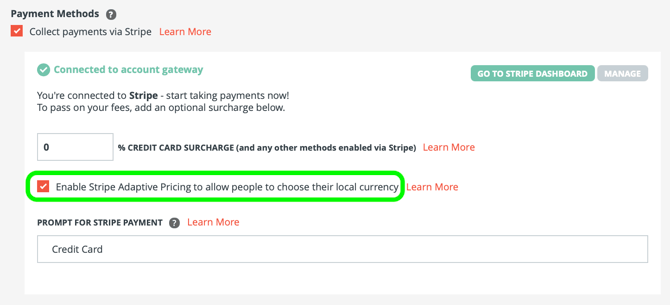
### 💱💱 Adaptive Pricing - take payments in 150+ currencies
We love seeing customers embracing the ability to accept payments in many currencies without the foreign exchange risk.
[Learn more about why Adaptive Pricing is a no-brainer.](https://support.youli.io/stripe-adaptive-pricing-multi-currency-option?hsLang=en)
Be sure this box is checked for your trips to take advantage:
*#10865 - Thanks to Stripe for sponsoring this feature*
### 🔢 Affiliate Profile
- *💪 11015* - Use Global Image Library when available for Affiliate Profile logos
- *💪 11020 -* Check the right permissions when linking Affiliates to Trips
### 🔢 Reservations with Pre/Post - Pay Separately
- *🐞 10998* - When selecting to pay separately with Pre and Post tours, the group payment options will now work as expected
### 🔢 Flight Search and Book using "Sky"
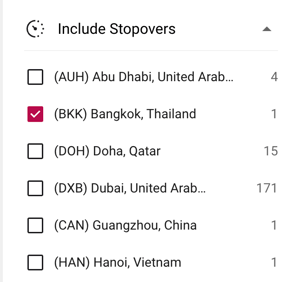
💪 We've changed the filter label from "Stopover Locations" to "Include Stopover" so it's clear that this is an "inclusion" not an "exclusion". So you can filter to routes that go through your preferred stopover locations (but may still go through the other locations as well).
🐞 We've optimized the GetFlightTicketBooking endpoint to return more accurate results to power automations connected to Sky.
🐞 We fixed an issue when adding refunded tickets as Flight Bookings.
COMING NEXT: Exclusion options to support avoiding certain airports due to certain global incidents.
*#11032, 11070*
### 🔢 Spring Cleaning
We've cleared out a bunch of old code for features that didn't make the cut.
This is the kind of work we do for you behind the scenes, and it makes it easier for us to make the changes that you ask for when you sponsor or prioritize a feature.
[If you're interested to explore sponsorship, get in touch.](https://support.youli.io/how-to-request-contact-from-sales-or-account-manager?hsLang=en)
*#11058, 10708, 10404, 10281*
### 💪🐞 Bugs & Enhancements
Thanks to everyone who submitted issues, we love making things work!
- 🐞 10970 - Super Users saw an error on payments across trips (Reservations). FIXED!
- 🐞 11036 - Users were confused by the recent change to allow "Also respond" on tasks to complete for everyone in the booking. So we've rolled it back. Stay tuned for a better version of this feature next month.
- 🐞 11057 - When you switched a trip from BOOKINGS to BROCHURE any Add-ons with responses would show an error when attempting to edit. FIXED!
### 🐞 KNOWN ISSUES
Sometimes the editor needs a reload when updating the Instructions on Tasks. If the HTML editor doesn't load the first time, reload the page. Please report this if you find it to help us narrow down why it happens.
*#10999*
### 🔜 COMING SOON
Not scheduled for this release, but [we are working on more things coming soon.](https://support.youli.io/coming-soon-youli-upcoming-roadmap?hsLang=en)
- [Get Started](https://support.youli.io/get-started?hsLang=en#main-content)
- [Checklists](https://support.youli.io/get-started?hsLang=en#checklists)
- [Setting up your account](https://support.youli.io/get-started?hsLang=en#setting-up-your-account)
- [Setting up your Trip Page](https://support.youli.io/get-started?hsLang=en#setting-up-your-trip-page)
- [Video Tutorials](https://support.youli.io/get-started?hsLang=en#video-tutorials)
- [Trip Registration](https://support.youli.io/get-started?hsLang=en#trip-registration)
- [Emails](https://support.youli.io/get-started?hsLang=en#emails)
- [Packages & Installments](https://support.youli.io/get-started?hsLang=en#packages-installments)
- [Payments](https://support.youli.io/get-started?hsLang=en#payments)
- [Adding & Managing People](https://support.youli.io/get-started?hsLang=en#adding-managing-people)
- [Starter Website](https://support.youli.io/get-started?hsLang=en#starter-website)
- [How-To](https://support.youli.io/how-to?hsLang=en#main-content)
- [Technology Partners](https://support.youli.io/how-to?hsLang=en#technology-partners)
- [API](https://support.youli.io/how-to?hsLang=en#api)
- [Reports](https://support.youli.io/how-to?hsLang=en#reports)
- [YouLi Plan Add-ons](https://support.youli.io/how-to?hsLang=en#youli-plan-add-ons)
- [Affiliates](https://support.youli.io/how-to?hsLang=en#affiliates)
- [Payments](https://support.youli.io/how-to?hsLang=en#payments)
- [Video Tutorials](https://support.youli.io/how-to?hsLang=en#video-tutorials)
- [Website Integration](https://support.youli.io/how-to?hsLang=en#website-integration)
- [Mobile App](https://support.youli.io/how-to?hsLang=en#mobile-app)
- [White Label App](https://support.youli.io/how-to?hsLang=en#white-label-app)
- [Account Roles](https://support.youli.io/how-to?hsLang=en#account-roles)
- [Tasks](https://support.youli.io/how-to?hsLang=en#tasks)
- [Packages](https://support.youli.io/how-to?hsLang=en#packages)
- [Highlights, Itinerary & Optional Add-ons](https://support.youli.io/how-to?hsLang=en#highlights-itinerary-optional-add-ons)
- [Invitation Groups](https://support.youli.io/how-to?hsLang=en#invitation-groups)
- [Coupons](https://support.youli.io/how-to?hsLang=en#coupons)
- [Trip Page Menu](https://support.youli.io/how-to?hsLang=en#trip-page-menu)
- [Integrating Cruise Deck Plans](https://support.youli.io/how-to?hsLang=en#integrating-cruise-deck-plans)
- [Managing Trip Dashboard](https://support.youli.io/how-to?hsLang=en#managing-trip-dashboard)
- [Emails](https://support.youli.io/how-to?hsLang=en#emails)
- [Bookings](https://support.youli.io/how-to?hsLang=en#bookings)
- [Managing People](https://support.youli.io/how-to?hsLang=en#managing-people)
- [Registration](https://support.youli.io/how-to?hsLang=en#registration)
- [PDF Confirmation](https://support.youli.io/how-to?hsLang=en#pdf-confirmation)
- [Documents](https://support.youli.io/how-to?hsLang=en#documents)
- [Billing](https://support.youli.io/how-to?hsLang=en#billing)
- [New Features](https://support.youli.io/new-features?hsLang=en#main-content)
- [Recent Releases](https://support.youli.io/new-features?hsLang=en#recent-releases)
- [Past Releases](https://support.youli.io/new-features?hsLang=en#past-releases)
- [Enterprise Clients](https://support.youli.io/enterprise-clients?hsLang=en#main-content)
- [Enterprise Onboarding](https://support.youli.io/enterprise-clients?hsLang=en#enterprise-onboarding)
- [Enterprise-only Features](https://support.youli.io/enterprise-clients?hsLang=en#enterprise-only-features)
- [FAQ](https://support.youli.io/faq?hsLang=en#main-content)
- [Data Security](https://support.youli.io/faq?hsLang=en#data-security)
- [Payments](https://support.youli.io/faq?hsLang=en#payments)
- [YouLi Account](https://support.youli.io/faq?hsLang=en#youli-account)
- [Emails](https://support.youli.io/faq?hsLang=en#emails)
- [Managing People](https://support.youli.io/faq?hsLang=en#managing-people)
- [Packages](https://support.youli.io/faq?hsLang=en#packages)
- [YouLi Subscription Plans](https://support.youli.io/faq?hsLang=en#youli-subscription-plans)
- [Tasks](https://support.youli.io/faq?hsLang=en#tasks)
- [Reporting](https://support.youli.io/reporting?hsLang=en)
- [YouLi User Roles](https://support.youli.io/youli-user-roles?hsLang=en)
- [For Travelers](https://support.youli.io/for-travelers?hsLang=en)
- [Partners](https://support.youli.io/partners?hsLang=en)
- [Upcoming Features](https://support.youli.io/upcoming-features?hsLang=en)
- [Incidents](https://support.youli.io/incidents?hsLang=en)
- [Contact Us](https://support.youli.io/contact-us?hsLang=en)
[](https://go.youli.io)
### Need more help?
Reach out to the YouLi Support team via the **Chat** icon at the bottom-right corner of your screen:
or [submit a Support Ticket.](https://support.youli.io/kb-tickets/new?hsLang=en)
Copyright © 2025, YouLi Travel Pty. Ltd
```json
{
"@context" : "https://schema.org",
"@type" : "VideoObject",
"caption" : {
"@type" : "MediaObject",
"contentUrl" : "https://support.youli.io/media-transcripts/211485502866/en.vtt",
"inLanguage" : "en",
"name" : "en Captions"
},
"contentUrl" : "https://4545741.fs1.hubspotusercontent-na1.net/hubfs/4545741/video_assets/211485502866/inherited/web_optimized.mp4",
"dateModified" : "2026-04-22T06:35:10.469Z",
"duration" : "PT26S",
"height" : 2560,
"name" : "Why_Embed_trips_-CTA demo_20260422_163010",
"thumbnailUrl" : "https://support.youli.io/hubfs/Why_Embed_trips_-CTA%20demo_20260422_163010.mp4/medium.jpg",
"uploadDate" : "2026-04-22T06:34:59.969Z",
"width" : 1440
}
```