---
title: "New Features: Minor Release 232 - Nov 5, 2026"
description: This MINOR update contains clearer transfer instructions, and enhanced flight features and reporting. This release also adds editable manual transaction dates, exact registration closing times, and activity searches by email.
---
[Skip to content](https://support.youli.io/new-features-minor-release-232-nov-2026#main-content)
[Open Ticket](https://support.youli.io/kb-tickets/new?hsLang=en) [Customer portal](https://support.youli.io/feature-request-tickets-view?hsLang=en)
[](https://support.youli.io/?hsLang=en)
- [Pricing](https://go.youli.io/pricing)
- [Book Demo](https://go.youli.io/youli-demo-videos)
- [Blog](https://blog.youli.io/)
Open main navigation
Close main navigation
- [Pricing](https://go.youli.io/pricing)
- [Book Demo](https://go.youli.io/youli-demo-videos)
- [Blog](https://blog.youli.io/)
- [Open Ticket](https://support.youli.io/kb-tickets/new)
- [Customer portal](https://support.youli.io/feature-request-tickets-view)
- [Open Ticket](https://support.youli.io/kb-tickets/new)
[Open Ticket](https://support.youli.io/kb-tickets/new?hsLang=en)
How can we help you?
- There are no suggestions because the search field is empty.
1. [Help Center](https://support.youli.io/?hsLang=en)
2. [New Features](https://support.youli.io/new-features?hsLang=en)
# New Features: Minor Release 232 - Nov 5, 2026
## Clearer transfer instructions, and enhanced flight features and reporting. This release also adds editable manual transaction dates, exact registration closing times, and activity searches by email.
### See All Updates
[New Features Index of Releases](https://support.youli.io/new-features?hsLang=en) - history of our recent updates
### 💬 Make YouLi Yours 🤗
👉👉 [Book a demo to see these features in action](https://go.youli.io/youli-demo-videos) 👈👈
### 🌤️ We are working on a Minor Release
Target release is: **Nov 05, 2026**
**That means we are focused on a *few fixes and enhancements***, we also include small improvements and bug fixes that we can.
If you're unsure how to read the notes or how to make the most of YouLi, you can schedule a [1:1 Consulting session](https://support.youli.io/4410822548623-how-to-get-help-from-youli-support?hsLang=en#pay) with one of our experts, and we will walk you through the features and best practices.
### Latest Taming your Tech Stack Video:
**Rooming lists made simple.**
Learn how to use YouLi's Room-Level Inventory feature to create rooms, assign travellers, manage roommates, and track accommodation inventory with an easy-to-use visual interface. Perfect for tour operators, student travel providers, and group travel organisers.
👉👉 [Book a demo to see these features in action](https://go.youli.io/youli-demo-videos) 👈👈
COMING SOON to PRO and above.
### Focus Features in this Update:
| Section | Summary |
| --- | --- |
| 🚌 Transfer Window | Clearer instructions when flight details fall outside the expected airport or transfer window. |
| 🛏️ Checkout with Reservations | Cleaner booking flow for solo travelers in a Reservations via Checkout Flow |
| 💳 Payments & Reporting | Editable dates and times for manual transactions, and accurate balances for fixed flight add-ons in global bookings report. |
| 🧭 Registration & Reservation Management | Exact registration closing times, synchronized reservation settings |
### 📦 Detailed Release Notes
### 1. 🚌 Flight + Included Transfer window
- **#11526 — Clearer Airport & Transfer Window Messages**
- **Summary:** When flight details fall outside the expected [airport or transfer window](https://support.youli.io/manage-transfer-windows-enhanced-itinerary-items?hsLang=en) a warning message is shown.
- Not taking advantage of this feature yet? [Get in touch](https://support.youli.io/how-to-request-contact-from-sales-or-account-manager?hsLang=en) to find out how you can connect to FlightAware and offer Transfer Windows for a fully integrated flight data collection and transfers up-sell experience.
### 2. 💳 Payments & Reporting
- **#11639 — Edit Dates & Times for Manual Transactions**
- **Summary:** A new “Edit Date” action lets planners adjust the recorded date and time of manual payments, credits, and refunds. Updating a traveler’s initial payment also updates their booking date.
### 3. 🧭 Registration & Reservation Management
- **#10759 — Automatic Allocation for Solo Travelers in a Reservation**
- **Summary:** When a solo traveler selects a package as part of a [Reservation](https://support.youli.io/reservations-managing-complex-bookings?hsLang=en), they are now automatically assigned to that package. This already worked for couples booking into a package.
- If the selected package requires more people, a message prompts them to change packages or add more guests
- If you're using [Room-Level Inventory](https://support.youli.io/manage-room-inventory-per-named-room?hsLang=en), you will still need to assign them to a specific room and they will appear with a "NO ROOM" marker on the Rooming List.
- **#9738 — Show the Exact Registration Closing Time**
- **Summary:** Use the new `[CloseTime]` shortcode in registration prompts to show the closing time alongside the date. Times display in 12-hour format using the trip’s time zone. 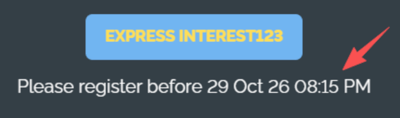
- **#11627 — Sync Pay Together Settings Across a Reservation**
- **Summary:** Changes to invoice payment modes, invoice visibility, and permissions to complete tasks for other travelers now get updated to all invitation groups within the same reservation.
- So if they book paying together and you need to split them to pay seperately, that will now apply across the reservation.
### 4. 🔎 Staff Activity Auditing
We hear all the time that knowing who took what activity is a crucial feature, now it's gotten that much easier to find out who made the change (and then ask them why!)
- **#11550 — Search Activity by Email Address**
- **Summary:** Find activity using a user’s (from your team) full email address in Trip Summary, TripBoard, and Activity Search reports.
- Searches work regardless of capitalization or how the action was originally recorded.
### 5. ✈️ Flight Bookings & Itinerary
[Interested in connecting your Sabre to YouLi for seamless flight booking, learn more.](https://support.youli.io/how-to-request-contact-from-sales-or-account-manager?hsLang=en)
- **#11336 — Accurate Balances for Fixed Flight Add-Ons in Global Bookings**
**Summary:** Bookings reports now include fixed flight add-on costs in trip totals, so balance due and owing amounts match traveler invoices.
- **#10981 — Choose How Flight Booking Fees Appear**
**Summary:** A new “Show Booking Fee as Line Item” setting lets planners choose whether flight booking fees appear separately at checkout or are included in the flight price. Configure this for each trip under Settings -\> Flight Services.
- **#11672 — Clearer PNR Update Button**
**Summary:** After you upload a PNR to an itinerary item, the button now changes from “Upload PNR” to “Update PNR,” making it clearer it will refresh an existing record rather than pull a new PNR.
- **#11666 — Consistent Names for Flight Itinerary Items**
**Summary:** Flight itinerary items created from bookings now use the format “PASSENGER NAME (PNR: ABC123),” with passenger names matching airline naming conventions.
- **#11671 — Flight Icons for Manually Created Flight Items**
**Summary:** Manually created flight booking itinerary items now display a flight icon instead of a generic placeholder.
- **#11230 — Email Auto-Fill for Multi-City Requests**
**Summary:** Travelers’ email addresses now pre-fill from their registration details when reviewing a multi-city flight request. That means less re-typing.
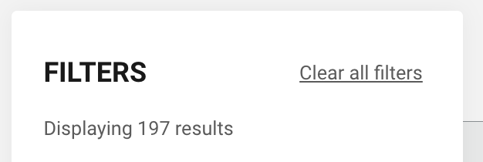
- **#11581 — Simpler Flight Search Results**
**Summary:** Flight searches now show “Displaying X results,” reflecting the current filters.
### 🔜 COMING SOON
Not scheduled for this release, but [we are working on more things coming soon.](https://support.youli.io/coming-soon-youli-upcoming-roadmap?hsLang=en)
### 💬 TELL US WHAT YOU THINK
Click **YES** below to tell us if you like these changes
or [contact support](https://support.youli.io/4410822548623-how-to-get-help-from-youli-support?hsLang=en)to share your feedback in detail.
- [Get Started](https://support.youli.io/get-started?hsLang=en#main-content)
- [Checklists](https://support.youli.io/get-started?hsLang=en#checklists)
- [Setting up your account](https://support.youli.io/get-started?hsLang=en#setting-up-your-account)
- [Setting up your Trip Page](https://support.youli.io/get-started?hsLang=en#setting-up-your-trip-page)
- [Video Tutorials](https://support.youli.io/get-started?hsLang=en#video-tutorials)
- [Trip Registration](https://support.youli.io/get-started?hsLang=en#trip-registration)
- [Emails](https://support.youli.io/get-started?hsLang=en#emails)
- [Packages & Installments](https://support.youli.io/get-started?hsLang=en#packages-installments)
- [Payments](https://support.youli.io/get-started?hsLang=en#payments)
- [Adding & Managing People](https://support.youli.io/get-started?hsLang=en#adding-managing-people)
- [Starter Website](https://support.youli.io/get-started?hsLang=en#starter-website)
- [How-To](https://support.youli.io/how-to?hsLang=en#main-content)
- [Technology Partners](https://support.youli.io/how-to?hsLang=en#technology-partners)
- [API](https://support.youli.io/how-to?hsLang=en#api)
- [Reports](https://support.youli.io/how-to?hsLang=en#reports)
- [YouLi Plan Add-ons](https://support.youli.io/how-to?hsLang=en#youli-plan-add-ons)
- [Affiliates](https://support.youli.io/how-to?hsLang=en#affiliates)
- [Payments](https://support.youli.io/how-to?hsLang=en#payments)
- [Video Tutorials](https://support.youli.io/how-to?hsLang=en#video-tutorials)
- [Website Integration](https://support.youli.io/how-to?hsLang=en#website-integration)
- [Mobile App](https://support.youli.io/how-to?hsLang=en#mobile-app)
- [White Label App](https://support.youli.io/how-to?hsLang=en#white-label-app)
- [Account Roles](https://support.youli.io/how-to?hsLang=en#account-roles)
- [Tasks](https://support.youli.io/how-to?hsLang=en#tasks)
- [Packages](https://support.youli.io/how-to?hsLang=en#packages)
- [Highlights, Itinerary & Optional Add-ons](https://support.youli.io/how-to?hsLang=en#highlights-itinerary-optional-add-ons)
- [Invitation Groups](https://support.youli.io/how-to?hsLang=en#invitation-groups)
- [Coupons](https://support.youli.io/how-to?hsLang=en#coupons)
- [Trip Page Menu](https://support.youli.io/how-to?hsLang=en#trip-page-menu)
- [Integrating Cruise Deck Plans](https://support.youli.io/how-to?hsLang=en#integrating-cruise-deck-plans)
- [Managing Trip Dashboard](https://support.youli.io/how-to?hsLang=en#managing-trip-dashboard)
- [Emails](https://support.youli.io/how-to?hsLang=en#emails)
- [Bookings](https://support.youli.io/how-to?hsLang=en#bookings)
- [Managing People](https://support.youli.io/how-to?hsLang=en#managing-people)
- [Registration](https://support.youli.io/how-to?hsLang=en#registration)
- [PDF Confirmation](https://support.youli.io/how-to?hsLang=en#pdf-confirmation)
- [Documents](https://support.youli.io/how-to?hsLang=en#documents)
- [Billing](https://support.youli.io/how-to?hsLang=en#billing)
- [New Features](https://support.youli.io/new-features?hsLang=en#main-content)
- [Recent Releases](https://support.youli.io/new-features?hsLang=en#recent-releases)
- [Past Releases](https://support.youli.io/new-features?hsLang=en#past-releases)
- [Enterprise Clients](https://support.youli.io/enterprise-clients?hsLang=en#main-content)
- [Enterprise Onboarding](https://support.youli.io/enterprise-clients?hsLang=en#enterprise-onboarding)
- [Enterprise-only Features](https://support.youli.io/enterprise-clients?hsLang=en#enterprise-only-features)
- [FAQ](https://support.youli.io/faq?hsLang=en#main-content)
- [Data Security](https://support.youli.io/faq?hsLang=en#data-security)
- [Payments](https://support.youli.io/faq?hsLang=en#payments)
- [YouLi Account](https://support.youli.io/faq?hsLang=en#youli-account)
- [Emails](https://support.youli.io/faq?hsLang=en#emails)
- [Managing People](https://support.youli.io/faq?hsLang=en#managing-people)
- [Packages](https://support.youli.io/faq?hsLang=en#packages)
- [YouLi Subscription Plans](https://support.youli.io/faq?hsLang=en#youli-subscription-plans)
- [Tasks](https://support.youli.io/faq?hsLang=en#tasks)
- [Reporting](https://support.youli.io/reporting?hsLang=en)
- [YouLi User Roles](https://support.youli.io/youli-user-roles?hsLang=en)
- [For Travelers](https://support.youli.io/for-travelers?hsLang=en)
- [Partners](https://support.youli.io/partners?hsLang=en)
- [Upcoming Features](https://support.youli.io/upcoming-features?hsLang=en)
- [Incidents](https://support.youli.io/incidents?hsLang=en)
- [Contact Us](https://support.youli.io/contact-us?hsLang=en)
[](https://go.youli.io)
### Need more help?
Reach out to the YouLi Support team via the **Chat** icon at the bottom-right corner of your screen:
or [submit a Support Ticket.](https://support.youli.io/kb-tickets/new?hsLang=en)
Copyright © 2025, YouLi Travel Pty. Ltd