---
title: "New Features: MAJOR Release 2.223 - June 2026"
description: Per room and per transfer pricing for pre/post nights and special transfers. Installment enhancements. Webhook and API Enhancements. Sponsored features.
---
[Skip to content](https://support.youli.io/new-features-major-release-223-june-2026#main-content)
[Open Ticket](https://support.youli.io/kb-tickets/new?hsLang=en) [Customer portal](https://support.youli.io/feature-request-tickets-view?hsLang=en)
[](https://support.youli.io/?hsLang=en)
- [Pricing](https://go.youli.io/pricing)
- [Book Demo](https://go.youli.io/youli-demo-videos)
- [Blog](https://blog.youli.io/)
Open main navigation
Close main navigation
- [Pricing](https://go.youli.io/pricing)
- [Book Demo](https://go.youli.io/youli-demo-videos)
- [Blog](https://blog.youli.io/)
- [Open Ticket](https://support.youli.io/kb-tickets/new)
- [Customer portal](https://support.youli.io/feature-request-tickets-view)
- [Open Ticket](https://support.youli.io/kb-tickets/new)
[Open Ticket](https://support.youli.io/kb-tickets/new?hsLang=en)
How can we help you?
- There are no suggestions because the search field is empty.
1. [Help Center](https://support.youli.io/?hsLang=en)
2. [New Features](https://support.youli.io/new-features?hsLang=en)
3. [Recent Releases](https://support.youli.io/new-features?hsLang=en#recent-releases)
# New Features: MAJOR Release 2.223 - June 2026
## Per room and per transfer pricing for pre/post nights and special transfers. Installment enhancements. Webhook and API Enhancements. Sponsored features.
### See All Updates
[New Features Index of Releases](https://support.youli.io/360001148516-new-features-release-notes?hsLang=en) - history of our recent updates
### 🌤️ This is a MAJOR Release
Release date: **June 18, 2026**
**That means we focused on a *few big features***, we also included as many small improvements and bug fixes that we can.
If you're unsure how to read the notes or how to make the most of YouLi, you can schedule a [1:1 Consulting session](https://support.youli.io/4410822548623-how-to-get-help-from-youli-support?hsLang=en#pay) with one of our experts, and we will walk you through the features and best practices.
### Latest Taming your Tech Stack Video:
### Focus Features in this Update:
### General Availability: 🛏️ Per Room Add-Ons and 🚗 Per Transfer Add-Ons
**PLANS:** GROW and Enterprise Extra
Works with [Reservations](https://support.youli.io/reservations-managing-complex-bookings?hsLang=en)!
If you have Enhanced Itinerary Items, you can now price PER ROOM! or PER TRANSFER!
- [Enhanced Itinerary Items: Accommodation](https://support.youli.io/manage-room-inventory-for-each-accommodation-with-room-blocks-enhanced-itinerary-items?hsLang=en)
- [Enhanced Itinerary Items: Transfer Windows](https://support.youli.io/manage-transfer-windows-enhanced-itinerary-items?hsLang=en)
Don't already have access to Enhanced Itinerary Items? [Contact Sales to learn more](https://support.youli.io/how-to-request-contact-from-sales-or-account-manager?hsLang=en)
So no matter how many people are in the Invitation Group, they only pay for the extra cost of the Room or Transfer.
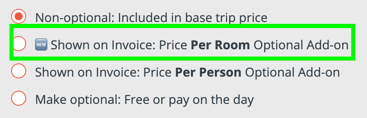
- Just like per person add-ons, once responses are received, the price cannot be changed
- Included in Configured Reports
- Included in Export from TripCRM
Use this for optional Pre and Post night extras to drive up revenue on your Trips.
COMING IN FUTURE; Per room per night. For now, Add-ons are just per Room, so create them as seperate items of 1 or 2 nights if you need to offer more than one extra night as an option.
#11146, 11194, 11179, 11198
### 🔴 Fixed: Installments showing in red that were NOT Past Due
Did you notice sometimes an installment would show in a red color even though it had been paid or skipped?
**Not to worry, those will no longer show with the same color as if they were Past Due.**
#11182
### ➡️ Skipped Payments showing properly as "Skipped" instead of Paid
When someone drops out of the installment plan by paying the Balance and then later adds an add-on, we show the skipped installments as "Skipped".
We corrected and issue that was showing some of those as "Paid" instead of "Skipped"
Learn more about [Skipped Installments](https://support.youli.io/skipped-installments-when-a-traveler-pays-the-balance-and-then-their-price-changes?hsLang=en)
#11181
### 💸 More accurate for all Installment Modes: Booked & Past Due
In **Fixed** OR **Percentage** Installments Mode, the Booking Status was showing as “Booked & Owing” even when it should have been “Booked & Past Due“.
This caused Planners to not be able to filter to everyone who was "Booked & Past Due" (unless they were using [Dynamic Installments](https://support.youli.io/how-to-setup-and-use-dynamic-installment-plan?hsLang=en))
#11167
### 📝 Embedded Images now appear in PDF Confirmation
When you generate a PDF confirmation for a traveler (in bulk or one by one) it will now include images from the Trip Summary on the first page of the PDF confirmation.
**TIP:** This is very handy if you include a pretty map of the route in your Trip Summary
#11165
### 🛏️ Change the occupancy label to be clearer for Group Size
We know not everyone speaks the "travel lingo" of "single or double occupancy".
So we changed it:
- Single Occupancy =\> “1 person (single occupancy)”
- Double Occupancy =\> “2 people (double occupancy)”
From:
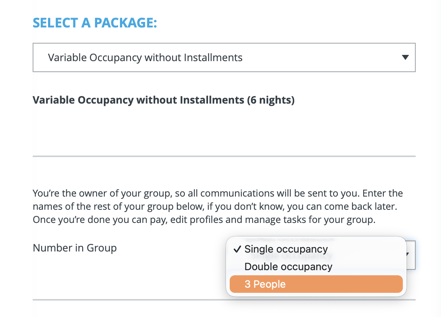
To:
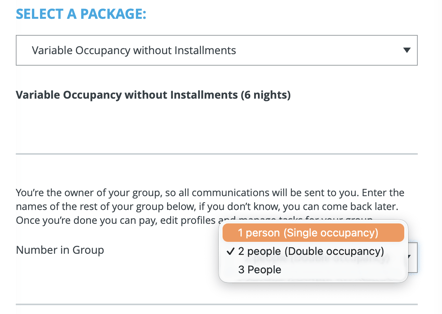
*#10853*
### ⚡ Early Adopter API Features
These are new features to support advanced automation. Please try them out and let us know your feedback.
Keen to automate, but not sure how? Schedule a [1:1 Consulting session](https://support.youli.io/4410822548623-how-to-get-help-from-youli-support?hsLang=en#pay) with one of our experts, and we will walk you through your requirements.
### Added 'registrationstatustext' for Friendly Automations
We have added a new field to the New Registration Webhook:
`registrationstatustext`
The values are:
- Registered
- Waitlisted
Use this instead of 'registrationstatus' to avoid doing a lookup of that number (1 or 3).
### ⚡New Webhook for Change of Registration Status
For improved integration with your CRM. Especially if you need to pass cancellation information into your CRM.
When the status changes, the new status and the previous status will be provided.
`registrationstatustext` and `previousregistrationstatustext`
can have the following values:
- **Approved**
- When `registrationstatus` value (5)
- **Invited**
- When `registrationstatus` value (0)
- **Registered**
- When `registrationstatus` value (1)
- **Declined**
- When `registrationstatus` value (3)
- No payment allocations on this invitee
- **Canceled**
- When `registrationstatus` value (3)
- Payment allocations on this invitee
- **Waitlisted**
- When `registrationstatus` value (6)
- **Transferred**
- When `registrationstatus` value (4)
- This will also fire a New Registration webhook for the invitee on the Trip they were Transferred to.
**TIP:** This webhook/trigger does not fire for NEW registrations, only changes. So listen to the New Registration Webhook for those events/
[Use this via Zapier.](https://support.youli.io/360001554695-zapier-youli-integration-connect-your-platforms-with-youli-and-vice-versa?hsLang=en)
- Look for the **Status Changed** Trigger
[Learn more about APIs and Webhooks](https://support.youli.io/4898359227151-webhooks-use-cases-for-integrating-with-events-generated-by-youli?hsLang=en)
Use these endpoints to subscribe/unsubscribe to the webhook
- ```
SubscribeTripInviteeRegistrationStatusChange
```
- ```
UnsubscribeTripInviteeRegistrationStatusChange
```
- ```
SubscribeUserTripInviteeRegistrationStatusChange
```
- ```
UnsubscribeUserTripInviteeRegistrationStatusChange
```
#11206, 11240, 11237,
### ⚡ Extra Payment information in Webhooks, API and Zapier
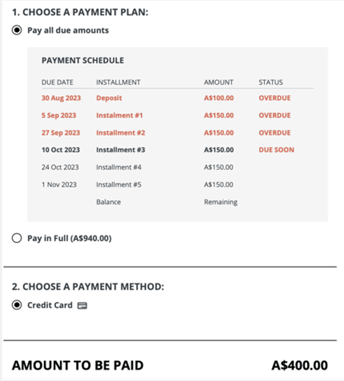
When you've got someone with past due payments, you might want to apply special messaging logic. Using an API integration, you can now access the necessary information.
Here's an example:
- **Past Due Amount -** `PastDueAmount`
The amount currently overdue for the relevant invoice or invitation group. This will include installments with a due date prior to the date the API call or webhook event is generated based on the Trip Timezone. Installments due on the same day will not be treated as past due. The amounts shown as OVERDUE in the screenshot will be summed to be this total amount.
- **Next Due Installment Amount -** `NextDueInstallmentAmount`
The amount of the next scheduled installment that is due today or in the future, excluding any past due amounts. In the screenshot above, the “Installment #3” amount would be provided in this field.
- **Next Due Installment Date -** `NextDueInstallmentDate`
The due date of the next scheduled installment that is due today or in the future. In the screenshot above, the date would be 10 Oct 2023
#10943 - Thanks to Flooglebinder for sponsoring.
### 👤 Ability to Add Custom Role Users Per Trip (and convert from Trip Coordinator)
Take advantage of the full [Role Based Access Control](https://support.youli.io/creating-a-limited-analyst-user-with-youli-role-based-access-control-rbac?hsLang=en)to create custom roles, then decide which TRIPS they can access based on:
1. **All Trips**
1. Great for full team members
2. **Trips with specified tags**
1. Great for partners or clients who run multiple trips with you
3. **Explicit Trips**
1. Great for Group Leaders or Hosts
2. When you add a new User from the Trip, they will automatically be added with this setting. You can change it from **TEAM MEMBERS**
When adding people as [custom roles](https://support.youli.io/creating-a-limited-analyst-user-with-youli-role-based-access-control-rbac?hsLang=en), you'll be able to convert them from Trip Coordinator or Traveler.
[Learn more about converting Users](https://support.youli.io/how-to-change-a-co-planner-or-team-member-to-a-trip-coordinator?hsLang=en)
#10351 - thanks to Select International and Reho for prioritizing
### 💲 SPONSORED
#### Affiliate Profiles
- Allow any User with `ViewAffiliateProfile` to be made an Affiliate Profile owner (#11191)
- Affiliate Profiles are now inherited from the Main Tour to avoid duplicate effort linking to all Tours
- Show the option to set an Affiliate Source in the EDIT PRICE popup for Manage Payments. To enable price changes based on the Affiliate Profile (#10657)
- [Learn more about Affiliate Profiles](https://support.youli.io/affiliate-profiles-advanced-partner-lead-tracking?hsLang=en)
#### Reservations
- Additional info will now be included in all Webhooks and API Payloads for travelers within a Reservation (#10997)
- `ReservationNumber`
- `TourType`
- `Trip` - not linked to Pre or Post tour
- `Main` - linked to a Pre or Post or both
- `Pre` - linked to a Main
- `Post` - linked to a Main
- Fixed broken icon on Trip Page showing to Travelers when they are canceled. (#11200)
- [Learn more about Reservations](https://support.youli.io/reservations-managing-complex-bookings?hsLang=en)
#### Pre/Post Tours
- Include links back to Main or Pre/Post from the Pre/Post Tours in the header (#11202)
- Pre/Post Tours is now a Subscription feature for Early Adopters (#10939)
- Fixed bug showing duplicate tasks to Traveler when they had no email address (#11184)
- When adding someone from a Main Tour onto a Pre/Post tour via the TripBoard, packages will be shown based on their Affiliate source from the Main Tour. (#11196)
- [Learn more about Pre/Post Tours](https://support.youli.io/how-to-link-pre-and-post-tours-to-a-main-tour-using-tour-series?hsLang=en)
#### Sky Flight Bookings (Sabre)
- Rounded corners on the Sky promo banner on Trip Page (#11226)
- `UpdateFlightTicket` new endpoint to support changes made via automation to the Commission, Markup, etc. based on a ticket number.
- If `Card Type` is null/None then `Form of Payment` = 'TRA-PAR' (#11112)
- [Learn more about integrating flights](https://blog.youli.io/product-launch-flight-booking-roadmap-build-and-buy-reho-sky?hsLang=en)
### 💪🐞 Bugs & Enhancements
Thanks to everyone who submitted issues, we love making things work!
- 💪 11028 - Trip Coordinators would sometimes see prompts for features they couldn't access - FIXED!
- 💪 11082 - Bots (or confused humans) attempting to respond to a Task with the wrong authentication will get a cleaner error message that is logged properly.
- 💪 11195 - Consolidated feature permissions for Enhanced Itinerary Items and Room/Transfer Blocks into one (upgrade to Grow to access)
- 💪 11201 - Increase tag limit from 10 to 100. [Learn more about tags.](https://support.youli.io/4404257355919-how-to-use-tags-effectively-to-categorize-trips-on-your-dashboard-and-website?hsLang=en)
- 💪 11201 - Stripe metadata truncated to 500 characters per requirement. [Learn more about Stripe metadata to improve your reconciliation](https://support.youli.io/how-to-improve-reconciling-with-stripe-using-metadata?hsLang=en)
- 🐞 11162 - Sometimes, a hidden highlight was showing on Trip Page - FIXED!
- 🐞 11141 - [Global Image Library](https://support.youli.io/managing-images-per-trip-or-per-account-global-image-library?hsLang=en) options would disappear after hiding and restoring an Itinerary or Highlight item - FIXED!
- 🐞 11158 - When clicking from People Search to Edit Item, the close X would not close - FIXED.
- 🐞 11205 - Corrected Affiliate commission report to account for the add-ons for all members of the invitation group (instead of just one)
### 🔜 COMING SOON
Not scheduled for this release, but [we are working on more things coming soon.](https://support.youli.io/coming-soon-youli-upcoming-roadmap?hsLang=en)
- [Get Started](https://support.youli.io/get-started?hsLang=en#main-content)
- [Checklists](https://support.youli.io/get-started?hsLang=en#checklists)
- [Setting up your account](https://support.youli.io/get-started?hsLang=en#setting-up-your-account)
- [Setting up your Trip Page](https://support.youli.io/get-started?hsLang=en#setting-up-your-trip-page)
- [Video Tutorials](https://support.youli.io/get-started?hsLang=en#video-tutorials)
- [Trip Registration](https://support.youli.io/get-started?hsLang=en#trip-registration)
- [Emails](https://support.youli.io/get-started?hsLang=en#emails)
- [Packages & Installments](https://support.youli.io/get-started?hsLang=en#packages-installments)
- [Payments](https://support.youli.io/get-started?hsLang=en#payments)
- [Adding & Managing People](https://support.youli.io/get-started?hsLang=en#adding-managing-people)
- [Starter Website](https://support.youli.io/get-started?hsLang=en#starter-website)
- [How-To](https://support.youli.io/how-to?hsLang=en#main-content)
- [Technology Partners](https://support.youli.io/how-to?hsLang=en#technology-partners)
- [API](https://support.youli.io/how-to?hsLang=en#api)
- [Reports](https://support.youli.io/how-to?hsLang=en#reports)
- [YouLi Plan Add-ons](https://support.youli.io/how-to?hsLang=en#youli-plan-add-ons)
- [Affiliates](https://support.youli.io/how-to?hsLang=en#affiliates)
- [Payments](https://support.youli.io/how-to?hsLang=en#payments)
- [Video Tutorials](https://support.youli.io/how-to?hsLang=en#video-tutorials)
- [Website Integration](https://support.youli.io/how-to?hsLang=en#website-integration)
- [Mobile App](https://support.youli.io/how-to?hsLang=en#mobile-app)
- [White Label App](https://support.youli.io/how-to?hsLang=en#white-label-app)
- [Account Roles](https://support.youli.io/how-to?hsLang=en#account-roles)
- [Tasks](https://support.youli.io/how-to?hsLang=en#tasks)
- [Packages](https://support.youli.io/how-to?hsLang=en#packages)
- [Highlights, Itinerary & Optional Add-ons](https://support.youli.io/how-to?hsLang=en#highlights-itinerary-optional-add-ons)
- [Invitation Groups](https://support.youli.io/how-to?hsLang=en#invitation-groups)
- [Coupons](https://support.youli.io/how-to?hsLang=en#coupons)
- [Trip Page Menu](https://support.youli.io/how-to?hsLang=en#trip-page-menu)
- [Integrating Cruise Deck Plans](https://support.youli.io/how-to?hsLang=en#integrating-cruise-deck-plans)
- [Managing Trip Dashboard](https://support.youli.io/how-to?hsLang=en#managing-trip-dashboard)
- [Emails](https://support.youli.io/how-to?hsLang=en#emails)
- [Bookings](https://support.youli.io/how-to?hsLang=en#bookings)
- [Managing People](https://support.youli.io/how-to?hsLang=en#managing-people)
- [Registration](https://support.youli.io/how-to?hsLang=en#registration)
- [PDF Confirmation](https://support.youli.io/how-to?hsLang=en#pdf-confirmation)
- [Documents](https://support.youli.io/how-to?hsLang=en#documents)
- [Billing](https://support.youli.io/how-to?hsLang=en#billing)
- [New Features](https://support.youli.io/new-features?hsLang=en#main-content)
- [Recent Releases](https://support.youli.io/new-features?hsLang=en#recent-releases)
- [Past Releases](https://support.youli.io/new-features?hsLang=en#past-releases)
- [Enterprise Clients](https://support.youli.io/enterprise-clients?hsLang=en#main-content)
- [Enterprise Onboarding](https://support.youli.io/enterprise-clients?hsLang=en#enterprise-onboarding)
- [Enterprise-only Features](https://support.youli.io/enterprise-clients?hsLang=en#enterprise-only-features)
- [FAQ](https://support.youli.io/faq?hsLang=en#main-content)
- [Data Security](https://support.youli.io/faq?hsLang=en#data-security)
- [Payments](https://support.youli.io/faq?hsLang=en#payments)
- [YouLi Account](https://support.youli.io/faq?hsLang=en#youli-account)
- [Emails](https://support.youli.io/faq?hsLang=en#emails)
- [Managing People](https://support.youli.io/faq?hsLang=en#managing-people)
- [Packages](https://support.youli.io/faq?hsLang=en#packages)
- [YouLi Subscription Plans](https://support.youli.io/faq?hsLang=en#youli-subscription-plans)
- [Tasks](https://support.youli.io/faq?hsLang=en#tasks)
- [Reporting](https://support.youli.io/reporting?hsLang=en)
- [YouLi User Roles](https://support.youli.io/youli-user-roles?hsLang=en)
- [For Travelers](https://support.youli.io/for-travelers?hsLang=en)
- [Partners](https://support.youli.io/partners?hsLang=en)
- [Upcoming Features](https://support.youli.io/upcoming-features?hsLang=en)
- [Incidents](https://support.youli.io/incidents?hsLang=en)
- [Contact Us](https://support.youli.io/contact-us?hsLang=en)
[](https://go.youli.io)
### Need more help?
Reach out to the YouLi Support team via the **Chat** icon at the bottom-right corner of your screen:
or [submit a Support Ticket.](https://support.youli.io/kb-tickets/new?hsLang=en)
Copyright © 2025, YouLi Travel Pty. Ltd
```json
{
"@context" : "https://schema.org",
"@type" : "VideoObject",
"caption" : {
"@type" : "MediaObject",
"contentUrl" : "https://support.youli.io/media-transcripts/213589539894/en.vtt",
"inLanguage" : "en",
"name" : "en Captions"
},
"contentUrl" : "https://4545741.fs1.hubspotusercontent-na1.net/hubfs/4545741/Trimmed%20Per-Room%20and%20Per-Transfer%20Add-on%20Update.mp4",
"dateModified" : "2026-05-26T02:42:10.085Z",
"duration" : "PT4M2S",
"height" : 1080,
"name" : "Trimmed Per-Room and Per-Transfer Add-on Update",
"thumbnailUrl" : "https://support.youli.io/hubfs/Trimmed%20Per-Room%20and%20Per-Transfer%20Add-on%20Update.mp4/medium.jpg",
"uploadDate" : "2026-05-26T02:41:51.251Z",
"width" : 1662
}
```