---
title: New Features - MAJOR Release 2.212 - Task Library, Copy Profile, List View
description: "COMING SOON: This article summarizes what we are working on for the next update. Listed items may NOT be released in this update - this is an intention, not a commitment."
---
[Skip to content](https://support.youli.io/new-features-major-release-212-november-27-2025#main-content)
[Open Ticket](https://support.youli.io/kb-tickets/new?hsLang=en) [Customer portal](https://support.youli.io/feature-request-tickets-view?hsLang=en)
[](https://support.youli.io/?hsLang=en)
- [Pricing](https://go.youli.io/pricing)
- [Book Demo](https://go.youli.io/youli-demo-videos)
- [Blog](https://blog.youli.io/)
Open main navigation
Close main navigation
- [Pricing](https://go.youli.io/pricing)
- [Book Demo](https://go.youli.io/youli-demo-videos)
- [Blog](https://blog.youli.io/)
- [Open Ticket](https://support.youli.io/kb-tickets/new)
- [Customer portal](https://support.youli.io/feature-request-tickets-view)
- [Open Ticket](https://support.youli.io/kb-tickets/new)
[Open Ticket](https://support.youli.io/kb-tickets/new?hsLang=en)
How can we help you?
- There are no suggestions because the search field is empty.
1. [Help Center](https://support.youli.io/?hsLang=en)
2. [New Features](https://support.youli.io/new-features?hsLang=en)
3. [Recent Releases](https://support.youli.io/new-features?hsLang=en#recent-releases)
# New Features - MAJOR Release 2.212 - Task Library, Copy Profile, List View
## General Availability of 3 key features for GROW plans.
### ☀️ This is a MAJOR Release
Target release is: **Nov 27, 2025**
If you're unsure how to read the notes or how to make the most of YouLi, you can schedule a [1:1 Consulting session](https://support.youli.io/4410822548623-how-to-get-help-from-youli-support?hsLang=en#pay) with one of our experts, and we will walk you through the features and best practices.
### New Welcome Video:
### Focus Features in this Update:
### 👀 List View
Did you know that there's a LIST VIEW option to see your Trips in more text based glory?
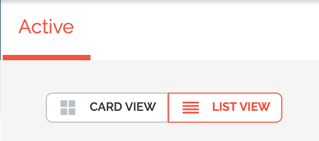
Now, when you select LIST VIEW you'll see how you're Trips are progressing towards your goals, showing colors based on your [Min/Max settings.](https://support.youli.io/how-to-set-min-and-max-people-per-trip?hsLang=en)
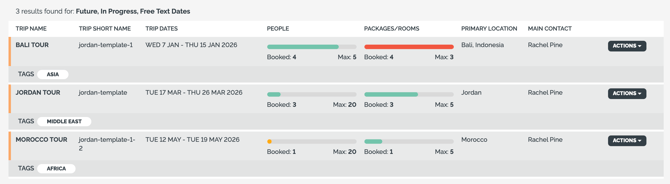
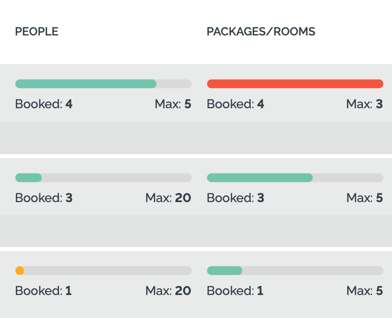
You'll be able to see:
- **Yellow**: If the Trip are under the minimum
- **Green**: if you are over your minimum and under your maximum
- **Red**: if you are over your Max People or over the Package Inventory
[Learn more about Min and Max People](https://support.youli.io/how-to-set-min-and-max-people-per-trip?hsLang=en)
### ⚡ New Zapier Trigger - Trip Created
This might be next level for some, but we know many of you are starting to discover the power of [YouLi + Zapier.](https://go.youli.io/zapier-integration)
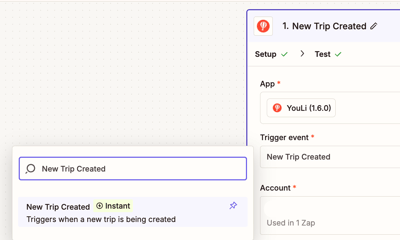
The latest trigger we've released is:
- **New Trip Created**
This will trigger anytime a new Trip is created using "CREATE TRIP" from the Dashboard.
What can you do with that?
- Create a new deal in your CRM
- Create a new contact in your Accounting Platform
- Notify your suppliers
- or anything else enabled by Zapier
**Does NOT trigger for:**
- Copy Trip
- Create Trip from Template
- CreateTrip via API
*#10360, 10619*
### ↪️ AddRegistrations - allow for partial task responses
**Endpoint:** `/trip/addRegistration`
**Endpoint Documentation:** [https://youlivetotravel.github.io/youli-doco/#add-registration](https://youlivetotravel.github.io/youli-doco/#add-registration)
If you'd like to turn off the required fields check when using addRegistration:
- Use this new parameter: `allowIncompleteTaskResponses=1`
Any incomplete task responses with required fields will be shown as INCOMPLETE tasks when Travelers view their Trip Page.
*#9751*
### ↪️ API update - /getinvitees - extra fields
We've updated the Task Response data object to include these three new fields to allow more ways to automate your integration with YouLi.
- `TaskResponseDateUTC`
- Date the task response was collected from the traveler
- `TaskResponseReviewRequired`
- true = planner does not need to review, `TaskResponseReviewedDateUTC` will be null
- false = planner DOES need to review, if `TaskResponseReviewedDateUTC` is null, it still needs to be reviewed
- `TaskResponseReviewedDateUTC`
- Date the task was reviewed by the planner
- NULL if not reviewed, and always NULL if `TaskResponseReviewRequired` = false
*#9751*
### General Availability for GROW
These features are now included in GROW plans automatically. [Upgrade now to unlock!](https://youli.io/account/billingsetup)
#### ✅ Task & Form Library
So now that you've mastered the [Content Library](https://support.youli.io/content-library-highlights-itinerary?hsLang=en), it's time to manage your Tasks & Forms properly too!
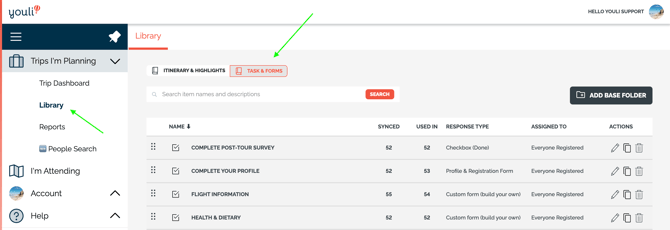
[Learn more about managing your Tasks and Forms in the Library](https://support.youli.io/task-library?hsLang=en)
#### ☑️ Pre-Approved Trips
Why would I need this?
Only people who are **Approved** can complete the Checkout process, *but the link can be shared publicly without fear that the wrong people will book.*
How do I set it up?
When creating a new Trip, select TRIP PRIVACY: **Public** and then check **Pre-Approved**
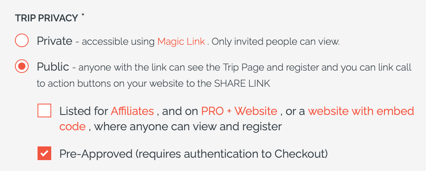
1\. Then you can add (one by one or bulk upload) all the people who are approved to book.
2\. Send them an email with the SHARE TRIP LINK.
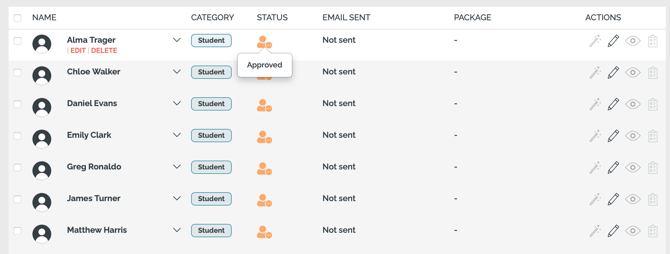
They must create an account and the email address much match and they must book themselves via Checkout using the SHARE TRIP LINK.
Since you're requiring your Travelers to make an account, [we recommend pairing this feature with Platform White Label](https://support.youli.io/platform-white-label-make-youli-all-yours?hsLang=en)
[Learn more about how to use Pre-Approved Trips](https://support.youli.io/pre-approved-bookings-using-authenticated-checkout?hsLang=en)
#### ©️ Copy Profile for Repeat Travelers
So Bob calls you and says, "I LOVED the trip last year and I want to book onto your next South American tour!"
1\. So you click to **People Search**
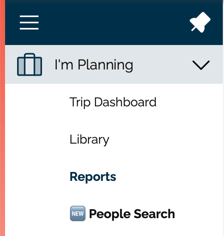
2\. Search for Bob's record and click to the TRIPBOARD on the last trip.
3\. Then click the first green button on the upper right
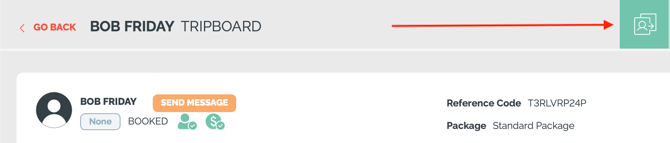
4\. Select the second option to Copy and follow the instructions
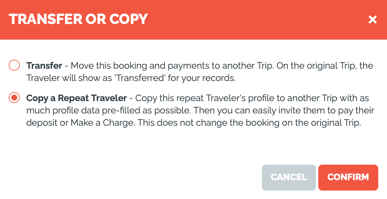
5\. Then you can send Bob a link to the new trip and he **just has to pay his deposit** - all the rest of his forms will be completed (assuming you used the Task Library to ensure your Task forms are consistent).
[Learn more about Transfer & Copy from TRIPBOARD](https://support.youli.io/how-to-transfer-move-a-traveler-to-another-trip?hsLang=en)
### 💳 PayPal User Experience Change
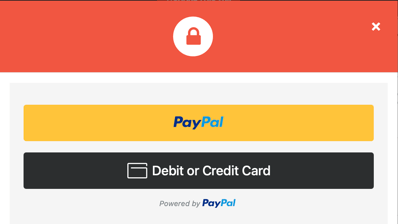
If you're connected to PayPal, your Travelers will now see a button to click to enter their Debit of Credit Card instead of the embedded form, this creates a cleaner checkout experience and helps minimize payment processing fees.
##### **What’s Changed?**
The current embedded card-entry form inside the PayPal popup is being removed.
It will be replaced with a simple **“Debit or Credit Card”** button.
##### **Why the Change?**
This update lowers the fees you pay as the merchant.
The new flow routes Travelers through PayPal’s streamlined checkout, which has **lower fees than the embedded form**.
##### **What This Means for You**
- You should pay less fees when Travelers select Debit or Credit Card
- **Saved Cards will no longer be supported** through PayPal.
- **Billing Address will no longer be collected by YouLi** — PayPal will collect and store this information directly.
- Billing details, if collected, will be available from **your PayPal Merchant Portal**.
##### **What Travelers Will See**
When your Travelers click to PAY NOW, they will see a popup to select whether they login to PayPal or have the option to enter their credit or debit card directly.
**Old experience:** A PayPal button + an embedded card-entry form

**New experience:** Two simple options -- **PayPal** or **Debit or Credit Card**
When a Traveler clicks **PAY NOW**, instead of the old embedded form, they will now see a popup with two buttons:
- **PayPal** – for those who want to log into their PayPal account
- **Debit or Credit Card** – for entering card details directly (replacing the embedded form)
*#10565*
### ▶️ Limited Release
### Sync Changes
- 🐞10620 - Edit Dates on a Synced Accommodation item
- 💪10605 - Allow linking Pre/Post tours even when dates do not align
- 💪10458 - When adding Content Item - option to add it Synced so the item being added will be updated based on the Synced Library Item.
- 🐞10589 - Clicking image on Itinerary list on a Synced item will prompt for choices - Make Unique, Edit Dates or Edit in Library
- 💪10470 - Sync toggle updated

**If you are GROW or ENTERPRISE:**
[Contact Sales](https://support.youli.io/how-to-request-contact-from-sales-or-account-manager?hsLang=en) if you're interested in gaining early access to this feature.
### 💲Sponsored
### 🚦 Affiliate Profiles
For accounts using Affiliate Profiles, the List View will now be the default view (instead of Card View) and it will show the linked Affiliates instead of the Main Contact on the Trip.
### 🚦Pre/Post Improvements
- 💪10609 - Maintain Pre/Post links even if the dates are no longer aligned
- 🐞10437 - Update the Pre/Post drop down default to be more clear: "Select Optional Pre-Tour from this Series"
- 🐞10580 - When making Trips from Main/Pre/Post Templates, use the Pre/Post Template names
### 💪🐞 Bugs & Enhancements
- 🐞10584 - After changing email on an account from Team Members, password resets failed - FIXED!
- 🐞10635 - Tasks with attachments were failing to add to the Library - FIXED!
- 🐞10590 - Trim leading and trailing spaces on search terms on the Dashboard. So next time you search for **' Jordan Trip'** it will match your **Jordan Trip**
- 🐞10580- Show Itinerary items even if they are before and after Trip dates
- 🐞10435 - Do not show Transferred entries on I'm Attending view
- 💪10610 - Sync Changes + Global Image library permissions separated
- 🐞10540 - Do not show triangle past due icon when there are skipped installments
- 🐞10522 - Show the correct error message for Accommodation checkin/checkout time
- 🐞10428 - Ensure [PWLD branding](https://support.youli.io/platform-white-label-make-youli-all-yours?hsLang=en)is shown on Library pages
- 💪10604 - Show TEMPLATE instead of TRIP to make those pages more clear
### 🔜 Coming Soon
Not scheduled for this release, but [we are working on more things coming soon.](https://support.youli.io/coming-soon-youli-upcoming-roadmap?hsLang=en)
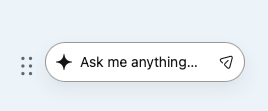
### 🐶 Scout, our AI Powered Chat
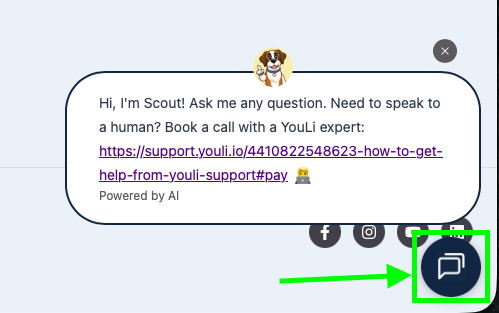
Have you had a chat with our new AI-powered helper yet? He’s here to answer your questions about our latest features or old ones you haven't discovered yet**.** 💬
Try asking him anything! He’ll do his best to help… but fair warning: he *is* a dog. 🐾 So if he gets a bit confused, just toss him a treat (or open a support ticket) and a human will be assigned to assist.
Look for the chat bubble here or inside the platform and start a conversation. See how quickly he can fetch the right help article for you! 🐕
- [Get Started](https://support.youli.io/get-started?hsLang=en#main-content)
- [Checklists](https://support.youli.io/get-started?hsLang=en#checklists)
- [Setting up your account](https://support.youli.io/get-started?hsLang=en#setting-up-your-account)
- [Setting up your Trip Page](https://support.youli.io/get-started?hsLang=en#setting-up-your-trip-page)
- [Video Tutorials](https://support.youli.io/get-started?hsLang=en#video-tutorials)
- [Trip Registration](https://support.youli.io/get-started?hsLang=en#trip-registration)
- [Emails](https://support.youli.io/get-started?hsLang=en#emails)
- [Packages & Installments](https://support.youli.io/get-started?hsLang=en#packages-installments)
- [Payments](https://support.youli.io/get-started?hsLang=en#payments)
- [Adding & Managing People](https://support.youli.io/get-started?hsLang=en#adding-managing-people)
- [Starter Website](https://support.youli.io/get-started?hsLang=en#starter-website)
- [How-To](https://support.youli.io/how-to?hsLang=en#main-content)
- [Technology Partners](https://support.youli.io/how-to?hsLang=en#technology-partners)
- [API](https://support.youli.io/how-to?hsLang=en#api)
- [Reports](https://support.youli.io/how-to?hsLang=en#reports)
- [YouLi Plan Add-ons](https://support.youli.io/how-to?hsLang=en#youli-plan-add-ons)
- [Affiliates](https://support.youli.io/how-to?hsLang=en#affiliates)
- [Payments](https://support.youli.io/how-to?hsLang=en#payments)
- [Video Tutorials](https://support.youli.io/how-to?hsLang=en#video-tutorials)
- [Website Integration](https://support.youli.io/how-to?hsLang=en#website-integration)
- [Mobile App](https://support.youli.io/how-to?hsLang=en#mobile-app)
- [White Label App](https://support.youli.io/how-to?hsLang=en#white-label-app)
- [Account Roles](https://support.youli.io/how-to?hsLang=en#account-roles)
- [Tasks](https://support.youli.io/how-to?hsLang=en#tasks)
- [Packages](https://support.youli.io/how-to?hsLang=en#packages)
- [Highlights, Itinerary & Optional Add-ons](https://support.youli.io/how-to?hsLang=en#highlights-itinerary-optional-add-ons)
- [Invitation Groups](https://support.youli.io/how-to?hsLang=en#invitation-groups)
- [Coupons](https://support.youli.io/how-to?hsLang=en#coupons)
- [Trip Page Menu](https://support.youli.io/how-to?hsLang=en#trip-page-menu)
- [Integrating Cruise Deck Plans](https://support.youli.io/how-to?hsLang=en#integrating-cruise-deck-plans)
- [Managing Trip Dashboard](https://support.youli.io/how-to?hsLang=en#managing-trip-dashboard)
- [Emails](https://support.youli.io/how-to?hsLang=en#emails)
- [Bookings](https://support.youli.io/how-to?hsLang=en#bookings)
- [Managing People](https://support.youli.io/how-to?hsLang=en#managing-people)
- [Registration](https://support.youli.io/how-to?hsLang=en#registration)
- [PDF Confirmation](https://support.youli.io/how-to?hsLang=en#pdf-confirmation)
- [Documents](https://support.youli.io/how-to?hsLang=en#documents)
- [Billing](https://support.youli.io/how-to?hsLang=en#billing)
- [New Features](https://support.youli.io/new-features?hsLang=en#main-content)
- [Recent Releases](https://support.youli.io/new-features?hsLang=en#recent-releases)
- [Past Releases](https://support.youli.io/new-features?hsLang=en#past-releases)
- [Enterprise Clients](https://support.youli.io/enterprise-clients?hsLang=en#main-content)
- [Enterprise Onboarding](https://support.youli.io/enterprise-clients?hsLang=en#enterprise-onboarding)
- [Enterprise-only Features](https://support.youli.io/enterprise-clients?hsLang=en#enterprise-only-features)
- [FAQ](https://support.youli.io/faq?hsLang=en#main-content)
- [Data Security](https://support.youli.io/faq?hsLang=en#data-security)
- [Payments](https://support.youli.io/faq?hsLang=en#payments)
- [YouLi Account](https://support.youli.io/faq?hsLang=en#youli-account)
- [Emails](https://support.youli.io/faq?hsLang=en#emails)
- [Managing People](https://support.youli.io/faq?hsLang=en#managing-people)
- [Packages](https://support.youli.io/faq?hsLang=en#packages)
- [YouLi Subscription Plans](https://support.youli.io/faq?hsLang=en#youli-subscription-plans)
- [Tasks](https://support.youli.io/faq?hsLang=en#tasks)
- [Reporting](https://support.youli.io/reporting?hsLang=en)
- [YouLi User Roles](https://support.youli.io/youli-user-roles?hsLang=en)
- [For Travelers](https://support.youli.io/for-travelers?hsLang=en)
- [Partners](https://support.youli.io/partners?hsLang=en)
- [Upcoming Features](https://support.youli.io/upcoming-features?hsLang=en)
- [Incidents](https://support.youli.io/incidents?hsLang=en)
- [Contact Us](https://support.youli.io/contact-us?hsLang=en)
[](https://go.youli.io)
### Need more help?
Reach out to the YouLi Support team via the **Chat** icon at the bottom-right corner of your screen:
or [submit a Support Ticket.](https://support.youli.io/kb-tickets/new?hsLang=en)
Copyright © 2025, YouLi Travel Pty. Ltd