---
title: Meeting Blocks - Allow Event Attendees to Request And Schedule Meetings With Each Other
description: This Events feature is perfect to allow your guests to arrange to meet with each other at your event or conference.
---
[Skip to content](https://support.youli.io/meeting-blocks-allow-event-attendees-to-book-meetings-with-each-other#main-content)
[Open Ticket](https://support.youli.io/kb-tickets/new?hsLang=en) [Customer portal](https://support.youli.io/feature-request-tickets-view?hsLang=en)
[](https://support.youli.io/?hsLang=en)
- [Pricing](https://go.youli.io/pricing)
- [Book Demo](https://go.youli.io/youli-demo-videos)
- [Blog](https://blog.youli.io/)
Open main navigation
Close main navigation
- [Pricing](https://go.youli.io/pricing)
- [Book Demo](https://go.youli.io/youli-demo-videos)
- [Blog](https://blog.youli.io/)
- [Open Ticket](https://support.youli.io/kb-tickets/new)
- [Customer portal](https://support.youli.io/feature-request-tickets-view)
- [Open Ticket](https://support.youli.io/kb-tickets/new)
[Open Ticket](https://support.youli.io/kb-tickets/new?hsLang=en)
How can we help you?
- There are no suggestions because the search field is empty.
1. [Help Center](https://support.youli.io/?hsLang=en)
2. [How-To](https://support.youli.io/how-to?hsLang=en)
# Meeting Blocks - Allow Event Attendees to Request And Schedule Meetings With Each Other
## This Events feature is perfect to allow your guests to arrange to meet with each other at your event or conference.
AVAILABLE PLANS:
- **GROW**
- **ENTERPRISE**
open a ticket to enable if it's not on in your account.
### What is the Meeting Block feature?
- YouLi's MEETING BLOCK feature allows you to create ITINERARY ITEMS where your **Attendees** can book meetings with one another.
- It's great for when you need to formalize the networking, rather than allow it to be organic, you can add a "MEETING BLOCK" to the agenda/itinerary.
- This allows **Attendees** to request and accept meeting requests
- for people in other [Traveler Categories](https://support.youli.io/how-to-categorize-people-on-trips-or-events-category?hsLang=en)
- or regardless of category
### Planner view
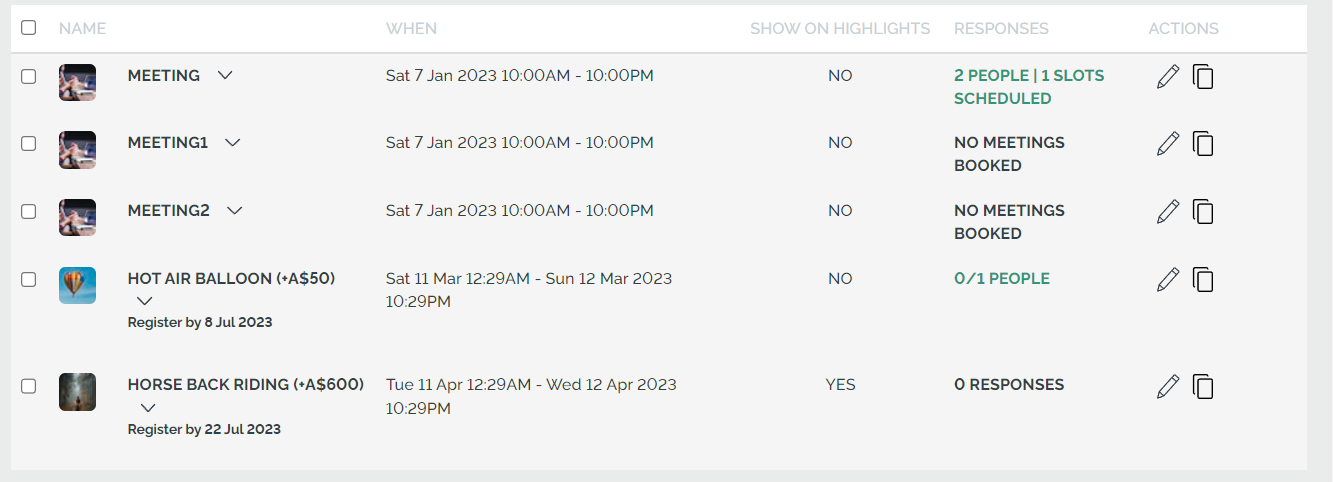
As a **Planner**, you'll be able to create an ITINERARY ITEM that is a "MEETING BLOCK" and set these values:
- NAME
- DATE
- START & END TIME
- MEETING SLOT DURATION
- TRANSITION DURATION
YouLi will generate the necessary meeting slots to meet those requirements.
-png-1.png)
- Once published, on the ITINERARY ITEM, you'll be able to see how many people have booked meeting slots on that specific MEETING BLOCK.
### Enable Full Profiles On Trip Page
Go to [Update Trip -\> Settings -\> Trip Page Menu](https://support.youli.io/360001095715-how-to-customize-trip-page-menu-control-what-your-travelers-see?hsLang=en) and scroll down to change the People label (to Guests or Attendees, etc) and to change to "Full Profiles"

This will make it possible for attendees to see the summary and click to VIEW PROFILE and then request a meeting spot.
To control what appears on the [Summary Cards and Full Profiles, be sure to properly configure your Profile & Registration form](https://support.youli.io/how-to-profile-fields-who-can-see-this-data-travelers-planners?hsLang=en) by setting the right "Who can see this" value for the right fields.
### Your Attendee's experience
- On their personalized TRIP PAGE, your **Attendees** will be able to see which slots are still available and which are booked by whom.
- They will also be able to request and confirm meetings on the profiles of other **Attendees**. Once scheduled, Attendees can edit/cancel or reschedule.
.png?width=670&height=373&name=MicrosoftTeams-image%20(4).png)
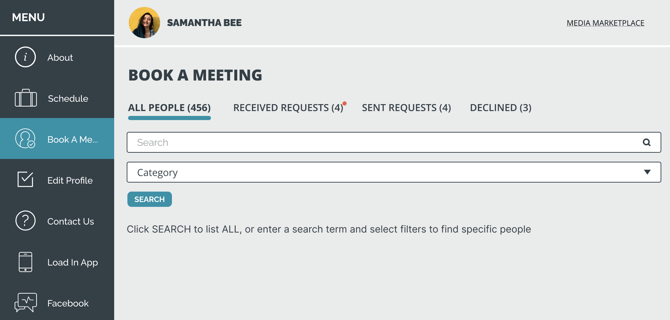
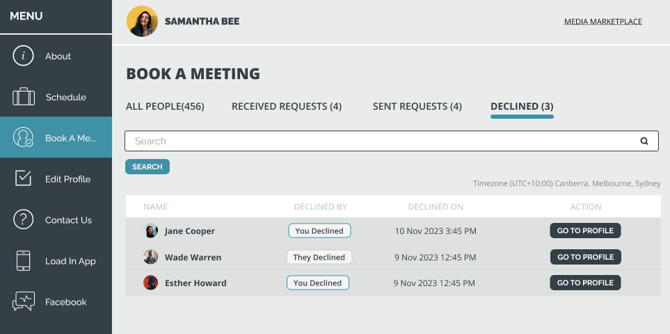
### To find people to book a meeting, Samantha Bee can use the Search:
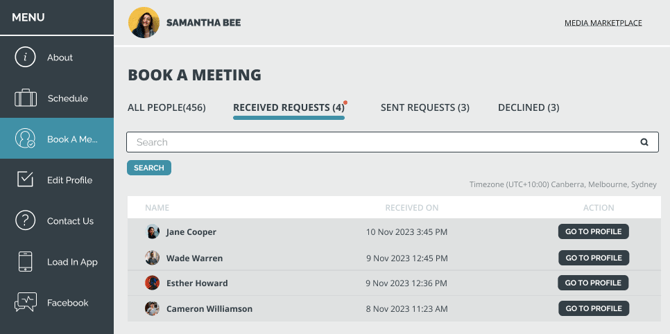
Samantha can click to see requests she has ***received***:
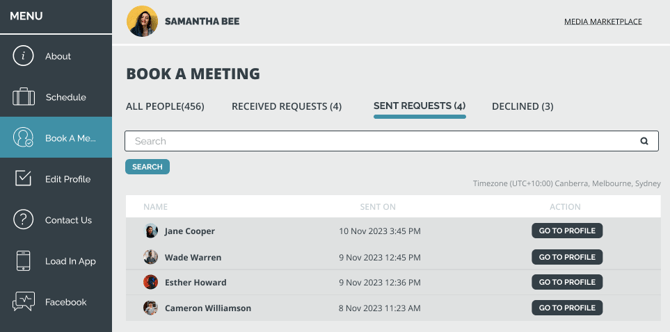
Samantha can click to see requests she has ***sent***:
Samantha can click to see requests that have been ***declined***:
---
- In order to book a meeting, attendees must:
- Have a "REGISTERED" STATUS
- Have a visible [Profile](https://support.youli.io/how-to-profile-fields-who-can-see-this-data-travelers-planners?hsLang=en)
- Be allowed to see the MEETING BLOCK item
### Restricting based on Traveler Category
- Currently, if you are also using the TRAVELER CATEGORY feature, then **Attendees** can only book a meeting with someone in *another* category.
- For example, if you have two Traveler Categories (1) Speaker (2) Attendee, only Speakers can book with Attendees. Attendees cannot book with *other* Attendees.
### How-to: Create Meeting Blocks in YouLi
---
### Need more help?
Reach out to the YouLi support team via a chat box at the bottom of your screen or submit a [ticket request](https://support.youli.io/kb-tickets/new?hsLang=en). If you need more advanced support, schedule a [1:1 Consulting session](https://buy.stripe.com/14kbLk6bBb6kdTW14b) with one of our experts, as we will walk you through the features and best practices.
- [Get Started](https://support.youli.io/get-started?hsLang=en#main-content)
- [Checklists](https://support.youli.io/get-started?hsLang=en#checklists)
- [Setting up your account](https://support.youli.io/get-started?hsLang=en#setting-up-your-account)
- [Setting up your Trip Page](https://support.youli.io/get-started?hsLang=en#setting-up-your-trip-page)
- [Video Tutorials](https://support.youli.io/get-started?hsLang=en#video-tutorials)
- [Trip Registration](https://support.youli.io/get-started?hsLang=en#trip-registration)
- [Emails](https://support.youli.io/get-started?hsLang=en#emails)
- [Packages & Installments](https://support.youli.io/get-started?hsLang=en#packages-installments)
- [Payments](https://support.youli.io/get-started?hsLang=en#payments)
- [Adding & Managing People](https://support.youli.io/get-started?hsLang=en#adding-managing-people)
- [Starter Website](https://support.youli.io/get-started?hsLang=en#starter-website)
- [How-To](https://support.youli.io/how-to?hsLang=en#main-content)
- [Technology Partners](https://support.youli.io/how-to?hsLang=en#technology-partners)
- [API](https://support.youli.io/how-to?hsLang=en#api)
- [Reports](https://support.youli.io/how-to?hsLang=en#reports)
- [YouLi Plan Add-ons](https://support.youli.io/how-to?hsLang=en#youli-plan-add-ons)
- [Affiliates](https://support.youli.io/how-to?hsLang=en#affiliates)
- [Payments](https://support.youli.io/how-to?hsLang=en#payments)
- [Video Tutorials](https://support.youli.io/how-to?hsLang=en#video-tutorials)
- [Website Integration](https://support.youli.io/how-to?hsLang=en#website-integration)
- [Mobile App](https://support.youli.io/how-to?hsLang=en#mobile-app)
- [White Label App](https://support.youli.io/how-to?hsLang=en#white-label-app)
- [Account Roles](https://support.youli.io/how-to?hsLang=en#account-roles)
- [Tasks](https://support.youli.io/how-to?hsLang=en#tasks)
- [Packages](https://support.youli.io/how-to?hsLang=en#packages)
- [Highlights, Itinerary & Optional Add-ons](https://support.youli.io/how-to?hsLang=en#highlights-itinerary-optional-add-ons)
- [Invitation Groups](https://support.youli.io/how-to?hsLang=en#invitation-groups)
- [Coupons](https://support.youli.io/how-to?hsLang=en#coupons)
- [Trip Page Menu](https://support.youli.io/how-to?hsLang=en#trip-page-menu)
- [Integrating Cruise Deck Plans](https://support.youli.io/how-to?hsLang=en#integrating-cruise-deck-plans)
- [Managing Trip Dashboard](https://support.youli.io/how-to?hsLang=en#managing-trip-dashboard)
- [Emails](https://support.youli.io/how-to?hsLang=en#emails)
- [Bookings](https://support.youli.io/how-to?hsLang=en#bookings)
- [Managing People](https://support.youli.io/how-to?hsLang=en#managing-people)
- [Registration](https://support.youli.io/how-to?hsLang=en#registration)
- [PDF Confirmation](https://support.youli.io/how-to?hsLang=en#pdf-confirmation)
- [Documents](https://support.youli.io/how-to?hsLang=en#documents)
- [Billing](https://support.youli.io/how-to?hsLang=en#billing)
- [New Features](https://support.youli.io/new-features?hsLang=en#main-content)
- [Recent Releases](https://support.youli.io/new-features?hsLang=en#recent-releases)
- [Past Releases](https://support.youli.io/new-features?hsLang=en#past-releases)
- [Enterprise Clients](https://support.youli.io/enterprise-clients?hsLang=en#main-content)
- [Enterprise Onboarding](https://support.youli.io/enterprise-clients?hsLang=en#enterprise-onboarding)
- [Enterprise-only Features](https://support.youli.io/enterprise-clients?hsLang=en#enterprise-only-features)
- [FAQ](https://support.youli.io/faq?hsLang=en#main-content)
- [Data Security](https://support.youli.io/faq?hsLang=en#data-security)
- [Payments](https://support.youli.io/faq?hsLang=en#payments)
- [YouLi Account](https://support.youli.io/faq?hsLang=en#youli-account)
- [Emails](https://support.youli.io/faq?hsLang=en#emails)
- [Managing People](https://support.youli.io/faq?hsLang=en#managing-people)
- [Packages](https://support.youli.io/faq?hsLang=en#packages)
- [YouLi Subscription Plans](https://support.youli.io/faq?hsLang=en#youli-subscription-plans)
- [Tasks](https://support.youli.io/faq?hsLang=en#tasks)
- [Reporting](https://support.youli.io/reporting?hsLang=en)
- [YouLi User Roles](https://support.youli.io/youli-user-roles?hsLang=en)
- [For Travelers](https://support.youli.io/for-travelers?hsLang=en)
- [Partners](https://support.youli.io/partners?hsLang=en)
- [Upcoming Features](https://support.youli.io/upcoming-features?hsLang=en)
- [Incidents](https://support.youli.io/incidents?hsLang=en)
- [Contact Us](https://support.youli.io/contact-us?hsLang=en)
[](https://go.youli.io)
### Need more help?
Reach out to the YouLi Support team via the **Chat** icon at the bottom-right corner of your screen:
or [submit a Support Ticket.](https://support.youli.io/kb-tickets/new?hsLang=en)
Copyright © 2025, YouLi Travel Pty. Ltd