---
title: "New Features: Minor Release 230 - October 2026"
description: Explore YouLi’s October 8, 2026 updates to payments, reservations, rooming and flight tracking, plus a real group booking call with a tour operator.
---
[Skip to content](https://support.youli.io/new-features-minor-release-230-october-2026#main-content)
[Open Ticket](https://support.youli.io/kb-tickets/new?hsLang=en) [Customer portal](https://support.youli.io/feature-request-tickets-view?hsLang=en)
[](https://support.youli.io/?hsLang=en)
- [Pricing](https://go.youli.io/pricing)
- [Book Demo](https://go.youli.io/youli-demo-videos)
- [Blog](https://blog.youli.io/)
Open main navigation
Close main navigation
- [Pricing](https://go.youli.io/pricing)
- [Book Demo](https://go.youli.io/youli-demo-videos)
- [Blog](https://blog.youli.io/)
- [Open Ticket](https://support.youli.io/kb-tickets/new)
- [Customer portal](https://support.youli.io/feature-request-tickets-view)
- [Open Ticket](https://support.youli.io/kb-tickets/new)
[Open Ticket](https://support.youli.io/kb-tickets/new?hsLang=en)
How can we help you?
- There are no suggestions because the search field is empty.
1. [Help Center](https://support.youli.io/?hsLang=en)
2. [New Features](https://support.youli.io/new-features?hsLang=en)
# New Features: Minor Release 230 - October 2026
## More reliable payments, clearer multi-trip invoices and practical planning improvements, plus a real conversation about winning group bookings.
### See All Updates
[New Features Index of Releases](https://support.youli.io/new-features?hsLang=en) - history of our recent updates
### 💬 Make YouLi Yours 🤗
👉👉 [Book a demo to see these features in action](https://go.youli.io/youli-demo-videos) 👈👈
### 🌤️ This is a Minor Release
Release date: **October 8th, 2026**
**That means we are focused on a *few fixes and enhancements***, we also include small improvements and bug fixes that we can.
If you're unsure how to read the notes or how to make the most of YouLi, you can schedule a [1:1 Consulting session](https://support.youli.io/4410822548623-how-to-get-help-from-youli-support?hsLang=en#pay) with one of our experts, and we will walk you through the features and best practices.
### Latest Taming your Tech Stack Video:
Jen has a problem this week - this time she's the **group leader** ...
Selling to group leaders? This real call shows some of their objections and how to get the group booking.
What does it actually look like when a **group leader considers a tour operator for a custom destination group trip**? In this real, unscripted call, group leader Jennifer talks through planning a 10–15 person birthday celebration in Mexico with tour operator Nick Vannello and the conversation is a masterclass in how the right tools can make or break a group sale.
If you're a tour operator working with group leaders or a group leader considering hiring one this call shows the real questions, real objections, and the tools that make the whole process work.
### Focus Features in this Update:
| Section | Summary |
| --- | --- |
| **💳 Payments, Invoicing & Fees** | Multi-trip reservation payment allocations, partial-payment reminder logic for late fee notifications, Apple Pay reliability improvements, and direct payment surcharge line-item visibility. |
| **🏨 Reservations & Multi-Trip Journeys** | Consolidated invoicing for Pre/Post tour line items, General Availability of Reservations across standard plans, and smarter trip page links within Reservations. |
| **🗺️ Itinerary, Highlights & Rooming** | Full descriptions in expanded itinerary rows to allow for Planners to quickly see what travelers will see, improved room allocation dropdowns, and room inventory mode safeguards. |
| **📝 Tasks & Content Library** | Permanent deletion available for hidden tasks and all associated files/responses. |
| **✈️ Flight Tracking & Traveler Experience** | Enhanced transfer add-on triggers based on task visibility, persistent add-on selections, public trip link stability, and flight field validation. |
| **⚙️ Platform, Dashboard & Usability** | "View All Trips" CTA for dashboards with \>100 trips, banner relocation for "Push to Your App", Duty of Care subscription integration, and database modernization. |
---
### 📦 Detailed Release Notes
### 1. Payments, Invoicing & Surcharges
- **#11496 — Manage Payments: Dynamic Payment & Credit Allocation Across Entire Reservations**
- **Summary:** Planners can now dynamically split and apply manual payments, charges, and credits across all linked trips in an person's [reservation](https://support.youli.io/reservations-managing-complex-bookings?hsLang=en) directly from **Manage Payments**.
- **#11395 — Automated Payment Reminders for Partial Installments when Late Fees are Enabled**
- **Summary:** Automated payment reminder emails will now reliably send for installments with outstanding partial balances whenever [automatic late fees](https://support.youli.io/automatic-late-fees?hsLang=en) are enabled, ensuring travelers stay informed of remaining amounts due when the consequence of a late payment is an extra fee.
- **#11612 — Itemized Surcharge Line Display for Direct Payments (Bank Transfer)**
- **Summary:** Fixed an invoice display issue on the traveler Trip Page so that configured convenience fees / surcharges for direct payment methods (e.g., Bank Transfer) appear as explicit, separate line items matching gateway payment layouts.
- **#11518 — Stripe Metadata: Include Reservation Number on Saved Card and AutoPay Charges**
- **Summary:** Resolved an issue where `YouLiReservationNumber` was omitted from Stripe metadata when processing saved cards or automatic recurring payments.
- **#11282 — Apple Pay Domain Addition Confirmation Modal**
- If you don't already have [Apple Pay turned on, learn how](https://support.youli.io/apple-pay-via-stripe?hsLang=en)
- We have have made it clear you're action was successful when you have White Label domain and click to add your domain. It will now say: *"Apple Pay domain has been added"* after registering a new domain under **Account \> Payments \> Gateway Setup**.
- **#11655 — Apple Pay & Digital Wallet Reliability Improvements**
- **7% of payments on YouLi are made using Apple Pay, but we can get that number higher!**
- **Summary:** Have you ever noticed that Apple Pay or Google Pay payments don't always succeed? Hopefully not! We did find some cases where the handover to the wallet failed, showing an error, so we fixed those to make this payment method work even better! [Explore Apple Pay](https://support.youli.io/apple-pay-via-stripe?hsLang=en)
---
### 2. Reservations & Multi-Trip Experience
****
- **#11638 — Pre/Post Tour Line Items Included on Consolidated Main Tour Invoices**
- **Summary:** Resolved an issue where custom line items added to Pre/Post extension tours were missing from the consolidated Main Tour invoice summary.
- **#11629 — Reservations General Availability: Default Enablement on Plan Upgrades**
- **Summary:** Reservations functionality is now automatically enabled out-of-the-box for all new account upgrades to Pro, Plus, Grow, and Enterprise subscription tiers.
---
### 3. Trip Planning, Itinerary & Rooming
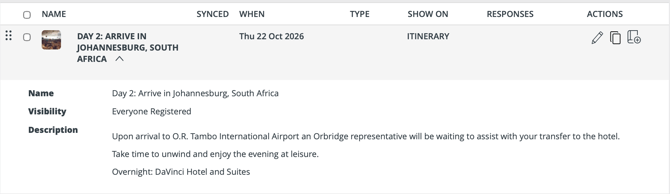
- **#11503 — Full Formatted Descriptions in Expanded Itinerary & Highlight Rows**
- **Summary:** Planners can now view the full rendered description (including images, styling, and video embeds) when expanding item rows in **Manage Highlights & Itinerary**.
- **#11375 — Refined Room Allocation vs. Free-Text Room Dropdown Logic**
- **Summary:** Streamlined the room selection UI across Trip CRM, TripBoard, and Manage Payments to display the structured "Allocated Room" dropdown when room inventory or a rooming map is configured, falling back to free-text entry only when no rooming structure is set.
- **#11624 — Package Selection & Inventory Guidance in Room Inventory Mode**
- **Summary:** Fixed an issue where packages configured with 0 room level inventory could not be selected in Add/Edit Person dialogs when operating in Room Level Inventory mode, replacing blocker errors with actionable inventory guidance.
- [Explore Room Level Inventory](https://support.youli.io/manage-room-inventory-per-named-room?hsLang=en)
---
### 4. Task Management

- **#10315 — Permanent Deletion of Hidden Tasks & Associated Data**
- **Summary:** Planners and Super Users can now permanently delete hidden [tasks on Trips and Templates](https://support.youli.io/360001244495-how-to-manage-tasks-custom-forms-resources-uploads?hsLang=en). Deleting a task securely removes all custom form fields, traveler responses, attached resources, and uploaded files, and logs the action in the Trip Activity Log.
- In your HIDDEN TASKS, hover over the task to see the DELETE option.

---
### 5. Flight Tracking & Traveler Experience
- **#11613 — Task Visibility Filtering for Airport Transfer Add-Ons**
- **Summary:** Ensured that flight tracking airport transfer add-ons on the traveler Trip Page respect task visibility and hidden states before displaying add-on prompts on invoices and itineraries.
- **#11616 — Persistent Display for Selected Transfer Add-Ons**
- **Summary:** Improved transfer add-on state handling so that confirmed transfer selections remain visible on traveler invoice and itinerary tabs and dynamically update if travelers adjust flight responses.
- So even if they change their flight details, the extra transfer add-on they selected will not be automatically removed.
- **#11652 — Flight Number Input Validation on Arrival Tasks**
- **Summary:** Added real-time validation warnings highlighting invalid characters in the Arrival task Flight field to ensure only numeric flight numbers are submitted.
---
### 6. Dashboard, Administration & Infrastructure
- **#11333 — Trip Dashboard: Direct "View All Trips" Action for \>100 Trips**
- **Summary:** Enhanced the footer notification on the Trip Dashboard when filters match more than 100 trips, adding an intuitive `Click here to view all trips` link to load the complete filtered list in one click.
- **#11559 — Relocated "Push to Your App" Button to Top Planner Banner**
- **Summary:** Moved the white-label mobile app sync button (*"PUSH TO YOUR APP"*) to the primary top header banner next to the Preview button for improved accessibility.
- [**Explore White Label App**](https://support.youli.io/how-to-use-your-white-label-mobile-app?hsLang=en)
- **#11393 — Duty of Care Subscription Package Integration & Visibility**
- **Summary:** Transitioned Duty of Care now available as part of the Operations Hub
### 🔜 COMING SOON
Not scheduled for this release, but [we are working on more things coming soon.](https://support.youli.io/coming-soon-youli-upcoming-roadmap?hsLang=en)
### 💬 TELL US WHAT YOU THINK
Click **YES** below to tell us if you like these changes
or [contact support](https://support.youli.io/4410822548623-how-to-get-help-from-youli-support?hsLang=en)to share your feedback in detail.
- [Get Started](https://support.youli.io/get-started?hsLang=en#main-content)
- [Checklists](https://support.youli.io/get-started?hsLang=en#checklists)
- [Setting up your account](https://support.youli.io/get-started?hsLang=en#setting-up-your-account)
- [Setting up your Trip Page](https://support.youli.io/get-started?hsLang=en#setting-up-your-trip-page)
- [Video Tutorials](https://support.youli.io/get-started?hsLang=en#video-tutorials)
- [Trip Registration](https://support.youli.io/get-started?hsLang=en#trip-registration)
- [Emails](https://support.youli.io/get-started?hsLang=en#emails)
- [Packages & Installments](https://support.youli.io/get-started?hsLang=en#packages-installments)
- [Payments](https://support.youli.io/get-started?hsLang=en#payments)
- [Adding & Managing People](https://support.youli.io/get-started?hsLang=en#adding-managing-people)
- [Starter Website](https://support.youli.io/get-started?hsLang=en#starter-website)
- [How-To](https://support.youli.io/how-to?hsLang=en#main-content)
- [Technology Partners](https://support.youli.io/how-to?hsLang=en#technology-partners)
- [API](https://support.youli.io/how-to?hsLang=en#api)
- [Reports](https://support.youli.io/how-to?hsLang=en#reports)
- [YouLi Plan Add-ons](https://support.youli.io/how-to?hsLang=en#youli-plan-add-ons)
- [Affiliates](https://support.youli.io/how-to?hsLang=en#affiliates)
- [Payments](https://support.youli.io/how-to?hsLang=en#payments)
- [Video Tutorials](https://support.youli.io/how-to?hsLang=en#video-tutorials)
- [Website Integration](https://support.youli.io/how-to?hsLang=en#website-integration)
- [Mobile App](https://support.youli.io/how-to?hsLang=en#mobile-app)
- [White Label App](https://support.youli.io/how-to?hsLang=en#white-label-app)
- [Account Roles](https://support.youli.io/how-to?hsLang=en#account-roles)
- [Tasks](https://support.youli.io/how-to?hsLang=en#tasks)
- [Packages](https://support.youli.io/how-to?hsLang=en#packages)
- [Highlights, Itinerary & Optional Add-ons](https://support.youli.io/how-to?hsLang=en#highlights-itinerary-optional-add-ons)
- [Invitation Groups](https://support.youli.io/how-to?hsLang=en#invitation-groups)
- [Coupons](https://support.youli.io/how-to?hsLang=en#coupons)
- [Trip Page Menu](https://support.youli.io/how-to?hsLang=en#trip-page-menu)
- [Integrating Cruise Deck Plans](https://support.youli.io/how-to?hsLang=en#integrating-cruise-deck-plans)
- [Managing Trip Dashboard](https://support.youli.io/how-to?hsLang=en#managing-trip-dashboard)
- [Emails](https://support.youli.io/how-to?hsLang=en#emails)
- [Bookings](https://support.youli.io/how-to?hsLang=en#bookings)
- [Managing People](https://support.youli.io/how-to?hsLang=en#managing-people)
- [Registration](https://support.youli.io/how-to?hsLang=en#registration)
- [PDF Confirmation](https://support.youli.io/how-to?hsLang=en#pdf-confirmation)
- [Documents](https://support.youli.io/how-to?hsLang=en#documents)
- [Billing](https://support.youli.io/how-to?hsLang=en#billing)
- [New Features](https://support.youli.io/new-features?hsLang=en#main-content)
- [Recent Releases](https://support.youli.io/new-features?hsLang=en#recent-releases)
- [Past Releases](https://support.youli.io/new-features?hsLang=en#past-releases)
- [Enterprise Clients](https://support.youli.io/enterprise-clients?hsLang=en#main-content)
- [Enterprise Onboarding](https://support.youli.io/enterprise-clients?hsLang=en#enterprise-onboarding)
- [Enterprise-only Features](https://support.youli.io/enterprise-clients?hsLang=en#enterprise-only-features)
- [FAQ](https://support.youli.io/faq?hsLang=en#main-content)
- [Data Security](https://support.youli.io/faq?hsLang=en#data-security)
- [Payments](https://support.youli.io/faq?hsLang=en#payments)
- [YouLi Account](https://support.youli.io/faq?hsLang=en#youli-account)
- [Emails](https://support.youli.io/faq?hsLang=en#emails)
- [Managing People](https://support.youli.io/faq?hsLang=en#managing-people)
- [Packages](https://support.youli.io/faq?hsLang=en#packages)
- [YouLi Subscription Plans](https://support.youli.io/faq?hsLang=en#youli-subscription-plans)
- [Tasks](https://support.youli.io/faq?hsLang=en#tasks)
- [Reporting](https://support.youli.io/reporting?hsLang=en)
- [YouLi User Roles](https://support.youli.io/youli-user-roles?hsLang=en)
- [For Travelers](https://support.youli.io/for-travelers?hsLang=en)
- [Partners](https://support.youli.io/partners?hsLang=en)
- [Upcoming Features](https://support.youli.io/upcoming-features?hsLang=en)
- [Incidents](https://support.youli.io/incidents?hsLang=en)
- [Contact Us](https://support.youli.io/contact-us?hsLang=en)
[](https://go.youli.io)
### Need more help?
Reach out to the YouLi Support team via the **Chat** icon at the bottom-right corner of your screen:
or [submit a Support Ticket.](https://support.youli.io/kb-tickets/new?hsLang=en)
Copyright © 2025, YouLi Travel Pty. Ltd