
Send Tasks reminders to ALL Non-Responders - Across Tasks
Available Plans:
- Grow - Upgrade today to access
- Enterprise - contact your account manager.
Instead of manually checking spreadsheets and emailing people one by one, you can use the "Send to Non-Responders" feature to blast a quick, personalized follow-up to everyone with outstanding tasks—in just one click.
📹 Nick Explains Why He loves this Feature (Video)
.png?width=670&height=377&name=YouTube%20Banners%20-%20Solving%20Group%20Travel%20Problems%20Template%20-%20all%20versions%20(2).png)
Nick discovered this feature when he had to add a last minute form to his retreat. He needed answers quick, and in two clicks his guys were responding about their meal preferences.
Watch this video to hear about Nick's Use Case
🛠️ Step-by-Step Guide
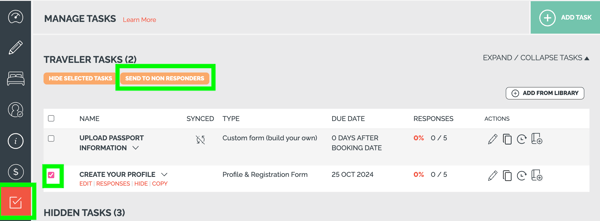
- Click on [Manage Tasks] from the left navigation menu.
- Select the Target Task: Check the box next to the specific task that requires completion (e.g., Create Your Profile).
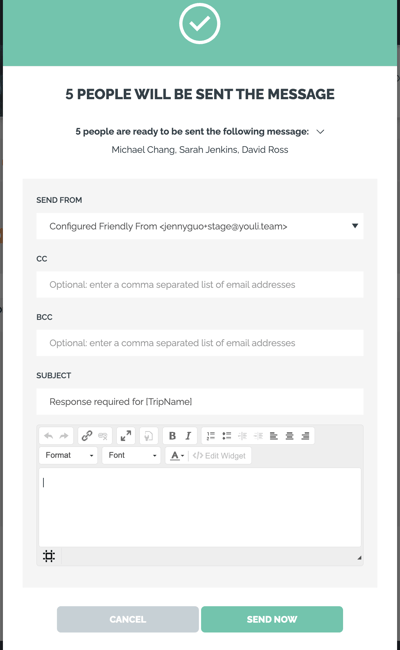
- Send the Reminder: Click the bright green [SEND TO NON RESPONDERS] button at the top. Add your custom message and hit send.
🎯 Key Benefits
- No More Manual Tracking: The system automatically filters out who has completed the task and who hasn't.
- Targeted Communication: Only travelers with incomplete tasks receive the email—no spam for your on-time guests.
- Direct Access: Travelers receive an email with a personalized, direct link that takes them straight to the task page, eliminating friction.