
PLANS: GROW and Enterprise, Upgrade now to gain access
Using a ticket number in People Search provides a fast and efficient way to connect all related information—traveler, trip, and itinerary item—in just a few clicks. This helps reduce manual searching and ensures you can quickly access the exact data you need.
How It Works in People Search
YouLi allows you to search by ticket number through the People Search report. This provides direct access to key booking information and links you to the relevant areas of the platform.
Steps to Follow
- Go to Report > People Search
Navigate to the People Search report from the main menu. - Enter the ticket number
Type the ticket number into the search field and run the search. - Click on the traveler’s name
Selecting the traveler’s name will open their TripBoard, where you can view all booking-related details for that individual. - Click on the trip name
This will take you to the Trip CRM, where you can manage the overall trip, including travelers, payments, and settings. - Click on the itinerary item name
This will take you directly to the specific flight itinerary item, allowing you to view or update ticket-related information.
What Information You Will See
The search results provide a quick overview of key booking details, including:
- Traveler category
- Booking status
- Reference code
- Registration date
This allows you to confirm that you are looking at the correct record before navigating further.
How to Use the GetFlightTicketBooking API Endpoint in Your Automation Process
The GetFlightTicketBooking endpoint allows you to retrieve full booking details based on a ticket number. This is especially useful when you need to locate the exact trip, traveler, and itinerary item associated with a flight ticket during automated workflows.
- The ticket number must be valid and issued
- If a match is found, the full booking context will be returned
- If no ticket is found, an error will be returned
Why Use This Endpoint
Using a ticket number, you can:
- Locate the trip where the ticket belongs
- Identify the traveler linked to the ticket
- Access the full booking information
- Use the data in automation workflows (e.g. Xero, PRISM)
Option 1: Using Zapier Action (Coming Soon)
If you are using Zapier, you can easily set this up using the YouLi app.
Steps:
-
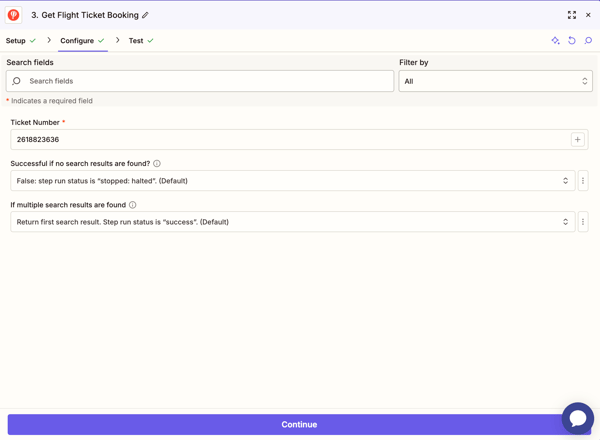
Add a new action in your Zap
-
Select YouLi > Get Flight Ticket Booking
-
Enter the Issued Ticket Number as the input value
-
Test the step
Result
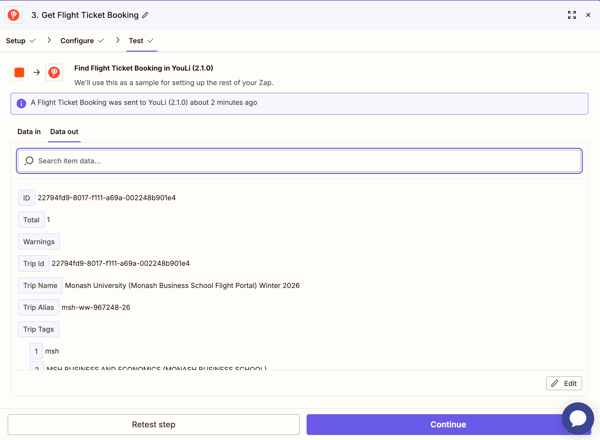
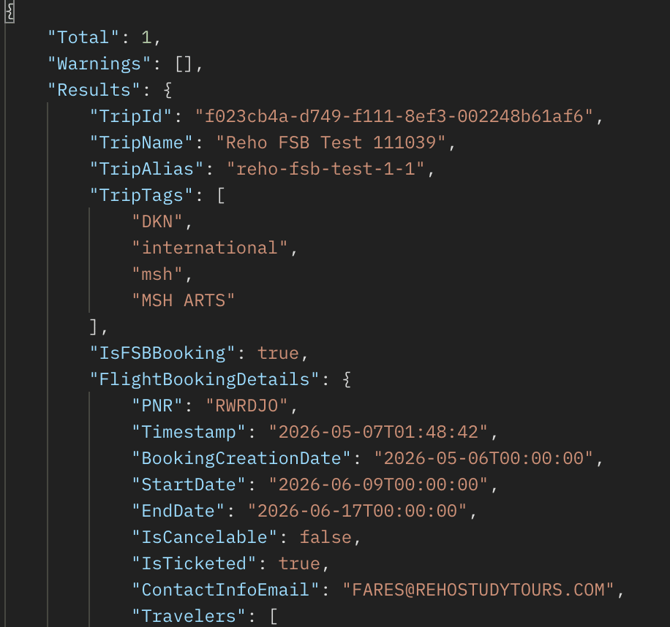
This will return the full booking information where the ticket is located, including:
-
Trip details
-
Traveler information
-
Flight Ticket information
-
Accounting information
-
Related Segments information
This is particularly useful when automating workflows such as pushing flight data into accounting systems like Xero.
Example Use Case
You receive a BSP file with ticket numbers
-
Extract the ticket number
-
Use Get Flight Ticket Booking
-
Retrieve trip and traveler data
-
Push data to Xero or PRISM
Option 2: Calling the API Directly
If you are not using Zapier, you can call the endpoint directly via API.
Example Request
POST https://api.youli.io/getFlightTicketBooking
Authorization: Bearer <your_api_token>
Content-Type: application/json

{
  "ticketNumber": "1234567890123"
}
Example Response
Summary
The GetFlightTicketBooking endpoint helps connect ticket numbers to full booking data.
-
Use it in Zapier for quick automation
-
Use API calls for custom integrations
-
Ideal for syncing ticket data with systems like Xero and PRISM
This allows you to streamline workflows and reduce manual searching when working with flight tickets.