---
title: "FAQ: How to Reset Your Password (Traveler Guide)"
description: Are you a Traveler going on a trip and stuck trying to reset your password?
---
[Skip to content](https://support.youli.io/faq-how-do-i-reset-my-password#main-content)
[Open Ticket](https://support.youli.io/kb-tickets/new?hsLang=en) [Customer portal](https://support.youli.io/feature-request-tickets-view?hsLang=en)
[](https://support.youli.io/?hsLang=en)
- [Pricing](https://go.youli.io/pricing)
- [Book Demo](https://go.youli.io/youli-demo-videos)
- [Blog](https://blog.youli.io/)
Open main navigation
Close main navigation
- [Pricing](https://go.youli.io/pricing)
- [Book Demo](https://go.youli.io/youli-demo-videos)
- [Blog](https://blog.youli.io/)
- [Open Ticket](https://support.youli.io/kb-tickets/new)
- [Customer portal](https://support.youli.io/feature-request-tickets-view)
- [Open Ticket](https://support.youli.io/kb-tickets/new)
[Open Ticket](https://support.youli.io/kb-tickets/new?hsLang=en)
How can we help you?
- There are no suggestions because the search field is empty.
1. [Help Center](https://support.youli.io/?hsLang=en)
2. [FAQ](https://support.youli.io/faq?hsLang=en)
# FAQ: How to Reset Your Password (Traveler Guide)
## Forgot your password or having trouble logging in to your YouLi Trip? Don’t worry — here are the steps to regain access quickly.
### Option 1: Reset Your Password
If you forgot your password:
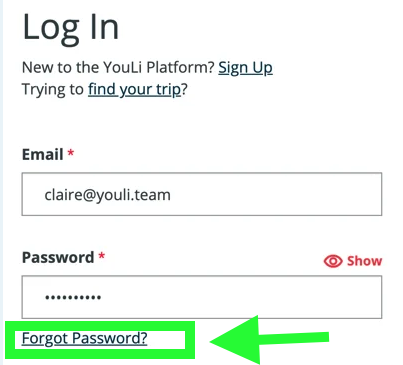
1. Go to the login page ([https://youli.io](https://youli.io) or get it from your Trip Planner)
2. Click [**Forgot Password**](https://youli.io/Account/ForgotPassword)
3. Enter your email address & click **Reset Password 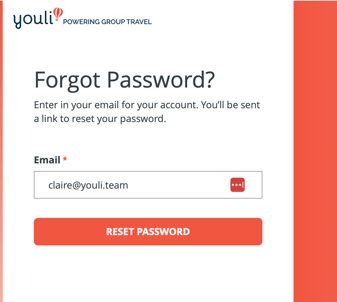**
4. Check your inbox for the reset email
5. Create a new password
---
### Option 2: Ask Your Trip Planner for Your Magic Link
If you only need access to your **Trip Page**, your **Trip Planner** can send you a **Magic Link**.
A Magic Link:
- Takes you directly to your Trip Page
- Does not require resetting your password
- Is often the fastest way to access your trip
Your Trip Planner can also:
- Confirm which email you signed up with
- Resend your Magic Link
- Help troubleshoot access issues
**Note:** Some trips still require login. If your Magic Link takes you to a login page, you'll need to log in or reset your password.
---
### Why Didn’t I Receive the Password Reset Email?
Here are the most common reasons:
#### 1. You May Not Have an Account Yet
Just because you're going on a trip doesn't always mean you created a YouLi account.
Try:
- Creating an account using the same email you registered for the trip
- Then log in to access your trip
If you're a Planner, you need to check if your Traveler has a YouLi account or not by following [these instructions](https://support.youli.io/360001328455-what-is-a-youli-traveler-account-#traveler-has-account) and if it says No Account then they need to make an account first by going tohttps://youli.io/Account/Register or your [White Label Domain](https://support.youli.io/4405271268495-white-label-domain-custom-domain-masking-on-youli-io?hsLang=en) URL.
**Note:** Travelers on trips do NOT have accounts automatically, they must choose to make them (or be forced if you have this setting enabled if you expect all your customers to have an account: [https://support.youli.io/require-login-on-trip-pages-password-magic-links](https://support.youli.io/require-login-on-trip-pages-password-magic-links?hsLang=en)
#### 2. Check Spam or Junk Folder
Sometimes reset emails go to spam.
Try:
- Searching your inbox for **"reset password"**
- Checking Spam or Junk folders
#### 3. You May Be Using the Wrong Email Address
If you're not receiving the email:
- Try another email address
- Ask your Trip Planner which email you registered with
---
### Seeing "Create Account" Instead of Reset Password?
If you're prompted to **create a new account**, it usually means:
- You're entering the wrong email address
- That email doesn't have an existing YouLi account
Try:
- Another email address
- Clicking **Forgot Password** again
---
### Invalid Token or Expired Link?
If you see an **Invalid Token** or **Expired Link** error:
- The reset link has expired
- Click **Forgot Password** again
- Use the newest email immediately
---
### Video Walkthrough
Watch this quick walkthrough on resetting your password:
- [Get Started](https://support.youli.io/get-started?hsLang=en#main-content)
- [Checklists](https://support.youli.io/get-started?hsLang=en#checklists)
- [Setting up your account](https://support.youli.io/get-started?hsLang=en#setting-up-your-account)
- [Setting up your Trip Page](https://support.youli.io/get-started?hsLang=en#setting-up-your-trip-page)
- [Video Tutorials](https://support.youli.io/get-started?hsLang=en#video-tutorials)
- [Trip Registration](https://support.youli.io/get-started?hsLang=en#trip-registration)
- [Emails](https://support.youli.io/get-started?hsLang=en#emails)
- [Packages & Installments](https://support.youli.io/get-started?hsLang=en#packages-installments)
- [Payments](https://support.youli.io/get-started?hsLang=en#payments)
- [Adding & Managing People](https://support.youli.io/get-started?hsLang=en#adding-managing-people)
- [Starter Website](https://support.youli.io/get-started?hsLang=en#starter-website)
- [How-To](https://support.youli.io/how-to?hsLang=en#main-content)
- [Technology Partners](https://support.youli.io/how-to?hsLang=en#technology-partners)
- [API](https://support.youli.io/how-to?hsLang=en#api)
- [Reports](https://support.youli.io/how-to?hsLang=en#reports)
- [YouLi Plan Add-ons](https://support.youli.io/how-to?hsLang=en#youli-plan-add-ons)
- [Affiliates](https://support.youli.io/how-to?hsLang=en#affiliates)
- [Payments](https://support.youli.io/how-to?hsLang=en#payments)
- [Video Tutorials](https://support.youli.io/how-to?hsLang=en#video-tutorials)
- [Website Integration](https://support.youli.io/how-to?hsLang=en#website-integration)
- [Mobile App](https://support.youli.io/how-to?hsLang=en#mobile-app)
- [White Label App](https://support.youli.io/how-to?hsLang=en#white-label-app)
- [Account Roles](https://support.youli.io/how-to?hsLang=en#account-roles)
- [Tasks](https://support.youli.io/how-to?hsLang=en#tasks)
- [Packages](https://support.youli.io/how-to?hsLang=en#packages)
- [Highlights, Itinerary & Optional Add-ons](https://support.youli.io/how-to?hsLang=en#highlights-itinerary-optional-add-ons)
- [Invitation Groups](https://support.youli.io/how-to?hsLang=en#invitation-groups)
- [Coupons](https://support.youli.io/how-to?hsLang=en#coupons)
- [Trip Page Menu](https://support.youli.io/how-to?hsLang=en#trip-page-menu)
- [Integrating Cruise Deck Plans](https://support.youli.io/how-to?hsLang=en#integrating-cruise-deck-plans)
- [Managing Trip Dashboard](https://support.youli.io/how-to?hsLang=en#managing-trip-dashboard)
- [Emails](https://support.youli.io/how-to?hsLang=en#emails)
- [Bookings](https://support.youli.io/how-to?hsLang=en#bookings)
- [Managing People](https://support.youli.io/how-to?hsLang=en#managing-people)
- [Registration](https://support.youli.io/how-to?hsLang=en#registration)
- [PDF Confirmation](https://support.youli.io/how-to?hsLang=en#pdf-confirmation)
- [Documents](https://support.youli.io/how-to?hsLang=en#documents)
- [Billing](https://support.youli.io/how-to?hsLang=en#billing)
- [New Features](https://support.youli.io/new-features?hsLang=en#main-content)
- [Recent Releases](https://support.youli.io/new-features?hsLang=en#recent-releases)
- [Past Releases](https://support.youli.io/new-features?hsLang=en#past-releases)
- [Enterprise Clients](https://support.youli.io/enterprise-clients?hsLang=en#main-content)
- [Enterprise Onboarding](https://support.youli.io/enterprise-clients?hsLang=en#enterprise-onboarding)
- [Enterprise-only Features](https://support.youli.io/enterprise-clients?hsLang=en#enterprise-only-features)
- [FAQ](https://support.youli.io/faq?hsLang=en#main-content)
- [Data Security](https://support.youli.io/faq?hsLang=en#data-security)
- [Payments](https://support.youli.io/faq?hsLang=en#payments)
- [YouLi Account](https://support.youli.io/faq?hsLang=en#youli-account)
- [Emails](https://support.youli.io/faq?hsLang=en#emails)
- [Managing People](https://support.youli.io/faq?hsLang=en#managing-people)
- [Packages](https://support.youli.io/faq?hsLang=en#packages)
- [YouLi Subscription Plans](https://support.youli.io/faq?hsLang=en#youli-subscription-plans)
- [Tasks](https://support.youli.io/faq?hsLang=en#tasks)
- [Reporting](https://support.youli.io/reporting?hsLang=en)
- [YouLi User Roles](https://support.youli.io/youli-user-roles?hsLang=en)
- [For Travelers](https://support.youli.io/for-travelers?hsLang=en)
- [Partners](https://support.youli.io/partners?hsLang=en)
- [Upcoming Features](https://support.youli.io/upcoming-features?hsLang=en)
- [Incidents](https://support.youli.io/incidents?hsLang=en)
- [Contact Us](https://support.youli.io/contact-us?hsLang=en)
[](https://go.youli.io)
### Need more help?
Reach out to the YouLi Support team via the **Chat** icon at the bottom-right corner of your screen:
or [submit a Support Ticket.](https://support.youli.io/kb-tickets/new?hsLang=en)
Copyright © 2025, YouLi Travel Pty. Ltd