
🤔 Why use Multiple Brand Options?
MULTIPLE BRAND OPTIONS allows you to use different brands on the same account. This way, you can set the brand for each trip rather than having to have two accounts for two different brands.
🎨 How to configure Multiple Brand Options?
We will need to know a bit of information to configure your other brands. When you submit a ticket please include:
- Name of the option to appear in the select box
- Logo file
- Link Logo to URL
- i.e. https://youragencywebsite.com
- Brand color (in HEX)
- I.e. #4524BA
- Text font
- Arial
- Montserrat
- Lucida
- Open Sans
- Raleway
- Times
- Verdana
- Text Color in HEX
- i.e. #000 (white)
- i.e. #fff (black)
👀 How to use Multiple Brand Options on the account?
Once the Trip Owner has Brand Options enabled:
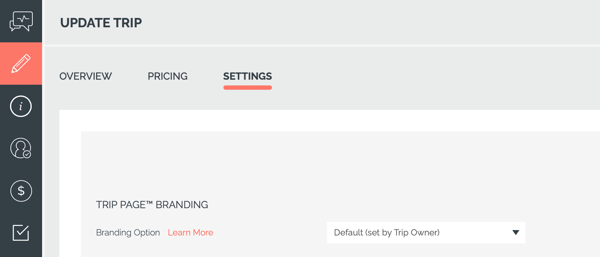
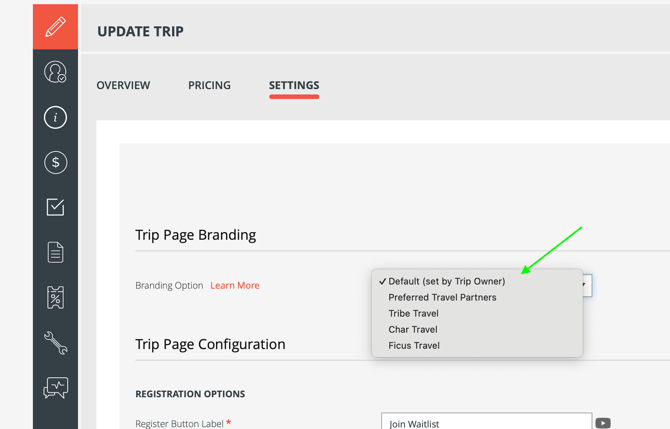
- Click on a Trip > go to UPDATE TRIP > SETTINGS
- From the down menu labeled BRANDING OPTIONS, you can choose your brand
✅ How to request for Multiple Brand Options?
If you are interested in using multiple brands on one account, please fill out the Multiple Brand Setup Form to provide us with the information above, along with the payment.
Need more help?
Reach out to the YouLi Support team via a chat box at the bottom of your screen or submit a Support Ticket..
We're offering pay-as-you-go support calls! Rather than spending hours figuring it out yourself or hiring extra help, book a 1:1 live call with a YouLi expert for setup, troubleshooting, or Q&A.