
Pulling a payment report from a specific trip
Do you want to pull a report in YouLi for your trip of all the payments that have occurred? Easy peasy!
- Click to MANAGE PAYMENTS
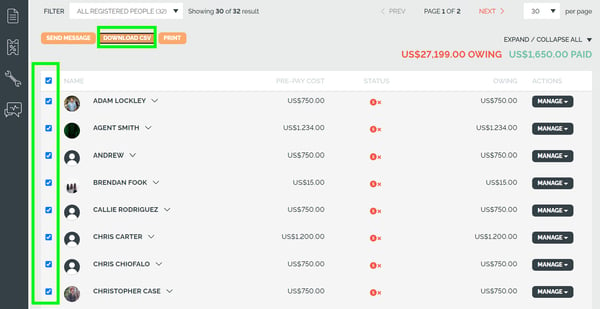
- Select the Travelers you want to include in your report - you can also select all from the check box on the top
- Click DOWNLOAD CSV
What information will be on the .csv
- Who the payment was made by
- Reference Code
- Selected Package
- Room
- Breakdown
- Currency Type
- Amount
- Method
- Type
- Payment Date

Additional information:
- Tracking Medium
- Tracking Source
- Tracking Campaign
- Tracking Referring URL
- Tracking Referring Domain
