---
title: No-Fee Direct Payment Methods
description: Take more bookings with fewer fees. Read more to learn about YouLi 0%-Fee Payment Options, like Direct Bank Transfer, Zelle, and more.
---
[Skip to content](https://support.youli.io/360001333075-no-fee-direct-payment-methods-up-to-4-options#main-content)
[Open Ticket](https://support.youli.io/kb-tickets/new?hsLang=en) [Customer portal](https://support.youli.io/feature-request-tickets-view?hsLang=en)
[](https://support.youli.io/?hsLang=en)
- [Pricing](https://go.youli.io/pricing)
- [Book Demo](https://go.youli.io/youli-demo-videos)
- [Blog](https://blog.youli.io/)
Open main navigation
Close main navigation
- [Pricing](https://go.youli.io/pricing)
- [Book Demo](https://go.youli.io/youli-demo-videos)
- [Blog](https://blog.youli.io/)
- [Open Ticket](https://support.youli.io/kb-tickets/new)
- [Customer portal](https://support.youli.io/feature-request-tickets-view)
- [Open Ticket](https://support.youli.io/kb-tickets/new)
[Open Ticket](https://support.youli.io/kb-tickets/new?hsLang=en)
How can we help you?
- There are no suggestions because the search field is empty.
1. [Help Center](https://support.youli.io/?hsLang=en)
2. [FAQ](https://support.youli.io/faq?hsLang=en)
3. [Payments](https://support.youli.io/faq?hsLang=en#payments)
# No-Fee Direct Payment Methods
## Take more bookings with fewer fees. Read more to learn about YouLi 0%-Fee Payment Options, like Direct Bank Transfer, Zelle, and more.
**Available with any of the plans:**
- Grow Annual - [Upgrade today to access](https://youli.io/account/billingsetup)
Credit Card payments are the most convenient way to collect bookings. You as a Planner receive the money in seconds, and the client receives immediate confirmation. However, Credit Card payments come with a price.
The fee you pay to process a booking via CC, the so-called "Merchant" or "Transaction" fee may include the CREDIT CARD FEE (always) and BOOKING FEE (depending on [your YouLi plan](https://go.youli.io/pricing)).
#### Credit card payments in YouLi will incur:
- CREDIT CARD FEES charged by the CC merchant service and processed via Stripe, Square, CyberSource, or Authorize.net
**NOTE**: Learn how to [apply Credit Card Surcharge](https://support.youli.io/articles/360001218676-payments-credit-card-surcharge?hsLang=en) to pass the CC fee to your customers.
- YouLi BOOKING FEES - depend on your subscription and can be reduced. [View YouLi plans to compare the fee options.](https://go.youli.io/pricing)
**NOTE**: If you want to avoid paying the YouLi BOOKING FEE, you can utilize one of our NO-FEE PAYMENT OPTIONS.
### What are the available no-fee payment options for group bookings?
1. [Manual Bank Transfer Instructions](https://support.youli.io/articles/360001286935-how-to-accept-direct-payments-bank-transfer?hsLang=en) - NO Credit Card Fees, NO YouLi Booking Fees.
Contact your bank to check if other fees apply (for example, fees associated with International transfers). The default label is "Bank Transfer", but it can be changed to a custom label, such as "Zelle" or "Bitcoin".
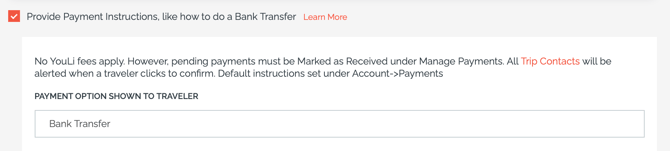
2. PayPal.me Link
3. Pay over Phone
4. Custom Payment Link and any other custom payment instructions (like Bitcoin if you are so brave!) - this could be ANY link.For example, your partner's booking page, Donation Page, Venmo, etc. - YouLi will redirect your payment to ANY platform.
NO-FEE PAYMENT OPTIONS are a great way to save $$$ on the booking fee. In many cases, like domestic bank transfers, you will avoid ALL transaction fees by allowing your clients to send the payment directly to your bank.
**NOTE**: Keep in mind that Direct Bank Transfers may take 3-7 business days.
To optimize your cash flow, you may set up the DEPOSITS to be collected via Credit Card, and collect the remaining installments via bank transfers.
### How to set up no-fee payment options for your bookings?
NO-FEE PAYMENT OPTIONS are available on [YouLi Grow Annual plans.](https://go.youli.io/pricing)
**To set up your payment options:**
- Go to UPDATE TRIP \> PRICING tab.
- If you are currently in a BROCHURE MODE, click "Switch to BOOKINGS MODE to start taking payments"
- Scroll down to PAYMENT METHODS
- Proceed as instructed on the screen (depending on your preferred payment method)
- SAVE CHANGES
**Watch the video below to review the BOOKING FLOW for no-fee payment methods in YouLi:**
### How to change the button labels
Looking to change NOTIFY PLANNER to something more relevant for your audience? Like PAYMENT MADE or DONE, etc.
1\. Within your trip, click to UPDATE TRIP -\> SETTINGS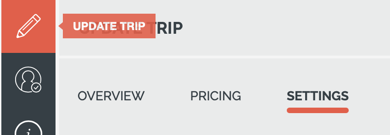
2\. Scroll down to PACKAGES & PAYMENTS:
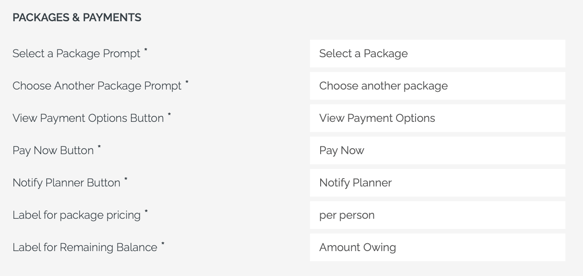
Update the value in the "Notify Planner Button" box and click SAVE CHANGES.
#### **Watch the webinar replay to learn how you can lower your TRANSACTION FEE by setting up the no-fee payment options:**
---
### Need more help?
Join our open [Community webinars](https://go.youli.io/travel-professional-community) or watch replays for a detailed overview of the features, LIVE discussion with the experts, and Q&A.
- [Get Started](https://support.youli.io/get-started?hsLang=en#main-content)
- [Checklists](https://support.youli.io/get-started?hsLang=en#checklists)
- [Setting up your account](https://support.youli.io/get-started?hsLang=en#setting-up-your-account)
- [Setting up your Trip Page](https://support.youli.io/get-started?hsLang=en#setting-up-your-trip-page)
- [Video Tutorials](https://support.youli.io/get-started?hsLang=en#video-tutorials)
- [Trip Registration](https://support.youli.io/get-started?hsLang=en#trip-registration)
- [Emails](https://support.youli.io/get-started?hsLang=en#emails)
- [Packages & Installments](https://support.youli.io/get-started?hsLang=en#packages-installments)
- [Payments](https://support.youli.io/get-started?hsLang=en#payments)
- [Adding & Managing People](https://support.youli.io/get-started?hsLang=en#adding-managing-people)
- [Starter Website](https://support.youli.io/get-started?hsLang=en#starter-website)
- [How-To](https://support.youli.io/how-to?hsLang=en#main-content)
- [Technology Partners](https://support.youli.io/how-to?hsLang=en#technology-partners)
- [API](https://support.youli.io/how-to?hsLang=en#api)
- [Reports](https://support.youli.io/how-to?hsLang=en#reports)
- [YouLi Plan Add-ons](https://support.youli.io/how-to?hsLang=en#youli-plan-add-ons)
- [Affiliates](https://support.youli.io/how-to?hsLang=en#affiliates)
- [Payments](https://support.youli.io/how-to?hsLang=en#payments)
- [Video Tutorials](https://support.youli.io/how-to?hsLang=en#video-tutorials)
- [Website Integration](https://support.youli.io/how-to?hsLang=en#website-integration)
- [Mobile App](https://support.youli.io/how-to?hsLang=en#mobile-app)
- [White Label App](https://support.youli.io/how-to?hsLang=en#white-label-app)
- [Account Roles](https://support.youli.io/how-to?hsLang=en#account-roles)
- [Tasks](https://support.youli.io/how-to?hsLang=en#tasks)
- [Packages](https://support.youli.io/how-to?hsLang=en#packages)
- [Highlights, Itinerary & Optional Add-ons](https://support.youli.io/how-to?hsLang=en#highlights-itinerary-optional-add-ons)
- [Invitation Groups](https://support.youli.io/how-to?hsLang=en#invitation-groups)
- [Coupons](https://support.youli.io/how-to?hsLang=en#coupons)
- [Trip Page Menu](https://support.youli.io/how-to?hsLang=en#trip-page-menu)
- [Integrating Cruise Deck Plans](https://support.youli.io/how-to?hsLang=en#integrating-cruise-deck-plans)
- [Managing Trip Dashboard](https://support.youli.io/how-to?hsLang=en#managing-trip-dashboard)
- [Emails](https://support.youli.io/how-to?hsLang=en#emails)
- [Bookings](https://support.youli.io/how-to?hsLang=en#bookings)
- [Managing People](https://support.youli.io/how-to?hsLang=en#managing-people)
- [Registration](https://support.youli.io/how-to?hsLang=en#registration)
- [PDF Confirmation](https://support.youli.io/how-to?hsLang=en#pdf-confirmation)
- [Documents](https://support.youli.io/how-to?hsLang=en#documents)
- [Billing](https://support.youli.io/how-to?hsLang=en#billing)
- [New Features](https://support.youli.io/new-features?hsLang=en#main-content)
- [Recent Releases](https://support.youli.io/new-features?hsLang=en#recent-releases)
- [Past Releases](https://support.youli.io/new-features?hsLang=en#past-releases)
- [Enterprise Clients](https://support.youli.io/enterprise-clients?hsLang=en#main-content)
- [Enterprise Onboarding](https://support.youli.io/enterprise-clients?hsLang=en#enterprise-onboarding)
- [Enterprise-only Features](https://support.youli.io/enterprise-clients?hsLang=en#enterprise-only-features)
- [FAQ](https://support.youli.io/faq?hsLang=en#main-content)
- [Data Security](https://support.youli.io/faq?hsLang=en#data-security)
- [Payments](https://support.youli.io/faq?hsLang=en#payments)
- [YouLi Account](https://support.youli.io/faq?hsLang=en#youli-account)
- [Emails](https://support.youli.io/faq?hsLang=en#emails)
- [Managing People](https://support.youli.io/faq?hsLang=en#managing-people)
- [Packages](https://support.youli.io/faq?hsLang=en#packages)
- [YouLi Subscription Plans](https://support.youli.io/faq?hsLang=en#youli-subscription-plans)
- [Tasks](https://support.youli.io/faq?hsLang=en#tasks)
- [Reporting](https://support.youli.io/reporting?hsLang=en)
- [YouLi User Roles](https://support.youli.io/youli-user-roles?hsLang=en)
- [For Travelers](https://support.youli.io/for-travelers?hsLang=en)
- [Partners](https://support.youli.io/partners?hsLang=en)
- [Upcoming Features](https://support.youli.io/upcoming-features?hsLang=en)
- [Incidents](https://support.youli.io/incidents?hsLang=en)
- [Contact Us](https://support.youli.io/contact-us?hsLang=en)
[](https://go.youli.io)
### Need more help?
Reach out to the YouLi Support team via the **Chat** icon at the bottom-right corner of your screen:
or [submit a Support Ticket.](https://support.youli.io/kb-tickets/new?hsLang=en)
Copyright © 2025, YouLi Travel Pty. Ltd