---
title: "How-to: Turn on Automated Reminders for Tasks"
description: Save the admin time you spend collecting waivers, forms, and travelers' information; avoid long email threads and reduce the noise by keeping everything in one place.
---
[Skip to content](https://support.youli.io/360001316835-tasks-automatic-emails-#main-content)
[Open Ticket](https://support.youli.io/kb-tickets/new?hsLang=en) [Customer portal](https://support.youli.io/feature-request-tickets-view?hsLang=en)
[](https://support.youli.io/?hsLang=en)
- [Pricing](https://go.youli.io/pricing)
- [Book Demo](https://go.youli.io/youli-demo-videos)
- [Blog](https://blog.youli.io/)
Open main navigation
Close main navigation
- [Pricing](https://go.youli.io/pricing)
- [Book Demo](https://go.youli.io/youli-demo-videos)
- [Blog](https://blog.youli.io/)
- [Open Ticket](https://support.youli.io/kb-tickets/new)
- [Customer portal](https://support.youli.io/feature-request-tickets-view)
- [Open Ticket](https://support.youli.io/kb-tickets/new)
[Open Ticket](https://support.youli.io/kb-tickets/new?hsLang=en)
How can we help you?
- There are no suggestions because the search field is empty.
1. [Help Center](https://support.youli.io/?hsLang=en)
2. [How-To](https://support.youli.io/how-to?hsLang=en)
3. [Tasks](https://support.youli.io/how-to?hsLang=en#tasks)
# How-to: Turn on Automated Reminders for Tasks
## Save the admin time you spend collecting waivers, forms, and travelers' information; avoid long email threads and reduce the noise by keeping everything in one place.
**
**NOTE**: If you haven't yet learned what the YouLi TASKS are, [this article](https://support.youli.io/articles/360001244495-how-to-manage-tasks-custom-forms-resources-uploads?hsLang=en) covers the essentials points.
You have the option to turn on TASK REMINDERS that are automatically sent on your behalf through to your Travelers. This allows you to let go of the 'nagging' to get your Travelers to enter in the necessary travel info or meaningful pre-trip work you need.
### How To Set Up Task Reminders
To set up TASK REMINDERS go to the MANAGE TASKS & CUSTOM FORMS tab.
- Only ONE reminder will be sent out each day and[PAYMENT REMINDERS](https://support.youli.io/articles/360001316136-automatic-emails-payments?hsLang=en) will take priority over TASK REMINDERS.
- So if a PAYMENT and a TASK are due on the same day, only the PAYMENT REMINDER will be sent. However, once on their TRIP PAGE, Travelers will be prompted to complete the TASK after PAYMENT has been made in the banner at the bottom.
- TASK REMINDERS are sent based on the DUE DATE you as the Planner create.
**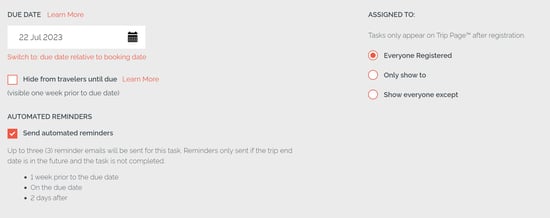**
**TIP**: Turn off automatic TASK emails by leaving the box unchecked to send automated reminders under that TASK. You will have the ability to turn automated reminders back on at any time.
### When do the reminders send?
If you turn on TASK REMINDERS, three reminders are sent:
- DUE SOON (1 week before Payment Due)
- DUE (On Due Date)
- OVERDUE (2 days after Due Date)
**NOTE**: The TASK REMIDNERS are ONLY sent until your Traveler completes the TASK and will stop once the TASK is marked as COMPLETE.
### What will my travelers see?
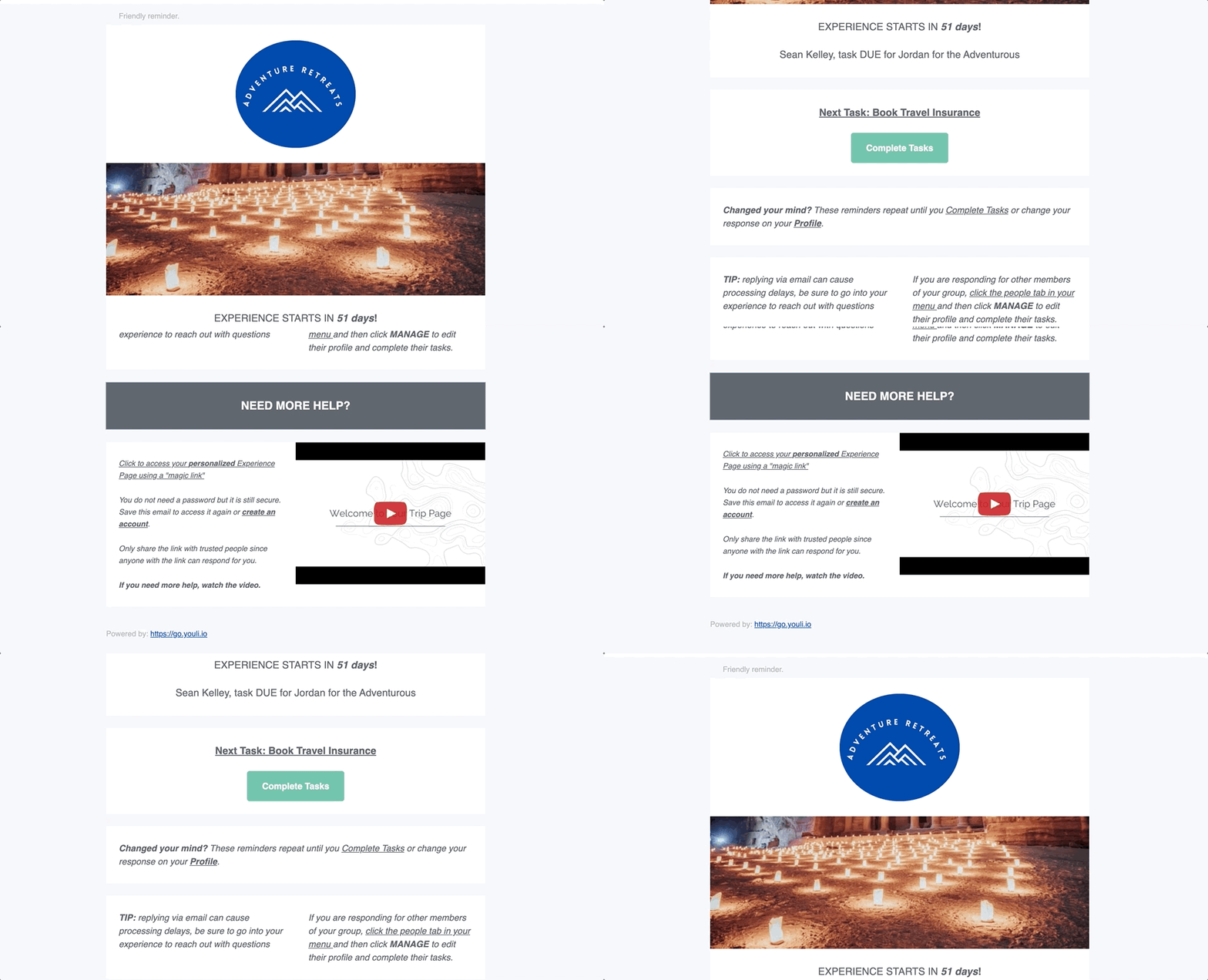
This is an example of a TASK DUE reminder email. The title of the email and description change depending on which TASK REMINDER is being sent.
**TIP:** Make yourself a Traveler on the Trip and go through some of the payments and tasks to understand the customer experience and see the emails. Then when ready, [delete yourself](https://support.youli.io/articles/360001252775-how-do-i-remove-travelers-who-were-interested-but-decide-not-to-go-on-my-trip-?hsLang=en) as a Traveler.
### Hide from travelers until due
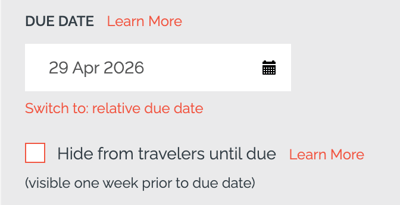
When this option is enabled, the task will be hidden from travelers and will only become visible one week prior to the due date. This helps control when tasks are introduced, ensuring travelers only see them when they are relevant and actionable.
This is particularly useful for managing task timing and avoiding overwhelming travelers with too many tasks too early. It creates a more structured experience by gradually revealing tasks closer to when they need to be completed.
If this option is not selected, the task will be visible to travelers as soon as it is published, regardless of the due date.
#### Learn more about automated emails that for out on your behalf to your travelers:
- Take a look at the [Automatic Email Reminders & Confirmations](https://support.youli.io/articles/360000531275-automatic-email-reminders-confirmations?hsLang=en) help doc.
- Discover [How To Stop Automatic Emails.](https://support.youli.io/articles/360001435015-how-to-stop-automatic-emails-for-people-or-trips?hsLang=en)
- Watch our 'Understanding Automatic Emails' help video:
- [Get Started](https://support.youli.io/get-started?hsLang=en#main-content)
- [Checklists](https://support.youli.io/get-started?hsLang=en#checklists)
- [Setting up your account](https://support.youli.io/get-started?hsLang=en#setting-up-your-account)
- [Setting up your Trip Page](https://support.youli.io/get-started?hsLang=en#setting-up-your-trip-page)
- [Video Tutorials](https://support.youli.io/get-started?hsLang=en#video-tutorials)
- [Trip Registration](https://support.youli.io/get-started?hsLang=en#trip-registration)
- [Emails](https://support.youli.io/get-started?hsLang=en#emails)
- [Packages & Installments](https://support.youli.io/get-started?hsLang=en#packages-installments)
- [Payments](https://support.youli.io/get-started?hsLang=en#payments)
- [Adding & Managing People](https://support.youli.io/get-started?hsLang=en#adding-managing-people)
- [Starter Website](https://support.youli.io/get-started?hsLang=en#starter-website)
- [How-To](https://support.youli.io/how-to?hsLang=en#main-content)
- [Technology Partners](https://support.youli.io/how-to?hsLang=en#technology-partners)
- [API](https://support.youli.io/how-to?hsLang=en#api)
- [Reports](https://support.youli.io/how-to?hsLang=en#reports)
- [YouLi Plan Add-ons](https://support.youli.io/how-to?hsLang=en#youli-plan-add-ons)
- [Affiliates](https://support.youli.io/how-to?hsLang=en#affiliates)
- [Payments](https://support.youli.io/how-to?hsLang=en#payments)
- [Video Tutorials](https://support.youli.io/how-to?hsLang=en#video-tutorials)
- [Website Integration](https://support.youli.io/how-to?hsLang=en#website-integration)
- [Mobile App](https://support.youli.io/how-to?hsLang=en#mobile-app)
- [White Label App](https://support.youli.io/how-to?hsLang=en#white-label-app)
- [Account Roles](https://support.youli.io/how-to?hsLang=en#account-roles)
- [Tasks](https://support.youli.io/how-to?hsLang=en#tasks)
- [Packages](https://support.youli.io/how-to?hsLang=en#packages)
- [Highlights, Itinerary & Optional Add-ons](https://support.youli.io/how-to?hsLang=en#highlights-itinerary-optional-add-ons)
- [Invitation Groups](https://support.youli.io/how-to?hsLang=en#invitation-groups)
- [Coupons](https://support.youli.io/how-to?hsLang=en#coupons)
- [Trip Page Menu](https://support.youli.io/how-to?hsLang=en#trip-page-menu)
- [Integrating Cruise Deck Plans](https://support.youli.io/how-to?hsLang=en#integrating-cruise-deck-plans)
- [Managing Trip Dashboard](https://support.youli.io/how-to?hsLang=en#managing-trip-dashboard)
- [Emails](https://support.youli.io/how-to?hsLang=en#emails)
- [Bookings](https://support.youli.io/how-to?hsLang=en#bookings)
- [Managing People](https://support.youli.io/how-to?hsLang=en#managing-people)
- [Registration](https://support.youli.io/how-to?hsLang=en#registration)
- [PDF Confirmation](https://support.youli.io/how-to?hsLang=en#pdf-confirmation)
- [Documents](https://support.youli.io/how-to?hsLang=en#documents)
- [Billing](https://support.youli.io/how-to?hsLang=en#billing)
- [New Features](https://support.youli.io/new-features?hsLang=en#main-content)
- [Recent Releases](https://support.youli.io/new-features?hsLang=en#recent-releases)
- [Past Releases](https://support.youli.io/new-features?hsLang=en#past-releases)
- [Enterprise Clients](https://support.youli.io/enterprise-clients?hsLang=en#main-content)
- [Enterprise Onboarding](https://support.youli.io/enterprise-clients?hsLang=en#enterprise-onboarding)
- [Enterprise-only Features](https://support.youli.io/enterprise-clients?hsLang=en#enterprise-only-features)
- [FAQ](https://support.youli.io/faq?hsLang=en#main-content)
- [Data Security](https://support.youli.io/faq?hsLang=en#data-security)
- [Payments](https://support.youli.io/faq?hsLang=en#payments)
- [YouLi Account](https://support.youli.io/faq?hsLang=en#youli-account)
- [Emails](https://support.youli.io/faq?hsLang=en#emails)
- [Managing People](https://support.youli.io/faq?hsLang=en#managing-people)
- [Packages](https://support.youli.io/faq?hsLang=en#packages)
- [YouLi Subscription Plans](https://support.youli.io/faq?hsLang=en#youli-subscription-plans)
- [Tasks](https://support.youli.io/faq?hsLang=en#tasks)
- [Reporting](https://support.youli.io/reporting?hsLang=en)
- [YouLi User Roles](https://support.youli.io/youli-user-roles?hsLang=en)
- [For Travelers](https://support.youli.io/for-travelers?hsLang=en)
- [Partners](https://support.youli.io/partners?hsLang=en)
- [Upcoming Features](https://support.youli.io/upcoming-features?hsLang=en)
- [Incidents](https://support.youli.io/incidents?hsLang=en)
- [Contact Us](https://support.youli.io/contact-us?hsLang=en)
[](https://go.youli.io)
### Need more help?
Reach out to the YouLi Support team via the **Chat** icon at the bottom-right corner of your screen:
or [submit a Support Ticket.](https://support.youli.io/kb-tickets/new?hsLang=en)
Copyright © 2025, YouLi Travel Pty. Ltd