---
title: "How-to: Manage Tasks & Custom Forms + Resources & Uploads"
description: These two tabs are where you manage all documentation and things you need your Travelers to do before the Trip. Through them, you will be able to collect completed waivers, passport scans, and and provide your Travelers with resources too!
---
[Skip to content](https://support.youli.io/360001244495-how-to-manage-tasks-custom-forms-resources-uploads#main-content)
[Open Ticket](https://support.youli.io/kb-tickets/new?hsLang=en) [Customer portal](https://support.youli.io/feature-request-tickets-view?hsLang=en)
[](https://support.youli.io/?hsLang=en)
- [Pricing](https://go.youli.io/pricing)
- [Book Demo](https://go.youli.io/youli-demo-videos)
- [Blog](https://blog.youli.io/)
Open main navigation
Close main navigation
- [Pricing](https://go.youli.io/pricing)
- [Book Demo](https://go.youli.io/youli-demo-videos)
- [Blog](https://blog.youli.io/)
- [Open Ticket](https://support.youli.io/kb-tickets/new)
- [Customer portal](https://support.youli.io/feature-request-tickets-view)
- [Open Ticket](https://support.youli.io/kb-tickets/new)
[Open Ticket](https://support.youli.io/kb-tickets/new?hsLang=en)
How can we help you?
- There are no suggestions because the search field is empty.
1. [Help Center](https://support.youli.io/?hsLang=en)
2. [Get Started](https://support.youli.io/get-started?hsLang=en)
3. [Setting up your Trip Page](https://support.youli.io/get-started?hsLang=en#setting-up-your-trip-page)
# How-to: Manage Tasks & Custom Forms + Resources & Uploads
## These two tabs are where you manage all documentation and things you need your Travelers to do before the Trip. Through them, you will be able to collect completed waivers, passport scans, and and provide your Travelers with resources too!
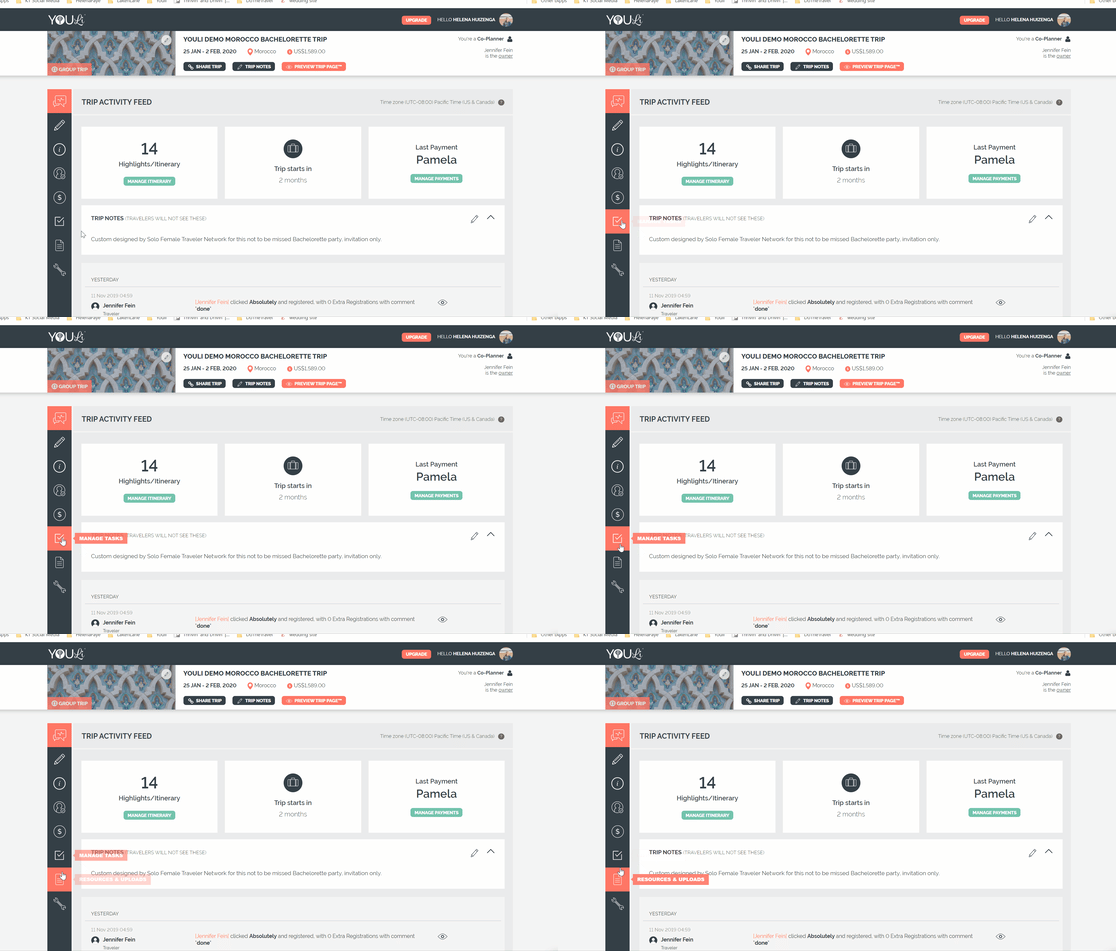
### Where do I find these two tabs?
### **What are Tasks in YouLi?**
- TASKS are how you manage what you need to gather *from* your **Travelers** to ensure they are ready for your TRIP, to ensure you have the information you need from them.
- Anything the **Traveler** is required to [provide](https://www.youtube.com/watch?v=5wDKDe2xrZ8) or [complete](https://www.youtube.com/watch?v=NnHW7_Iev8k) can be a TASK.
**NOTE:** Responses are private to each **Traveler**, so rest assured no one besides **Planners** (or others in their [Invitation Group](https://support.youli.io/360001123556-what-is-an-invitation-group-?hsLang=en)) can see their responses.
### How to make sure Tasks are visible to your Travelers
**WARNING: Travelers** cannot complete Tasks if the "Tasks" tab is hidden. Make sure that [menu tab is visible](https://support.youli.io/360001095715-how-to-customize-trip-page-menu-control-what-your-travelers-see?hsLang=en) on your **Traveler's** Trip Page.
Even if the TASKS menu tabis visible, the tab will not be shown if
- - The TRIP is "PUBLIC" and the person viewing the Trip has not yet registered
- The **Traveler** viewing does not have any assigned TASKS
### **How to add Tasks in YouLi**
**NOTE:** The number of Tasks that you can add depends on your YouLi plan. See our [pricing comparison chart](https://go.youli.io/pricing-comparison) to see how your plan compares to others & how many Tasks are included on your current plan.
1\. From your TRIP MENU, click on MANAGE TASKS & CUSTOM FORMS
2\. Click ADD TASK
3\. Fill out all fields (
- TASK -Give your task a name - this will be visible to your **Travelers**!
- INSTRUCTIONS - Add detailed instructions. What do your **Travelers** need to do?
- DUE DATE - This can either be:
- A) A specific due date (i.e. November 27, 2023) or you can "Switch to: due date relative to booking date" and
- B) Choose when the task is due, based on how many days out someone is from paying their deposit (when they are officially considered "booked").
- ASSIGNED TO/TASK VISIBILITY - You have the ability to assign certain TASKS to certain people. When you edit or create a Task, you can pick which **Travelers** will be prompted to complete it.
- Watch this [YouLi How-To: Task Visibility](https://www.youtube.com/watch?v=_DaaZQaF7Xg) video for a more detailed walk-through. If you need to enable or disable a Task for certain **Travelers**, you can do that within individual Tasks.
- AUTOMATED REMINDERS - Do you want to send reminders automatically? If you check this box, reminders will be sent in the following cadence (and not if the TASK is completed!). See here for more details on [automated email reminders](https://support.youli.io/360000531275-automatic-email-reminders-confirmations?hsLang=en).
- 1 week prior to the due date
- On the due date
- 2 days after the due date
**NOTE:** YouLi sends Automated Reminders for Tasks due up to 30 days after the Trip ends. This is so you can send post-trip tasks, like leaving your company a review!
- ATTACH RESOURCES - You can add a video or document for your **Traveler** to watch or fill out, through a TASK in YouLi.
- Here is the [YouLi How-To: Add Resource to Task](https://www.youtube.com/watch?v=qt6dHHhAgp8) video that outlines how to add a resource (document, video, PDF form to fill out, etc. ) to a task (something you're sharing with your Traveler, which is a part of what they need to do).
- REQUIRES A PLANNER TO REVIEW - Do you want to approve the TASK and have it set as "PENDING REVIEW" until you review it? Check this box, to say "YES."
- NOTIFY ALL TRIP CONTACTS FOR EACH RESPONSE - If it's important that all of your TRIP CONTACTS see that this TASK has been responded to, check this box, to say "YES."
- ENABLE 'ALSO RESPOND FOR' OPTION - If you have people booking in Invitation Groups and they need to submit the same information for everyone in their group, enable this option. [Learn more about Also Respond For](https://support.youli.io/how-to-enable-also-respond-for-option-on-tasks?hsLang=en)
- REQUIRED RESPONSE TYPE - There are many types of responses to a TASK from Yes/No to full passport details. You can choose what type of Task you want your **Traveler** to complete.
- See our [help article detailing all Task Response Types](https://support.youli.io/360001209395-task-response-type?hsLang=en) (like asking for passport details)
- If you prefer to create a CUSTOM FORM, like a health questionnaire, [see here](https://support.youli.io/360001209415-tasks-custom-forms?hsLang=en) for details on how to do that!
- ENABLE OPTIONAL DOCUMENT UPLOAD(S) - If you want to allow your **Travelers** to upload a document on this specific TASK, check this box.
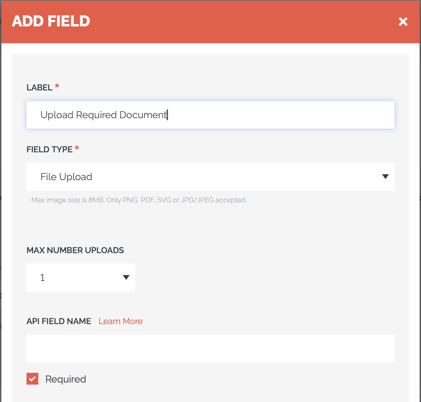
**Need to Require Document Upload?**
Use a Custom Form and include a "File Upload" field type and make it "Required"
### How to set the order for your Tasks (displayed to Travelers)
- TASKS are automatically sorted by DUE DATE and then alphabetically by TASK NAME.
**A few things to note:**
- We only send one reminder per day
- Payment reminders will override task reminders (always)
- One task reminder is sent out 1 day after it would be due
#### But, do you want to order your Tasks in another way, other than when they are due?
- If you need to sort a TASK to the top of a set of Tasks that are due on the same day, you can put an asterisk (\*) at the beginning of the TASK NAME.
OR
- You can number your TASKS and they will sort (for up to 9 Tasks).
- Because the TASK NAME sorts alphabetically, if 10 Tasks are due at the same time, 10 will sort right after 1.
**Note:** The sort order **on the Trip Page (as displayed to travelers) is alphabetical.**
However, this does ***not* determine the order in which Automated Reminder emails are sent to travelers.**
The timing of Reminders is **based on their configured schedule (ie. Due Dates)**, not their display order.
If all Tasks have the *same* due date then there is no further sorting - it's random.
So be sure to **change the Due Dates of your Tasks** and stagger them onto different days.
### Are you having trouble adding more Tasks?
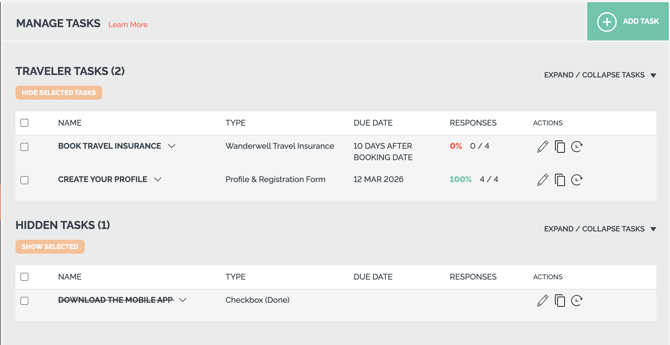
- **If you cannot access the full amount of TASKS included in your YouLi plan, make sure that your hidden Tasks are visible and edit those Tasks.**
- See below. Load the hidden item to restore your TASK and ensure it's visible. You can edit and reuse your hidden tasks, or delete them and create new ones.
### How Do I Permanently Delete Hidden Tasks & Associated Data?
- Planners and Super Users can now permanently delete hidden [tasks on Trips and Templates](https://support.youli.io/360001244495-how-to-manage-tasks-custom-forms-resources-uploads?hsLang=en). Deleting a task securely removes all custom form fields, traveler responses, attached resources, and uploaded files, and logs the action in the Trip Activity Log.
- In your HIDDEN TASKS, hover over the task to see the DELETE option.

### What are Resources in YouLi?
- RESOURCES are links, documents, videos, photos, etc. that you want to share with your **Travelers**.
### How do I add Resources for my Travelers to review?
- RESOURCES must be attached to TASKS, to ensure your **Travelers** confirm that they have read/reviewed them.
- See [this help article](https://support.youli.io/360001298536-how-to-share-documents-from-planner-resources-with-suppliers?hsLang=en) for more details on adding RESOURCES & sharing them with your Suppliers (when needed!).
- Watch this overview video, for more information on all things Manage Tasks & Custom Forms + Resources & Uploads.
- [Get Started](https://support.youli.io/get-started?hsLang=en#main-content)
- [Checklists](https://support.youli.io/get-started?hsLang=en#checklists)
- [Setting up your account](https://support.youli.io/get-started?hsLang=en#setting-up-your-account)
- [Setting up your Trip Page](https://support.youli.io/get-started?hsLang=en#setting-up-your-trip-page)
- [Video Tutorials](https://support.youli.io/get-started?hsLang=en#video-tutorials)
- [Trip Registration](https://support.youli.io/get-started?hsLang=en#trip-registration)
- [Emails](https://support.youli.io/get-started?hsLang=en#emails)
- [Packages & Installments](https://support.youli.io/get-started?hsLang=en#packages-installments)
- [Payments](https://support.youli.io/get-started?hsLang=en#payments)
- [Adding & Managing People](https://support.youli.io/get-started?hsLang=en#adding-managing-people)
- [Starter Website](https://support.youli.io/get-started?hsLang=en#starter-website)
- [How-To](https://support.youli.io/how-to?hsLang=en#main-content)
- [Technology Partners](https://support.youli.io/how-to?hsLang=en#technology-partners)
- [API](https://support.youli.io/how-to?hsLang=en#api)
- [Reports](https://support.youli.io/how-to?hsLang=en#reports)
- [YouLi Plan Add-ons](https://support.youli.io/how-to?hsLang=en#youli-plan-add-ons)
- [Affiliates](https://support.youli.io/how-to?hsLang=en#affiliates)
- [Payments](https://support.youli.io/how-to?hsLang=en#payments)
- [Video Tutorials](https://support.youli.io/how-to?hsLang=en#video-tutorials)
- [Website Integration](https://support.youli.io/how-to?hsLang=en#website-integration)
- [Mobile App](https://support.youli.io/how-to?hsLang=en#mobile-app)
- [White Label App](https://support.youli.io/how-to?hsLang=en#white-label-app)
- [Account Roles](https://support.youli.io/how-to?hsLang=en#account-roles)
- [Tasks](https://support.youli.io/how-to?hsLang=en#tasks)
- [Packages](https://support.youli.io/how-to?hsLang=en#packages)
- [Highlights, Itinerary & Optional Add-ons](https://support.youli.io/how-to?hsLang=en#highlights-itinerary-optional-add-ons)
- [Invitation Groups](https://support.youli.io/how-to?hsLang=en#invitation-groups)
- [Coupons](https://support.youli.io/how-to?hsLang=en#coupons)
- [Trip Page Menu](https://support.youli.io/how-to?hsLang=en#trip-page-menu)
- [Integrating Cruise Deck Plans](https://support.youli.io/how-to?hsLang=en#integrating-cruise-deck-plans)
- [Managing Trip Dashboard](https://support.youli.io/how-to?hsLang=en#managing-trip-dashboard)
- [Emails](https://support.youli.io/how-to?hsLang=en#emails)
- [Bookings](https://support.youli.io/how-to?hsLang=en#bookings)
- [Managing People](https://support.youli.io/how-to?hsLang=en#managing-people)
- [Registration](https://support.youli.io/how-to?hsLang=en#registration)
- [PDF Confirmation](https://support.youli.io/how-to?hsLang=en#pdf-confirmation)
- [Documents](https://support.youli.io/how-to?hsLang=en#documents)
- [Billing](https://support.youli.io/how-to?hsLang=en#billing)
- [New Features](https://support.youli.io/new-features?hsLang=en#main-content)
- [Recent Releases](https://support.youli.io/new-features?hsLang=en#recent-releases)
- [Past Releases](https://support.youli.io/new-features?hsLang=en#past-releases)
- [Enterprise Clients](https://support.youli.io/enterprise-clients?hsLang=en#main-content)
- [Enterprise Onboarding](https://support.youli.io/enterprise-clients?hsLang=en#enterprise-onboarding)
- [Enterprise-only Features](https://support.youli.io/enterprise-clients?hsLang=en#enterprise-only-features)
- [FAQ](https://support.youli.io/faq?hsLang=en#main-content)
- [Data Security](https://support.youli.io/faq?hsLang=en#data-security)
- [Payments](https://support.youli.io/faq?hsLang=en#payments)
- [YouLi Account](https://support.youli.io/faq?hsLang=en#youli-account)
- [Emails](https://support.youli.io/faq?hsLang=en#emails)
- [Managing People](https://support.youli.io/faq?hsLang=en#managing-people)
- [Packages](https://support.youli.io/faq?hsLang=en#packages)
- [YouLi Subscription Plans](https://support.youli.io/faq?hsLang=en#youli-subscription-plans)
- [Tasks](https://support.youli.io/faq?hsLang=en#tasks)
- [Reporting](https://support.youli.io/reporting?hsLang=en)
- [YouLi User Roles](https://support.youli.io/youli-user-roles?hsLang=en)
- [For Travelers](https://support.youli.io/for-travelers?hsLang=en)
- [Partners](https://support.youli.io/partners?hsLang=en)
- [Upcoming Features](https://support.youli.io/upcoming-features?hsLang=en)
- [Incidents](https://support.youli.io/incidents?hsLang=en)
- [Contact Us](https://support.youli.io/contact-us?hsLang=en)
[](https://go.youli.io)
### Need more help?
Reach out to the YouLi Support team via the **Chat** icon at the bottom-right corner of your screen:
or [submit a Support Ticket.](https://support.youli.io/kb-tickets/new?hsLang=en)
Copyright © 2025, YouLi Travel Pty. Ltd