---
title: "How-to: Create Custom Forms Within Tasks"
description: Create Custom Forms to collect specific or personalized information from Travelers, explore all the field types!
image: https://support.youli.io/hubfs/Illustrations/Tasks.svg
---
[Skip to content](https://support.youli.io/360001209415-tasks-custom-forms#main-content)
[Open Ticket](https://support.youli.io/kb-tickets/new?hsLang=en) [Customer portal](https://support.youli.io/feature-request-tickets-view?hsLang=en)
[](https://support.youli.io/?hsLang=en)
- [Pricing](https://go.youli.io/pricing)
- [Book Demo](https://go.youli.io/youli-demo-videos)
- [Blog](https://blog.youli.io/)
Open main navigation
Close main navigation
- [Pricing](https://go.youli.io/pricing)
- [Book Demo](https://go.youli.io/youli-demo-videos)
- [Blog](https://blog.youli.io/)
- [Open Ticket](https://support.youli.io/kb-tickets/new)
- [Customer portal](https://support.youli.io/feature-request-tickets-view)
- [Open Ticket](https://support.youli.io/kb-tickets/new)
[Open Ticket](https://support.youli.io/kb-tickets/new?hsLang=en)
How can we help you?
- There are no suggestions because the search field is empty.
1. [Help Center](https://support.youli.io/?hsLang=en)
2. [How-To](https://support.youli.io/how-to?hsLang=en)
3. [Tasks](https://support.youli.io/how-to?hsLang=en#tasks)
# How-to: Create Custom Forms Within Tasks
## Create Custom Forms to collect specific or personalized information from Travelers.
### **What are Custom Forms?**
CUSTOM FORMS are TASKS that allow you to ask your travelers custom questions and collect useful and specific information.
### When do I need a Custom Form?
In most cases, you can collect the information you need using our pre-set TASK types. These allow you to collect simple responses like yes/no answers, checkboxes, passport information, or a document upload.
However, CUSTOM FORMS allow you to collect a lot of information on the same form. With Custom Forms, you can customize the questions to fit your needs.
For example, use Custom Forms to have your **Travelers** fill out:
- a pre-trip questionnaire
- a health & dietary form
- a packing list with items you want to ensure they don't forget!
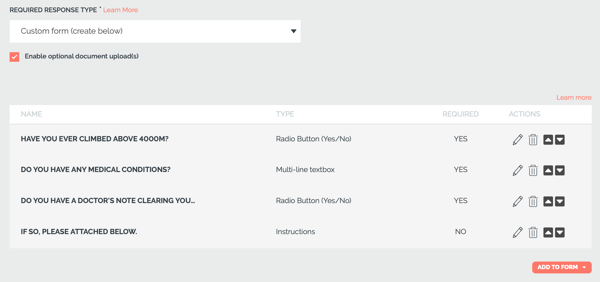
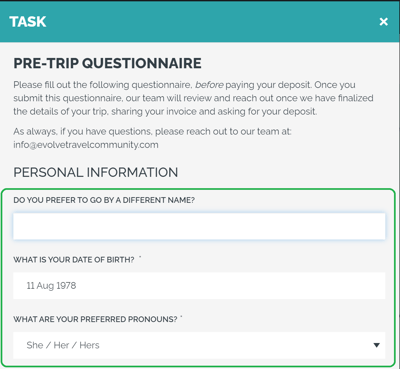
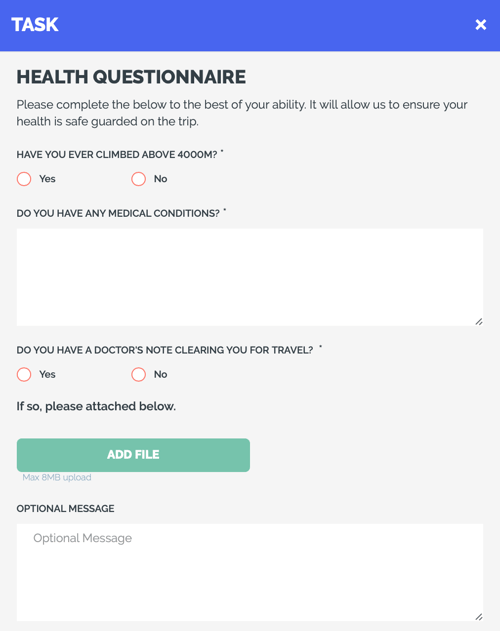
Below is an example of a health form you might want your **Travelers** to fill out:
### How to create a Custom Form
1. From MANAGE TASKS & CUSTOM FORMS, click ADD TASK
2. Under REQUIRED RESPONSE TYPE select CUSTOM FORM from the dropdown box

3\. An empty table will appear below; from there, you can begin to add fields to build your CUSTOM FORM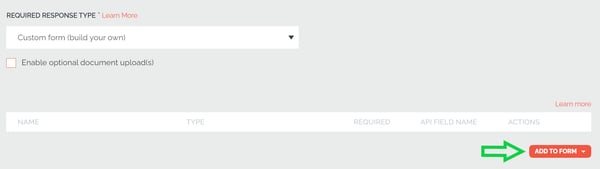
4\. Click ADD TO FORM and select one of the three elements:
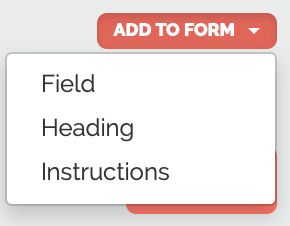
FIELD- this will be the most common part of your form
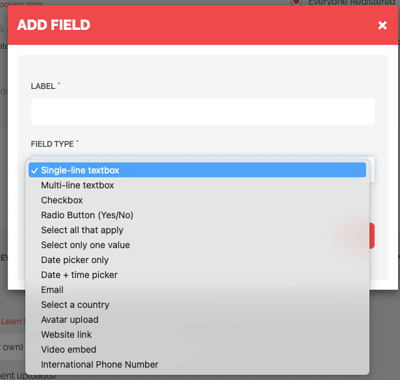
- Enter the LABEL - this is your prompt or question. For example, "What is your birth date, including the year?"
- Choose the FIELD TYPE type - *how* you want to collect that information, the response type. So if you are collecting a date for a birth date, you would want to choose "Date picker only" as your FIELD TYPE.
- Choose whether or not this question or prompt requires a response from your **Traveler** (if their response is optional, you can leave this box unchecked)
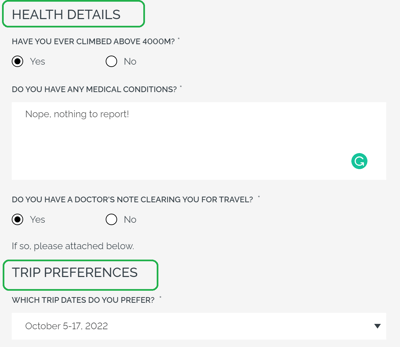
HEADING- this is a sub-heading within the form to create a sub-section
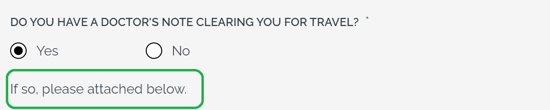
INSTRUCTIONS - if you have detailed instructions to insert in the middle of the form (besides the ones shown at the top)
5\. You can re-order your form elements using the up/down arrows at the end of the row
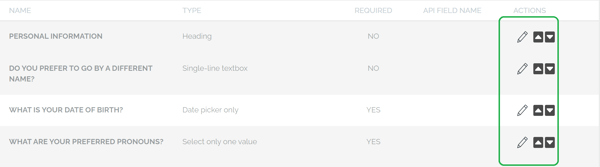
**NOTE:** You can ENABLE OPTIONAL DOCUMENT UPLOAD(S) if you need to give your Travelers the option to upload documents within the Custom Form. Just check the checkbox to allow it!
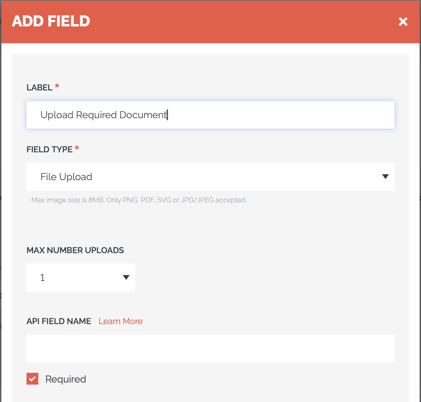
**Need to Require Document Upload?**
Use a Custom Form and include a "File Upload" field type and make it "Required"
### What can be edited in my Custom Form once Travelers have begun responding to it?
- LABELS, HEADINGS, and INSTRUCTIONS can all still be edited
- FIELDS can be changed to/from required
**CAUTION:** Once responses have been collected for a Custom Form it will not be possible to add or remove any form entries.
### How does a Custom Form appear & work for a Traveler?
- Just like a standard TASK, each **Traveler** will be prompted to respond and complete all of the required fields in a CUSTOM FORM.
- Here is an example of what a Custom Form looks like
### Need to view and download Task Responses?
Are you having trouble viewing responses to TASKS? [Click here to learn how!](https://support.youli.io/articles/how-to-view-tasks-responses?hsLang=en)
### Are you more of a visual learner? Watch our video tutorial
---
### Need more help?
Reach out to the YouLi Support Team via the chat box at the bottom of your screen or submit a [Support Ticket request](https://support.youli.io/kb-tickets/new?hsLang=en). If you need more advanced support, schedule a [1:1 Consulting session](https://buy.stripe.com/14kbLk6bBb6kdTW14b) with one of our experts, and we will walk through Traveler flow options & best practices.
- [Get Started](https://support.youli.io/get-started?hsLang=en#main-content)
- [Checklists](https://support.youli.io/get-started?hsLang=en#checklists)
- [Setting up your account](https://support.youli.io/get-started?hsLang=en#setting-up-your-account)
- [Setting up your Trip Page](https://support.youli.io/get-started?hsLang=en#setting-up-your-trip-page)
- [Video Tutorials](https://support.youli.io/get-started?hsLang=en#video-tutorials)
- [Trip Registration](https://support.youli.io/get-started?hsLang=en#trip-registration)
- [Emails](https://support.youli.io/get-started?hsLang=en#emails)
- [Packages & Installments](https://support.youli.io/get-started?hsLang=en#packages-installments)
- [Payments](https://support.youli.io/get-started?hsLang=en#payments)
- [Adding & Managing People](https://support.youli.io/get-started?hsLang=en#adding-managing-people)
- [Starter Website](https://support.youli.io/get-started?hsLang=en#starter-website)
- [How-To](https://support.youli.io/how-to?hsLang=en#main-content)
- [Technology Partners](https://support.youli.io/how-to?hsLang=en#technology-partners)
- [API](https://support.youli.io/how-to?hsLang=en#api)
- [Reports](https://support.youli.io/how-to?hsLang=en#reports)
- [YouLi Plan Add-ons](https://support.youli.io/how-to?hsLang=en#youli-plan-add-ons)
- [Affiliates](https://support.youli.io/how-to?hsLang=en#affiliates)
- [Payments](https://support.youli.io/how-to?hsLang=en#payments)
- [Video Tutorials](https://support.youli.io/how-to?hsLang=en#video-tutorials)
- [Website Integration](https://support.youli.io/how-to?hsLang=en#website-integration)
- [Mobile App](https://support.youli.io/how-to?hsLang=en#mobile-app)
- [White Label App](https://support.youli.io/how-to?hsLang=en#white-label-app)
- [Account Roles](https://support.youli.io/how-to?hsLang=en#account-roles)
- [Tasks](https://support.youli.io/how-to?hsLang=en#tasks)
- [Packages](https://support.youli.io/how-to?hsLang=en#packages)
- [Highlights, Itinerary & Optional Add-ons](https://support.youli.io/how-to?hsLang=en#highlights-itinerary-optional-add-ons)
- [Invitation Groups](https://support.youli.io/how-to?hsLang=en#invitation-groups)
- [Coupons](https://support.youli.io/how-to?hsLang=en#coupons)
- [Trip Page Menu](https://support.youli.io/how-to?hsLang=en#trip-page-menu)
- [Integrating Cruise Deck Plans](https://support.youli.io/how-to?hsLang=en#integrating-cruise-deck-plans)
- [Managing Trip Dashboard](https://support.youli.io/how-to?hsLang=en#managing-trip-dashboard)
- [Emails](https://support.youli.io/how-to?hsLang=en#emails)
- [Bookings](https://support.youli.io/how-to?hsLang=en#bookings)
- [Managing People](https://support.youli.io/how-to?hsLang=en#managing-people)
- [Registration](https://support.youli.io/how-to?hsLang=en#registration)
- [PDF Confirmation](https://support.youli.io/how-to?hsLang=en#pdf-confirmation)
- [Documents](https://support.youli.io/how-to?hsLang=en#documents)
- [Billing](https://support.youli.io/how-to?hsLang=en#billing)
- [New Features](https://support.youli.io/new-features?hsLang=en#main-content)
- [Recent Releases](https://support.youli.io/new-features?hsLang=en#recent-releases)
- [Past Releases](https://support.youli.io/new-features?hsLang=en#past-releases)
- [Enterprise Clients](https://support.youli.io/enterprise-clients?hsLang=en#main-content)
- [Enterprise Onboarding](https://support.youli.io/enterprise-clients?hsLang=en#enterprise-onboarding)
- [Enterprise-only Features](https://support.youli.io/enterprise-clients?hsLang=en#enterprise-only-features)
- [FAQ](https://support.youli.io/faq?hsLang=en#main-content)
- [Data Security](https://support.youli.io/faq?hsLang=en#data-security)
- [Payments](https://support.youli.io/faq?hsLang=en#payments)
- [YouLi Account](https://support.youli.io/faq?hsLang=en#youli-account)
- [Emails](https://support.youli.io/faq?hsLang=en#emails)
- [Managing People](https://support.youli.io/faq?hsLang=en#managing-people)
- [Packages](https://support.youli.io/faq?hsLang=en#packages)
- [YouLi Subscription Plans](https://support.youli.io/faq?hsLang=en#youli-subscription-plans)
- [Tasks](https://support.youli.io/faq?hsLang=en#tasks)
- [Reporting](https://support.youli.io/reporting?hsLang=en)
- [YouLi User Roles](https://support.youli.io/youli-user-roles?hsLang=en)
- [For Travelers](https://support.youli.io/for-travelers?hsLang=en)
- [Partners](https://support.youli.io/partners?hsLang=en)
- [Upcoming Features](https://support.youli.io/upcoming-features?hsLang=en)
- [Incidents](https://support.youli.io/incidents?hsLang=en)
- [Contact Us](https://support.youli.io/contact-us?hsLang=en)
[](https://go.youli.io)
### Need more help?
Reach out to the YouLi Support team via the **Chat** icon at the bottom-right corner of your screen:
or [submit a Support Ticket.](https://support.youli.io/kb-tickets/new?hsLang=en)
Copyright © 2025, YouLi Travel Pty. Ltd