---
title: "How-to: Provide a Payment Plan Using Installments With Automated Reminders"
description: "Provide a payment plan with Installments. YouLi sends Automated Reminders, saving you the hassle. Use \"pretty percentages\" for different amounts per package."
---
[Skip to content](https://support.youli.io/360001169076-how-to-provide-payment-plans-using-installments-with-automated-reminders#main-content)
[Open Ticket](https://support.youli.io/kb-tickets/new?hsLang=en) [Customer portal](https://support.youli.io/feature-request-tickets-view?hsLang=en)
[](https://support.youli.io/?hsLang=en)
- [Pricing](https://go.youli.io/pricing)
- [Book Demo](https://go.youli.io/youli-demo-videos)
- [Blog](https://blog.youli.io/)
Open main navigation
Close main navigation
- [Pricing](https://go.youli.io/pricing)
- [Book Demo](https://go.youli.io/youli-demo-videos)
- [Blog](https://blog.youli.io/)
- [Open Ticket](https://support.youli.io/kb-tickets/new)
- [Customer portal](https://support.youli.io/feature-request-tickets-view)
- [Open Ticket](https://support.youli.io/kb-tickets/new)
[Open Ticket](https://support.youli.io/kb-tickets/new?hsLang=en)
How can we help you?
- There are no suggestions because the search field is empty.
1. [Help Center](https://support.youli.io/?hsLang=en)
2. [Get Started](https://support.youli.io/get-started?hsLang=en)
3. [Packages & Installments](https://support.youli.io/get-started?hsLang=en#packages-installments)
# How-to: Provide a Payment Plan Using Installments With Automated Reminders
## To make your Trip more affordable for your Travelers, you have the ability to provide a payment plan with Installments. For each installment, YouLi can send Automated Reminders, ensuring that your Travelers stay on top of their payments.
Let's set up Payment Installments!
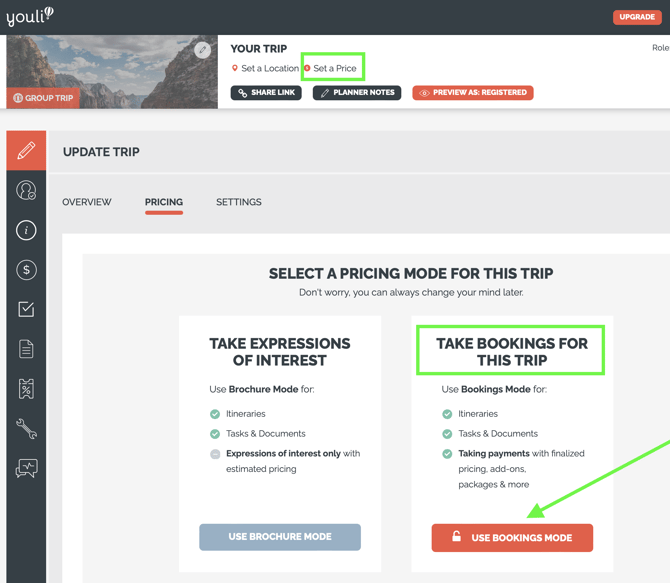
### 1. Choose Bookings Mode
Access this option for a TRIP by clicking UPDATE TRIP \> PRICING or by clicking the PRICE in the header.
### 2. Set Payment Installments & Due Dates
You can provide an INSTALLMENT plan for your **Travelers,** but only one Installment plan per Trip, NOT per **Traveler.**
This can be as simple as: Click on EDIT next to Balance Due, which is always there and will calculate automatically.
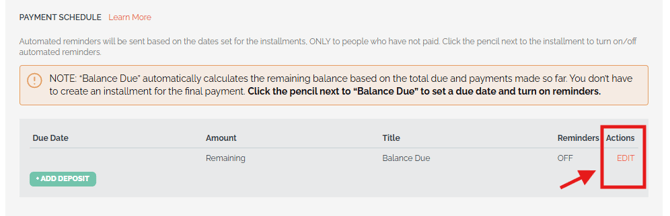
Or it can be more complicated by adding as many installments as you like.
Click the green "+ ADD DEPOSIT" button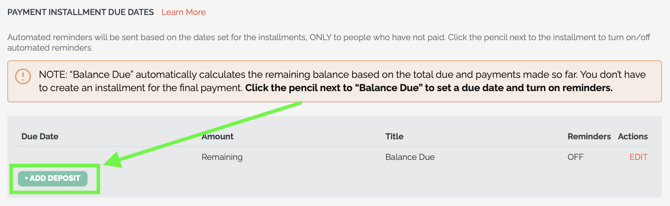
You'll be prompted to choose between 3 **PAYMENT SCHEDULE MODES**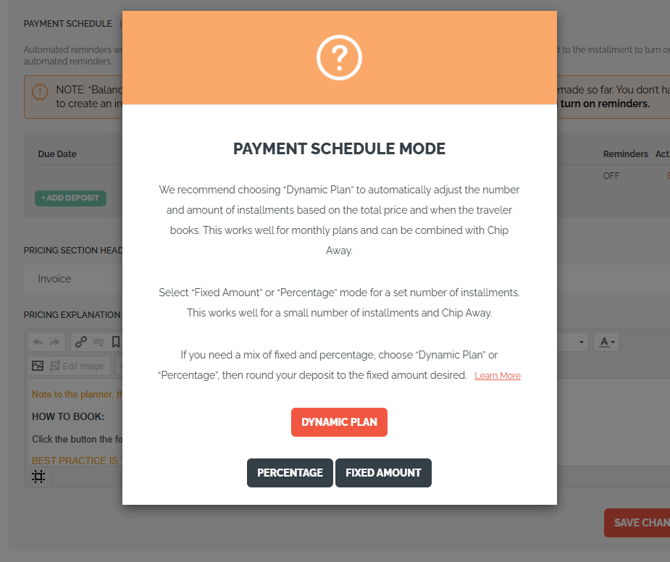
You have to choose 1 of the 3 options for each of your INSTALLMENTS on a TRIP. Please note that it isn't possible to have a FIXED AMOUNT for just the deposit and then PERCENTAGES for subsequent Installments.
**CAUTION:** Once selected, you'll have to delete the entire Installment to change to the other option (i.e. percentage \> fixed), **so choose wisely.**
Additionally, if a payment is made on an Installment, you will *not* be able to make changes to it & you will need to contact YouLi Support.
**TIP:** We highly recommend using a percentage (over a fixed amount), beyond your initial deposit, if you have different priced Packages.
YouLi does the math for your "Remaining" amount and will not allow your **Travelers** to overpay for their Package, but this can get tricky if you do your math incorrectly by charging too much on Installments because you're using a fixed amount with your highest priced Package in mind.
#### **1) DYNAMIC PLAN**
We recommend choosing “Dynamic Plan” to automatically adjust the number and amount of installments based on the total price and when the traveler books. This works well for monthly plans and can be combined with [Chip Away](https://support.youli.io/how-to-allow-travelers-to-pay-monthly-custom-installments-pay-what-they-can-and-chip-away-at-their-balance?hsLang=en).
**TIP:** If you need a mix of fixed and percentage, choose “Dynamic” or “Percentage”, then round your deposit to the fixed amount desired using "Pretty Percentages" (documented below).
For example:
Deposit: 1% Rounded to 500 will give you a $500 deposit
[✨ Learn more about Dynamic Plan Mode ✨](https://support.youli.io/how-to-setup-and-use-dynamic-installment-plan?hsLang=en)
#### **2) PERCENTAGE**
Select “Percentage” for a set number of installments. This works well for a small number of installments and [Chip Away](https://support.youli.io/how-to-allow-travelers-to-pay-monthly-custom-installments-pay-what-they-can-and-chip-away-at-their-balance?hsLang=en).
Then you'll be prompted to enter the percent for that particular INSTALLMENT.
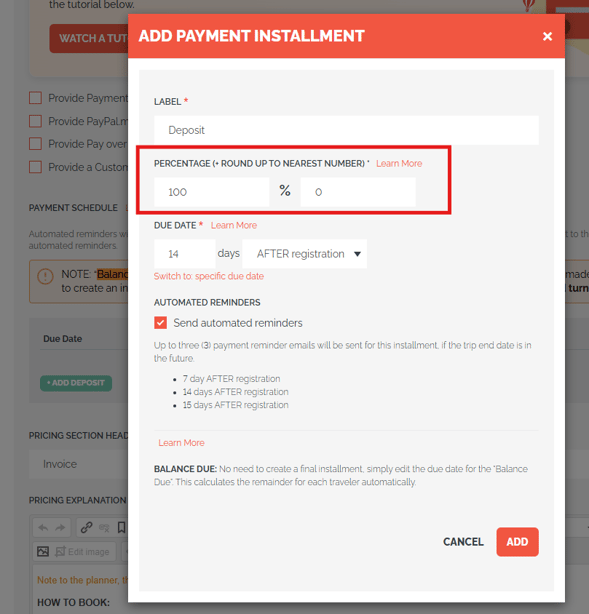
In **"PERCENTAGE (+ROUND UP TO NEAREST NUMBER)"** you can choose to round up the percentage to be a nice, even number. This known as **Pretty Percentages - Rounding Up!**
**Why would you want to do this?**
Simply put, to make your INSTALLMENT amounts just a bit prettier!💄
Note that this is a per-Installment feature, so each INSTALLMENT can be rounded differently (including not rounded at all).
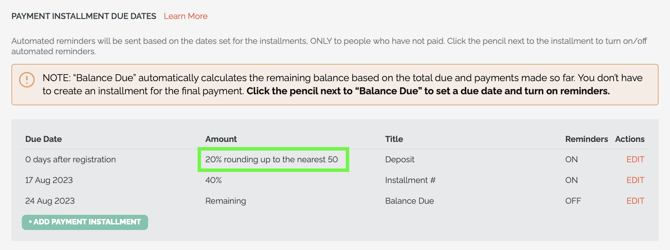
**An example & how to set up Rounding/Pretty Percentages**
- For example, if you want to charge a **20% Deposit** but for a PACKAGE that costs **$1,948** this would make the amount due for that INSTALLMENT: **$389.60** \<-- not so nice looking
- You could *instead* set your ROUNDING to:
- 0 - NO rounding, amount due will be **$389.60**
- 1 - this will round it to **$390**
- 5 - this will round it to **$390**
- 50 - this will round it to **$400**
**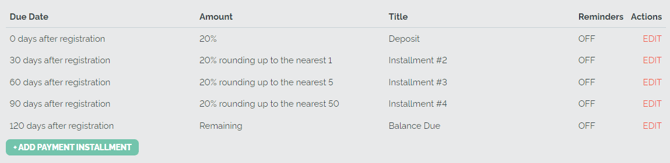**
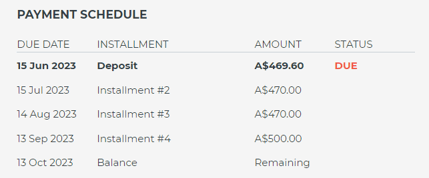
- Using the example above, your INSTALLMENTS will look nice and clean on TRIP PAGE after rounding (Note: We did not round up the Deposit, so it doesn't look as "pretty"😊).
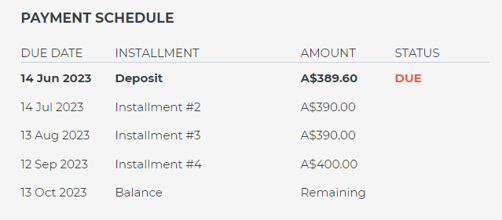
- Continuing this example, if you have more than one PRICING PACKAGE on that same TRIP, then someone who selects a more expensive Package (or includes ADD-ONS, changing the cost of their BASE PRICE) might owe **$2,348**:
- If your Deposit is 20%, without using ROUNDING, your Deposit would be **$469.60** \<-- not so nice looking
- You could *instead* set your ROUNDING to:
- 0 - NO rounding, the amount due will be **$469.60**
- 1 - this will round it to **$470**
- 5 - this will round it to **$470**
- 50 - this will round it to **$500**
****
**Was that too much math? Watch it in action in this video**
#### **3) FIXED AMOUNT**
Select “Fixed Amount” for a set number of installments. This works well for a small number of installments and [Chip Away](https://support.youli.io/how-to-allow-travelers-to-pay-monthly-custom-installments-pay-what-they-can-and-chip-away-at-their-balance?hsLang=en).
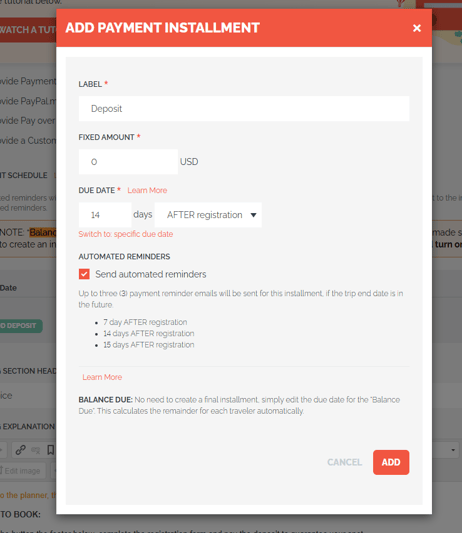
Simply fill out the form and click ADD.
#### **4) Add additional Installments, following the Deposit**
After you've added the DEPOSIT, you can continue to add as many as 6 INSTALLMENTS spread out over 6 months. Just keep clicking "ADD PAYMENT INSTALLMENT" to add an additional Installment.
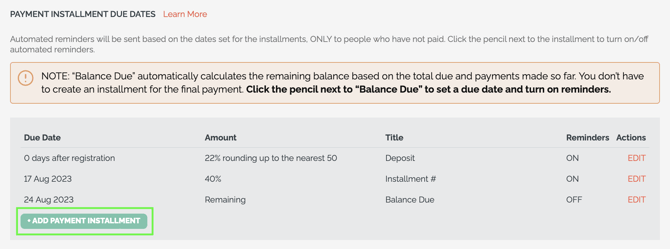
Click on the EDIT (to the right of the INSTALLMENT), to open the popup and set
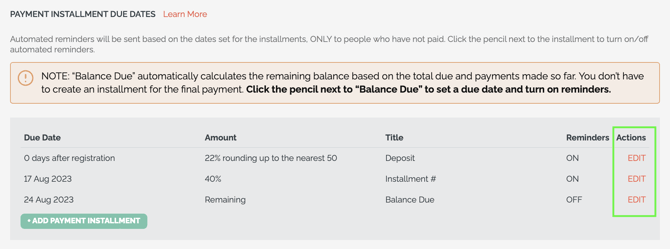
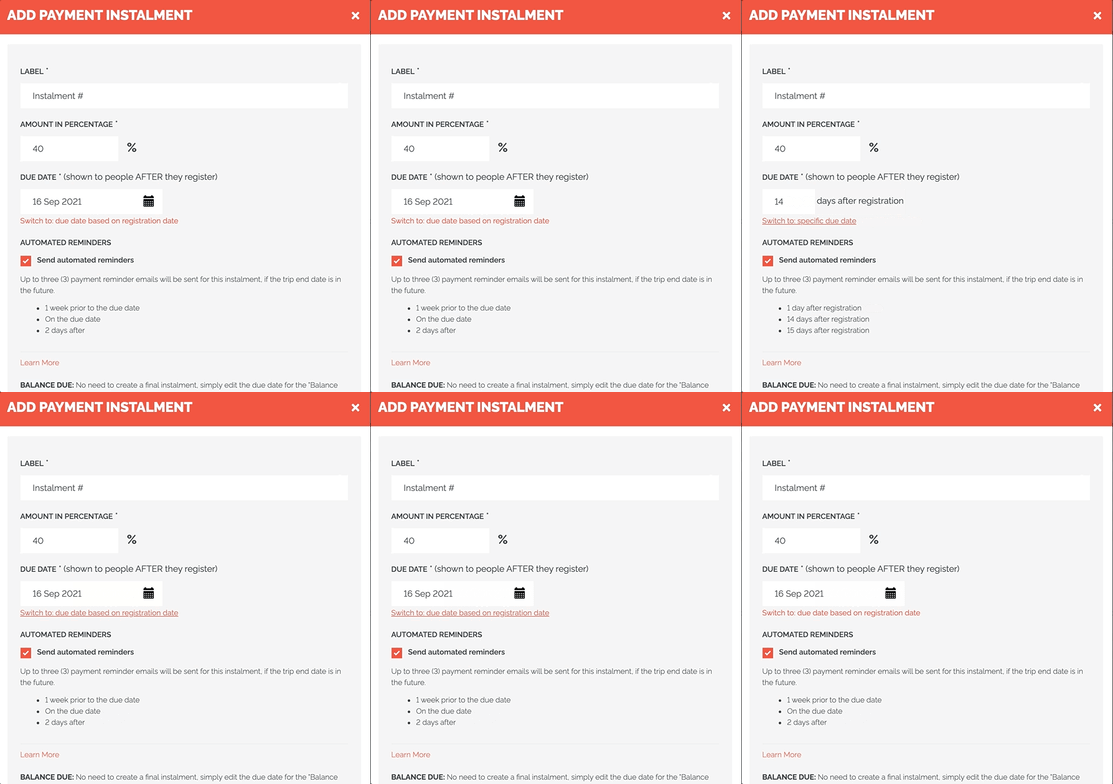
**a) When they are due: Specific or Relative Due Dates**
PAYMENT/INSTALLMENT DUE DATES are displayed to **Travelers** in AUTOMATED REMINDER EMAILS and within the [Trip Page.](https://support.youli.io/360001196656-trip-page-landing-page-booking-page-or-sales-pages-for-your-customers?hsLang=en)
- They can either be:
- SET DATE - Example: April 30, 2022 (this will be the same for all travelers)
- RELATIVE TO REGISTRATION DATE - Example: 15 days after registration (dynamic per **Traveler**, based on when they register for your TRIP)
- Use the toggle (see image below) under the input box to switch between the two.
**b) Whether or not AUTOMATED EMAIL REMINDERS are sent**
- By default, TRIPS only have one INSTALLMENT: "BALANCE DUE" and no DUE DATE is set, so no AUTOMATED EMAIL REMINDERS will be sent.
- To enable AUTOMATED EMAIL REMINDERS you will first need to add a DEPOSIT

- After filling in the information, be sure to check the box to SEND AUTOMATED REMINDERS
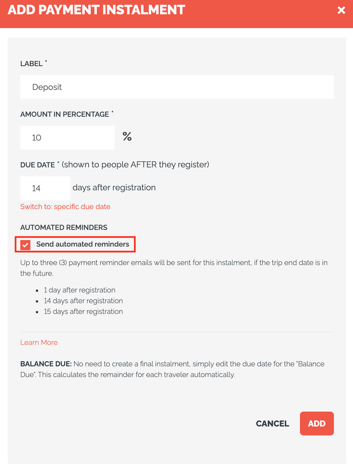
- When a **Traveler** registers for a TRIP with an INSTALLMENT reminder set, YouLi sends up to 3 AUTOMATED EMAIL REMINDERS on your behalf
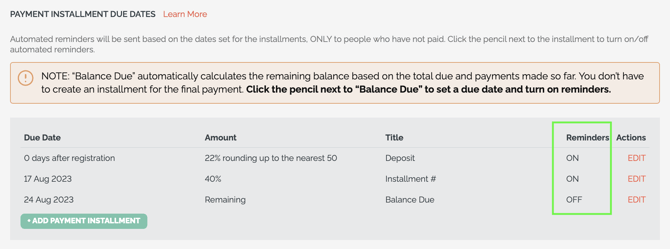
- You can see which installments have reminders enabled in the table
- ON - qualified **Travelers** will be sent a reminder as per the schedule *if they have not paid the installment*
- OFF - no **Travelers** will be sent automated reminders. You can still send manual reminders from [Manage Payments](https://support.youli.io/360001219316-trip-manage-payments?hsLang=en).
In this example, there are 2 installments, the Deposit for 20% and the next installment for 40%.
The **Traveler** will be prompted to pay the first 60% (20% + 40% = 60%) of the total between the first two payments.
No need to add another installment for the final 40%, will be covered by the BALANCE DUE - and if they change their price or add-ons, that will be added to the remaining balance automatically.
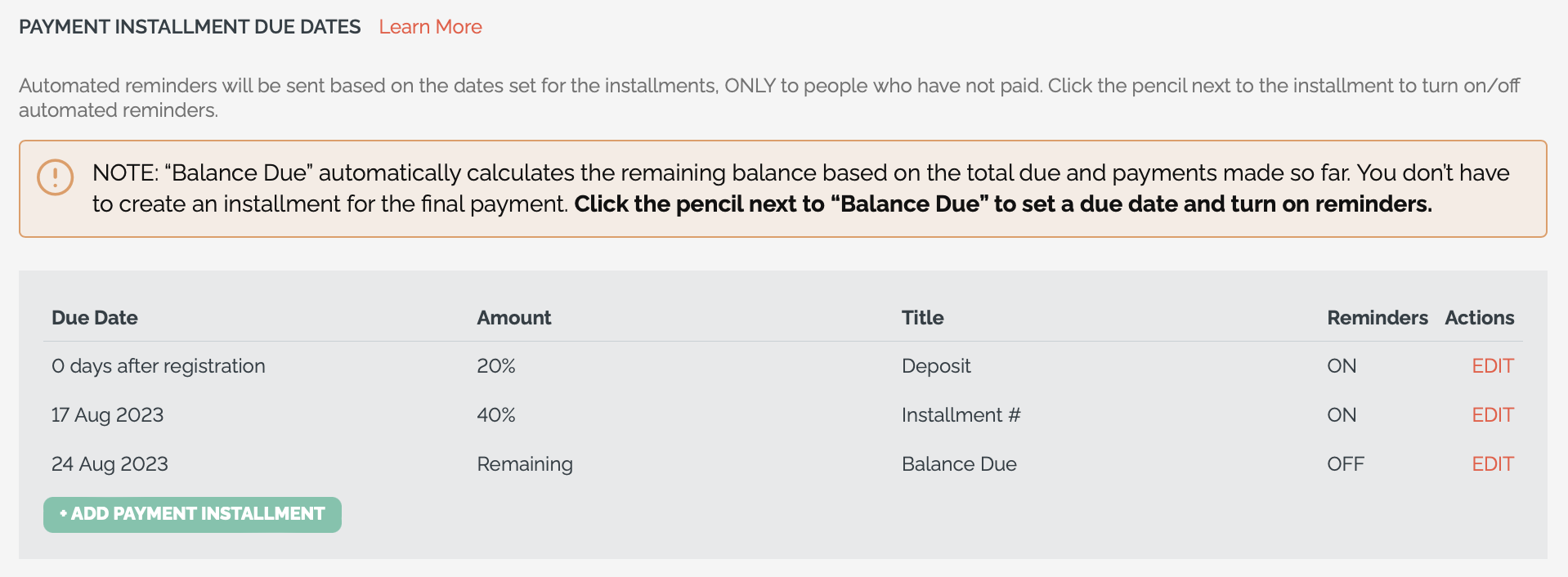
**IMPORTANT:** Because the "Balance Due" is calculated automatically (based on other Installments added), you do not need to add an Installment for the remaining balance.
### 3. Sorting of Installments in Planner Table
The the due dates first based on the type of due date:
1. AFTER registration
2. Specific dates
3. BEFORE trip start date
### Extra notes on setting up Payment Plans to manage Installments
- - INSTALLMENTS are per person (not per INVITATION GROUP, if you have one set up)
- You can still change the DUE DATE after the original selection
- We roll up/combine all INSTALLMENTS of the amounts which are due within 7 days (or past due)
- This is meant as a convenience, so that the **Traveler** doesn’t need to pay the DEPOSIT and then immediately pay the remaining amount due
- No email requesting payment will be sent to a **Traveler** who has completed their DEPOSIT or payment before or by the DUE DATE
- An [Automated Email Reminder](https://support.youli.io/360001316136-automatic-emails-payments?hsLang=en) will only be sent to **Travelers** who still need to pay
- Automated Email Reminders for payments are only sent if
- The TRIP has SET DEPARTURE DATES (not ESTIMATED DATES)
- And the INSTALLMENT has the AUTOMATED REMINDERS option enabled
- Learn more about all [Automated Email Reminders and Confirmations](https://support.youli.io/360000531275-automatic-email-reminders-confirmations?hsLang=en) that you can utilize in YouLi
**NOTE:** Are Fixed Schedule Installments just not flexible enough? [Consider Chip Away payments](https://support.youli.io/how-to-allow-travelers-to-pay-monthly-custom-installments-pay-what-they-can-and-chip-away-at-their-balance?hsLang=en), to allow your **Travelers** to pay what they can (above your minimum) each month or on their own schedule.
### Troubleshooting
#### But what if my Traveler decides not to go on the Trip? Will they be reminded to pay?
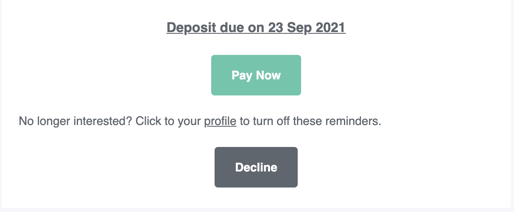
- Sometimes people register for TRIPS and then decide they don’t want to go. But don't worry! The payment reminder email will give them the option to “PAY NOW” or “DECLINE.”
- If they choose to decline, you will see this STATUS reflected under MANAGE PEOPLE & REPORTS and they will no longer be emailed automated reminders to pay (or complete tasks).
#### And what if a Traveler was refunded on an Installment? Will they still receive Automated Reminders for that Installment and others?
- Yes, AUTOMATED EMAIL REMINDERS (when turned on for a particular INSTALLMENT) will still be sent for a refunded payment because the **Traveler** may need to pay a different amount, and unless they aren't going on the TRIP, YouLi assumes you want reminders sent.
- If you do not want them sent, you can simply change their STATUS to "Declined."
#### How to make a change to an Installment that someone has already made a payment on
- 1. Delete the payment on that INSTALLMENT
**NOTE:** If it is for a credit card payment, please [open a Support Request](https://support.youli.io/kb-tickets/new?hsLang=en) ticket, so that we can delete the payment for you.
1. Then delete the actual INSTALLMENT
2. Now, create the new INSTALLMENT with the updates you want
3. Add a MANUAL PAYMENT or CREDIT to that *new* INSTALLMENT, for that same **Traveler**
---
### Need more help?
Reach out to the YouLi support team via a chat box at the bottom of your screen or submit a [Support Ticket request](https://support.youli.io/kb-tickets/new?hsLang=en). If you need more advanced support, schedule a [1:1 Consulting session](https://buy.stripe.com/14kbLk6bBb6kdTW14b) with one of our experts, as we will walk you through the features and best practices.
- [Get Started](https://support.youli.io/get-started?hsLang=en#main-content)
- [Checklists](https://support.youli.io/get-started?hsLang=en#checklists)
- [Setting up your account](https://support.youli.io/get-started?hsLang=en#setting-up-your-account)
- [Setting up your Trip Page](https://support.youli.io/get-started?hsLang=en#setting-up-your-trip-page)
- [Video Tutorials](https://support.youli.io/get-started?hsLang=en#video-tutorials)
- [Trip Registration](https://support.youli.io/get-started?hsLang=en#trip-registration)
- [Emails](https://support.youli.io/get-started?hsLang=en#emails)
- [Packages & Installments](https://support.youli.io/get-started?hsLang=en#packages-installments)
- [Payments](https://support.youli.io/get-started?hsLang=en#payments)
- [Adding & Managing People](https://support.youli.io/get-started?hsLang=en#adding-managing-people)
- [Starter Website](https://support.youli.io/get-started?hsLang=en#starter-website)
- [How-To](https://support.youli.io/how-to?hsLang=en#main-content)
- [Technology Partners](https://support.youli.io/how-to?hsLang=en#technology-partners)
- [API](https://support.youli.io/how-to?hsLang=en#api)
- [Reports](https://support.youli.io/how-to?hsLang=en#reports)
- [YouLi Plan Add-ons](https://support.youli.io/how-to?hsLang=en#youli-plan-add-ons)
- [Affiliates](https://support.youli.io/how-to?hsLang=en#affiliates)
- [Payments](https://support.youli.io/how-to?hsLang=en#payments)
- [Video Tutorials](https://support.youli.io/how-to?hsLang=en#video-tutorials)
- [Website Integration](https://support.youli.io/how-to?hsLang=en#website-integration)
- [Mobile App](https://support.youli.io/how-to?hsLang=en#mobile-app)
- [White Label App](https://support.youli.io/how-to?hsLang=en#white-label-app)
- [Account Roles](https://support.youli.io/how-to?hsLang=en#account-roles)
- [Tasks](https://support.youli.io/how-to?hsLang=en#tasks)
- [Packages](https://support.youli.io/how-to?hsLang=en#packages)
- [Highlights, Itinerary & Optional Add-ons](https://support.youli.io/how-to?hsLang=en#highlights-itinerary-optional-add-ons)
- [Invitation Groups](https://support.youli.io/how-to?hsLang=en#invitation-groups)
- [Coupons](https://support.youli.io/how-to?hsLang=en#coupons)
- [Trip Page Menu](https://support.youli.io/how-to?hsLang=en#trip-page-menu)
- [Integrating Cruise Deck Plans](https://support.youli.io/how-to?hsLang=en#integrating-cruise-deck-plans)
- [Managing Trip Dashboard](https://support.youli.io/how-to?hsLang=en#managing-trip-dashboard)
- [Emails](https://support.youli.io/how-to?hsLang=en#emails)
- [Bookings](https://support.youli.io/how-to?hsLang=en#bookings)
- [Managing People](https://support.youli.io/how-to?hsLang=en#managing-people)
- [Registration](https://support.youli.io/how-to?hsLang=en#registration)
- [PDF Confirmation](https://support.youli.io/how-to?hsLang=en#pdf-confirmation)
- [Documents](https://support.youli.io/how-to?hsLang=en#documents)
- [Billing](https://support.youli.io/how-to?hsLang=en#billing)
- [New Features](https://support.youli.io/new-features?hsLang=en#main-content)
- [Recent Releases](https://support.youli.io/new-features?hsLang=en#recent-releases)
- [Past Releases](https://support.youli.io/new-features?hsLang=en#past-releases)
- [Enterprise Clients](https://support.youli.io/enterprise-clients?hsLang=en#main-content)
- [Enterprise Onboarding](https://support.youli.io/enterprise-clients?hsLang=en#enterprise-onboarding)
- [Enterprise-only Features](https://support.youli.io/enterprise-clients?hsLang=en#enterprise-only-features)
- [FAQ](https://support.youli.io/faq?hsLang=en#main-content)
- [Data Security](https://support.youli.io/faq?hsLang=en#data-security)
- [Payments](https://support.youli.io/faq?hsLang=en#payments)
- [YouLi Account](https://support.youli.io/faq?hsLang=en#youli-account)
- [Emails](https://support.youli.io/faq?hsLang=en#emails)
- [Managing People](https://support.youli.io/faq?hsLang=en#managing-people)
- [Packages](https://support.youli.io/faq?hsLang=en#packages)
- [YouLi Subscription Plans](https://support.youli.io/faq?hsLang=en#youli-subscription-plans)
- [Tasks](https://support.youli.io/faq?hsLang=en#tasks)
- [Reporting](https://support.youli.io/reporting?hsLang=en)
- [YouLi User Roles](https://support.youli.io/youli-user-roles?hsLang=en)
- [For Travelers](https://support.youli.io/for-travelers?hsLang=en)
- [Partners](https://support.youli.io/partners?hsLang=en)
- [Upcoming Features](https://support.youli.io/upcoming-features?hsLang=en)
- [Incidents](https://support.youli.io/incidents?hsLang=en)
- [Contact Us](https://support.youli.io/contact-us?hsLang=en)
[](https://go.youli.io)
### Need more help?
Reach out to the YouLi Support team via the **Chat** icon at the bottom-right corner of your screen:
or [submit a Support Ticket.](https://support.youli.io/kb-tickets/new?hsLang=en)
Copyright © 2025, YouLi Travel Pty. Ltd